

If you are looking for the best camcorder for a Mac, the good news is that you do not need a special Mac-only camera.
The important things are a sensible recording format, a removable SD or microSD card, and—if you want to use the camera for calls or livestreaming—a clearly documented webcam or HDMI output option.
For most people, the Canon VIXIA HF G70 is the best traditional camcorder to use with a Mac. It records 4K MP4 footage, has a useful 20x optical zoom and can send HD video directly to a Mac over USB-C using UVC. It is sold as the LEGRIA HF G70 in some regions.
If you need 4K at 60fps, long event recording and more production controls, choose the Panasonic HC-X2100. For professional paid work, the Canon XF605 is the standout choice.
It is also worth being clear about the search term here. Some people searching for a “camcorder for Mac” want a conventional video camera for family events, sport or interviews. Others actually want a compact camera that produces better footage than a webcam. We have included the best choices for both uses, and made the webcam limitations clear.
The Best Camcorders and Video Cameras for Mac
| Camera | Best for | Maximum video | Best Mac connection route |
|---|---|---|---|
| Canon VIXIA HF G70 | Best traditional all-rounder and simplest webcam option | 4K UHD at 30p | USB-C UVC video or SD card reader |
| Panasonic HC-X2100 | Events, long shoots and 4K 60p | 4K UHD at 60p | SD card reader; HDMI/SDI capture for a Mac webcam setup |
| Sony FDR-AX43A | Smooth handheld travel and family footage | 4K at 30p/25p | SD card reader; HDMI capture if needed |
| Canon XF605 | Professional productions, paid work and broadcast workflows | 4K UHD at 60p | USB-C UVC, SD card reader, HDMI or 12G-SDI |
| DJI Osmo Pocket 4 | Pocketable creator and travel video | 4K at 240fps | USB-C or microSD card reader |
| GoPro MISSION 1 | Rugged action footage and compact cinematic B-roll | 8K at 30fps; 4K at 120fps | USB-C or microSD card reader |
What Actually Matters When Choosing a Camcorder for a Mac
Do not buy a camcorder for Thunderbolt
Modern Macs use USB-C-shaped ports, and many of those ports also support Thunderbolt. That does not mean a camera needs Thunderbolt to work well with a Mac.
Very few cameras use Thunderbolt, and it makes little practical difference to a normal video workflow. The quickest, most reliable way to move large clips is usually to remove the SD or microSD card and use a good USB-C card reader—or the SD card slot on a MacBook Pro that has one.
USB-C also describes the connector shape, not the speed or the feature set. For more on that distinction, see our guide to USB-C vs Thunderbolt.
Choose Mac-friendly recording formats
MP4 or MOV footage using H.264 or H.265/HEVC will import into iMovie, Final Cut Pro, DaVinci Resolve and Adobe Premiere Pro on current Macs. Apple Silicon Macs are particularly good with H.264 and HEVC footage.
That said, 10-bit HEVC, 4K at high frame rates and especially 8K files can still be demanding. If you use an older Intel Mac, or want a smoother editing experience, create proxy or optimised media in Final Cut Pro before editing.
Decide whether you mean “webcam” before buying
Recording 4K footage and working as a webcam are different jobs.
- A camera with UVC/USB webcam support can appear directly in FaceTime, Zoom, OBS and similar Mac software.
- A camera with HDMI output can usually become a webcam with a capture device such as an Elgato Cam Link, provided its output is suitable for clean video.
- Some cameras are excellent for recording but are not the best buy if your main goal is all-day video calls.
If webcam use is your priority, see our guide on using a digital camera as a webcam on a Mac. A dedicated webcam is often simpler and cheaper for meetings, while a camcorder is far better for zoom range, handheld shooting and long recordings.
Prioritise optical zoom, stabilisation and audio for real-world filming
For sport, school performances, weddings and interviews, a long optical zoom matters far more than an impressive digital-zoom number. A conventional camcorder is also easier to hold for long periods and generally gives you better battery life, physical controls and uninterrupted recording than an action camera.
If sound matters, look for a 3.5mm microphone input at minimum. XLR inputs, as found on professional models, are much better for serious interviews and event work.
1. Canon VIXIA HF G70 – Best Traditional Camcorder for Most Mac Users

The Canon VIXIA HF G70 is our top pick for most people who genuinely want a traditional camcorder rather than a small vlogging or action camera.
It combines a 20x optical zoom with 4K UHD MP4 recording, a comfortable handheld design, dedicated controls and dual SD card slots. The 29.3–601mm equivalent zoom range makes it much more useful than a wide-angle action camera for school events, travel, wildlife and family occasions.
It is also the most straightforward choice here if you want to use a camcorder as a Mac webcam. The HF G70 has UVC livestreaming over USB-C, so it can send HD video directly to a Mac without an HDMI capture card.
The important catch is that Canon specifies that its USB webcam connection does not send audio. For livestreams and calls, choose your Mac’s microphone, a USB microphone or a separate audio interface in Zoom, OBS or your chosen streaming app.
Key features
- 1/2.3-inch 4K sensor with 4K UHD MP4 recording at up to 30p
- 20x optical zoom with 5-axis image stabilisation
- UVC HD video output over USB-C for direct Mac webcam use
- Dual SD card slots for relay recording or instant backup
- 3.5-inch touch screen, electronic viewfinder and built-in ND filters
- 3.5mm microphone input and headphone output
Pros
- The best balance of zoom, controls, image quality and simplicity
- A genuine one-cable video webcam option for Macs
- MP4 files are easy to import and edit
- Better for long recordings than a small creator camera
Cons
- 4K recording tops out at 30p
- UVC webcam output is HD, not 4K
- USB webcam output does not include audio
The HF G70 is the camera we would buy for a Mac-owning family, teacher, club or creator who needs real zoom and easy editing without stepping up to professional broadcast equipment.
2. Panasonic HC-X2100 – Best for Events and 4K 60fps
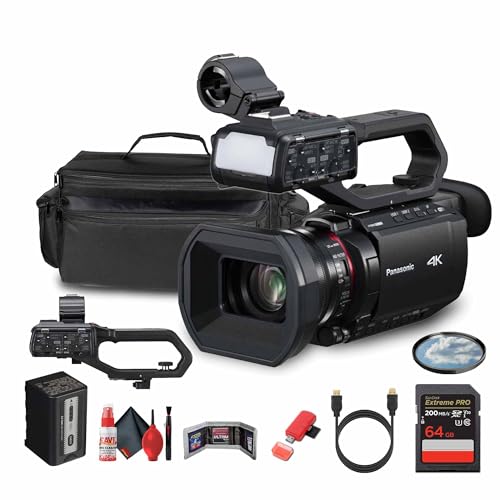
The Panasonic HC-X2100 is a much more production-focused camcorder. It is the better choice when 4K at 60fps, longer continuous shooting, live-event connectivity and a longer zoom are more important than keeping the camera compact.
It has a 25mm wide-angle lens with 24x optical zoom, 4K 60p recording, strong stabilisation and professional-style controls in a body that is still manageable for a one-person shoot. Its dual card slots and extended battery life also make it a strong fit for weddings, conferences, performances and corporate video.
For editing on a Mac, take the SD cards out and import the footage through a card reader. That is usually quicker and less fiddly than connecting the camcorder itself. Its 4K 60p files offer more flexibility for slowing footage down in Final Cut Pro or DaVinci Resolve.
The HC-X2100 is also designed for real live production, with HDMI and 3G-SDI outputs plus streaming features. It is not the simplest plug-and-play webcam on this list, however. For Zoom, OBS or a Mac livestreaming setup, use a suitable HDMI or SDI capture device and test the signal before an important event.
Key features
- 4K UHD recording at up to 60p
- 24x optical zoom, covering a 25–600mm equivalent range
- High-precision autofocus and Hybrid O.I.S. stabilisation
- Dual SD card slots and a large supplied battery
- HDMI and 3G-SDI outputs for production setups
- Built-in Wi-Fi and live streaming features
Pros
- 4K 60p is a major step up for sport and event coverage
- Excellent zoom range for a compact professional camcorder
- Better suited to long shoots than an action or pocket camera
- Flexible for live production as well as editing on a Mac
Cons
- More expensive and more complex than the Canon HF G70
- A capture device is the sensible route for use as a Mac webcam
- Its smaller sensor is less forgiving in very low light than the Canon XF605
3. Sony FDR-AX43A – Best for Smooth Handheld Video
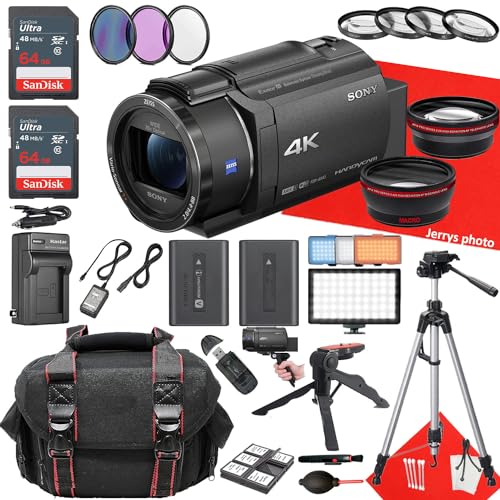
The Sony FDR-AX43A remains a sensible traditional camcorder for people who value stabilisation above all else. Its headline feature is Sony’s Balanced Optical SteadyShot system, which gives handheld footage a noticeably steadier look than many similarly sized camcorders.
It has a 20x ZEISS optical zoom, a compact body and 4K recording in Sony’s XAVC S H.264 format. That footage is easy to work with on a Mac, especially after importing the SD card into Final Cut Pro or iMovie.
The AX43A is an older design, so buy it only when it is readily available and sensibly priced in your region. It lacks the Canon HF G70’s direct USB-C UVC webcam advantage and uses a Multi/Micro USB terminal rather than USB-C. For webcam work, plan on using HDMI and a compatible capture device instead.
Key features
- 20x ZEISS Vario-Sonnar T* optical zoom
- Balanced Optical SteadyShot with 5-axis Intelligent Active mode
- 4K XAVC S H.264 recording at up to 30p (25p in PAL regions)
- 3.5mm microphone and headphone sockets
- SD card support and HDMI output
Pros
- Excellent stabilisation for walking, travel and family footage
- Strong zoom range in a relatively light body
- Mac-friendly H.264 recording format
Cons
- Older hardware and regional availability can vary
- No direct UVC Mac webcam mode
- 4K frame rate is limited compared with the Panasonic HC-X2100
4. Canon XF605 – Best Professional Camcorder for Mac

The Canon XF605 is the one to buy if the camera will earn its keep. It is a professional 4K camcorder built for people filming paid interviews, events, documentaries, news, corporate work or multi-camera productions.
It has a much larger 1-inch sensor than the consumer camcorders above, a 15x optical zoom, Canon Dual Pixel autofocus with eye detection, 4K recording at up to 60p and serious connectivity. You get dual XLR inputs, HDMI, 12G-SDI, timecode, Ethernet and USB-C.
For a Mac workflow, that means you can use fast media transfers, import high-quality formats into Final Cut Pro, connect it to a professional monitor or recorder, and use its USB Video Class support when a direct webcam connection is appropriate. It is also far better equipped for high-quality live sound than the cheaper cameras here.
The XF605 is expensive and overkill for home videos, but it is a far more sensible investment than buying a collection of cheaper cameras and accessories if you regularly work with clients.
Key features
- 1-inch 4K sensor with 15x optical zoom
- 4K UHD recording at up to 60p
- Dual XLR audio inputs, plus 3.5mm microphone and headphone connections
- USB-C with UVC support, HDMI and 12G-SDI outputs
- Ethernet, Wi-Fi, timecode and professional network features
- Dual SD card slots and a full set of manual controls
Pros
- Professional image, audio and connectivity in one camera
- A much stronger low-light and autofocus proposition
- Excellent fit for Final Cut Pro, multicamera and live-production workflows
- Direct UVC capability as well as professional video outputs
Cons
- Expensive
- Larger and heavier than the consumer options
- Too much camera for casual holiday videos
5. DJI Osmo Pocket 4 – Best Compact Video Camera for Mac Creators
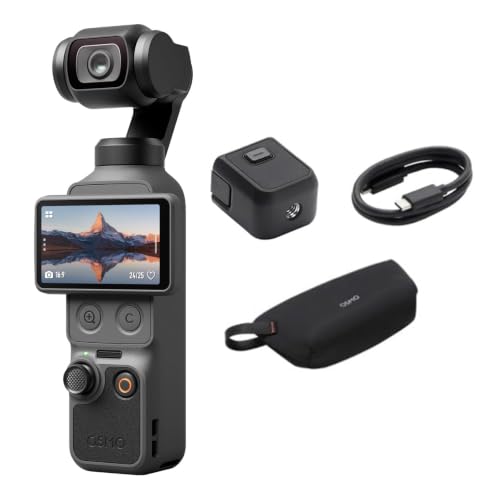
The DJI Osmo Pocket 4 is not a conventional camcorder, but it is one of the best options for people who search for a “camcorder for Mac” when what they really want is polished handheld video for YouTube, travel or social content.
It pairs a 1-inch sensor with a built-in three-axis gimbal, so it can produce smooth, high-quality video from a device that genuinely fits in a pocket. It records up to 4K at 240fps and supports 10-bit D-Log footage for people who want more scope for grading on a Mac. Its 2x lossless zoom is useful for a compact camera, although it is not a substitute for the 20x or 24x optical zoom on a true camcorder.
The Pocket 4 is an excellent companion to a MacBook Air or MacBook Pro because it is easy to carry, produces more deliberate-looking footage than a phone and can be transferred through USB-C or a microSD card reader. If you work on an older Intel Mac, use proxies for its highest-quality footage.
It is not the right pick for filming a child’s football match from the touchline, a stage performance from the back of a hall or a long conference. In those situations, a camcorder with optical zoom and swappable batteries is much more useful.
Key features
- 1-inch sensor with up to 4K 240fps recording
- Built-in three-axis mechanical gimbal
- 10-bit D-Log recording and 14 stops of dynamic range
- 2x lossless zoom in a pocket-sized camera
- USB-C and microSD-based Mac workflow
Pros
- Outstanding portability and stabilisation
- Much more versatile for walking shots and travel than a conventional camcorder
- Great choice for creators who edit in Final Cut Pro or DaVinci Resolve
Cons
- No long optical zoom
- Not designed for lengthy event coverage
- Its highest frame rates and colour modes need a capable Mac for smooth editing
6. GoPro MISSION 1 – Best Rugged Compact Camera for Mac Editing
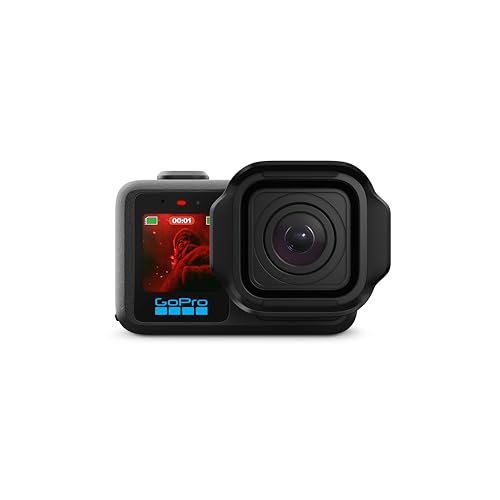
The GoPro MISSION 1 is the current pick for people who need a camera that can go where a normal camcorder should not: on a bike, helmet, surfboard, car, hiking trail or in the water.
It is a significant step beyond the older GoPro HERO11 and HERO13 models. The MISSION 1 has a 1-inch sensor, records 10-bit HEVC MP4 footage, captures up to 8K at 30fps or 4K at 120fps, and is waterproof to 20 metres. Its HyperSmooth stabilisation is also excellent when the camera is mounted or moving quickly.
For Mac users, the important part is that it records conventional HEVC MP4 files, which you can import from its microSD card or transfer over USB-C. Its 8K and high-frame-rate modes give you plenty of room to crop or reframe in post-production, but they also make proxies a good idea on all but the most powerful Macs.
The MISSION 1 does not replace a camcorder for zoomed, seated event filming. Think of it as a rugged action and B-roll camera that pairs well with a more traditional main camera.
Key features
- 1-inch sensor
- Up to 8K at 30fps and 4K at 120fps
- 10-bit HEVC MP4 recording and GP-Log2 support
- HyperSmooth stabilisation
- Waterproof to 20 metres
- USB-C, microSD recording and flexible mounting options
Pros
- The best choice here for action, outdoor and mounted footage
- More cinematic flexibility than previous GoPro models
- Mac-friendly MP4 workflow and excellent stabilisation
Cons
- No optical zoom
- High-resolution HEVC footage is demanding to edit
- Not a substitute for a proper camcorder at long distance
How to Import Camcorder Footage to a Mac
For most of the cameras above, this is the workflow we recommend:
- Turn off the camera and remove its SD or microSD card.
- Connect the card to your Mac using its built-in card reader or a quality USB-C reader.
- Copy the footage to a project folder on an external SSD or your Mac’s internal storage.
- Import it into iMovie, Final Cut Pro, DaVinci Resolve or your preferred editor.
- Create proxy media if you are editing 10-bit HEVC, high-frame-rate 4K or 8K footage on an older or less powerful Mac.
This approach is normally faster and more dependable than transferring video through the camera. It also avoids draining the camera battery or having a cable disconnected midway through a large copy.
For more editing choices, see our round-up of the best video editing software for Mac.
Which Camcorder Should You Buy?
Choose the Canon VIXIA HF G70 if you want the best traditional all-round camcorder and the easiest route to direct Mac webcam video.
Choose the Panasonic HC-X2100 if you need 4K 60p, a longer zoom and more serious event or streaming capability.
Choose the Sony FDR-AX43A if smooth handheld footage is your priority and you can find it at a good price.
Choose the Canon XF605 if video work is part of your business and you need professional audio, connectivity and image quality.
Choose the DJI Osmo Pocket 4 for compact, stabilised creator and travel video, or the GoPro MISSION 1 for rugged action and high-resolution B-roll.
FAQ
Can any camcorder work with a Mac?
Almost any current camcorder can work with a Mac if it records to an SD or microSD card in a common format such as MP4, MOV, H.264 or H.265/HEVC. The camera does not need Thunderbolt support. Importing its card through a USB-C reader is usually the best workflow.
What is the best camcorder to use as a webcam on a Mac?
The Canon VIXIA HF G70 is the easiest traditional choice because it supports UVC video over USB-C. Remember that its USB connection does not send audio, so use a Mac or USB microphone for sound. For cameras without UVC, an HDMI capture device is the usual solution.
Do I need a capture card to use a camcorder with a Mac?
Not if the camera explicitly supports UVC webcam mode. You will normally need one if it only has HDMI or SDI output. Always check that your camera can output a clean, stable video signal at the resolution and frame rate your capture device supports.
Is 4K worth it for a Mac video project?
Yes. Even if you export in 1080p, 4K lets you crop, stabilise and reframe without losing as much quality. It is also the sensible minimum for a camera you expect to keep for several years. For basic Zoom calls, however, 1080p is more than enough.
Is a camcorder or mirrorless camera better for Mac users?
Mac compatibility is broadly the same; both use standard video files and removable media. Choose a camcorder if you need long recording times, built-in zoom, comfortable handheld operation and dependable event coverage. Choose a mirrorless or compact creator camera when a larger sensor, shallow depth of field or a smaller kit matters more.
Can I edit 8K or 4K 120fps footage on a Mac?
Yes, especially on Apple Silicon Macs, but it can be demanding. Use an external SSD for your project files and create proxy media in Final Cut Pro, DaVinci Resolve or Adobe Premiere Pro when playback is not smooth. That lets you edit fluently while retaining the original high-quality files for export.