

Contents
Quick Answer
To allow cookies on a Mac:
- Safari:
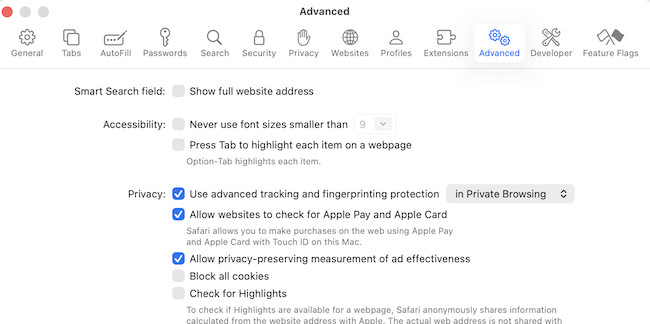
Go to Settings > Advanced and turn off “Block all cookies” - Chrome:
Go to Settings > Privacy and security > Third-party cookies and allow cookies - Edge:
Go to Settings > Cookies and site permissions > Manage and delete cookies and allow cookies
How To Allow Cookies in Safari on a Mac
- Open Safari
- Click Safari in the menu bar
- Select Settings
- Go to the Advanced tab
- Turn OFF:
- Block all cookies
This will allow websites to store cookies on your Mac.
How To Allow Cookies in Google Chrome on a Mac
- Open Google Chrome
- Click the three-dot menu (top right)
- Select Settings
- Go to Privacy and security
- Click Third-party cookies
- Choose:
- Allow third-party cookies
You can also add exceptions for specific sites.
How To Allow Cookies in Microsoft Edge on a Mac
- Open Microsoft Edge
- Click the three-dot menu
- Go to Settings
- Click Manage and delete cookies and site data
- Turn ON:
- Allow sites to save and read cookie data
What Are Cookies and Why Do They Matter?
Cookies are small files stored by websites to:
- Keep you logged in
- Remember preferences
- Enable shopping carts
- Improve site performance
If cookies are blocked, you may notice:
- Login issues
- Websites not loading properly
- Settings not saving
Is It Safe to Allow Cookies?
Generally, yes – but with some precautions.
Safe:
- First-party cookies (from trusted websites)
Less safe:
- Third-party cookies (used for tracking/ads)
Best option:
- Allow cookies, but block third-party cookies when possible
How To Allow Cookies for Specific Websites Only
In Chrome:
- Go to Third-party cookies
- Click Add under “Sites that can always use cookies”
In Safari:
- Safari doesn’t allow fine control per site, but you can:
- Disable “Prevent cross-site tracking”
Common Problems (and Fixes)
Websites still not working?
- Clear browser cache
- Restart browser
- Disable extensions
Cookies keep getting blocked?
- Check:
- Privacy settings
- Ad blockers
- Security software
FAQ
Why are cookies blocked by default?
Browsers like Safari block some cookies to improve privacy and prevent tracking.
Should I allow third-party cookies?
Only if necessary – many users keep them disabled for better privacy.
Do cookies slow down my Mac?
No – they are small files and have minimal impact on performance.