

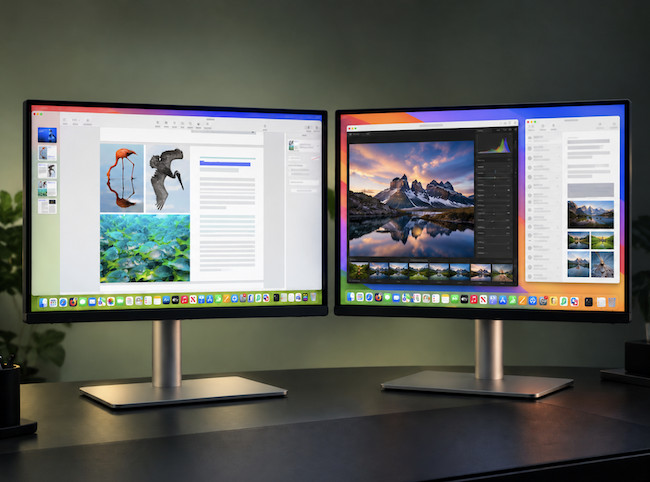
If you are deciding between the BenQ MA320UG and BenQ MA320UP, the good news is that both are unusually Mac-friendly 32-inch 4K monitors.
They share the same 31.5-inch 3840×2160 resolution, 140 PPI pixel density, Nano Gloss finish, adjustable stand and BenQ features designed to make an external display feel more at home with a MacBook, Mac mini or Mac Studio.
However, they are not simply the same monitor at different prices.
The MA320UP is the more straightforward choice for Mac users who want a large, glossy 4K screen, a clean one-cable USB-C setup and strong brightness without paying for features they may never use.
The MA320UG is the higher-spec model. It adds a 120Hz refresh rate, Thunderbolt 4, daisy chaining, Smart KVM, faster USB connectivity and a more adjustable stand. It is designed for people who want their 32-inch Mac display to feel smoother, work across more than one computer or grow into a more ambitious desktop setup.
For most MacBook users doing everyday productivity and creative work, the MA320UP will probably be the better-value choice.
For anyone coming from a ProMotion MacBook Pro, using a Mac and PC at the same desk, or wanting 120Hz and Thunderbolt connectivity, the MA320UG is worth the extra money.
We have tested the MA320UG extensively with an M3 MacBook Pro. We have not yet had the MA320UP in for hands-on testing, so the MA320UP-specific observations below are based on BenQ’s current UK specifications and feature set rather than a physical review.
Quick Verdict
BenQ MA320UG 31.5-inch 4K 120Hz Nano Gloss Monitor: £699.99 / $829.99: A premium large-screen Mac monitor for users who value smoother 120Hz motion, Thunderbolt 4, Smart KVM and a more flexible Mac-and-PC or multi-display setup.
BenQ MA320UP 31.5-inch 4K Nano Gloss Monitor: £599.99 / $699.99: A brighter 60Hz 4K Mac monitor for users who want the same large glossy workspace, Mac colour matching and USB-C charging for less.
Prices and retailer discounts change regularly, so check the current price before buying. The important comparison is whether the MA320UG’s roughly £100/$130 premium is worthwhile for your setup.
BenQ MA320UG vs MA320UP: Comparison Table
| Feature | BenQ MA320UG | BenQ MA320UP | Best For |
|---|---|---|---|
| Screen size | 31.5-inch | 31.5-inch | Large desktop workspace |
| Resolution | 3840×2160 | 3840×2160 | Equal 4K desktop space |
| Pixel density | 140 PPI | 140 PPI | Equal text sharpness |
| Panel | IPS | IPS | Everyday Mac work and creative use |
| Screen finish | Nano Gloss | Nano Gloss | Users who prefer a glossy, Mac-like look |
| Refresh rate | 120Hz | 60Hz | MA320UG for smoother motion |
| Brightness | 450 nits typical | 550 nits typical | MA320UP for brighter rooms |
| HDR | HDR10, DisplayHDR 400 | HDR10, DisplayHDR 600 | MA320UP on paper |
| Native contrast | 2000:1 | 1300:1 | MA320UG on paper |
| Colour gamut | 99% sRGB, 98% P3 | 99% sRGB, 97% P3 | Very similar Mac-focused colour coverage |
| Main laptop connection | Thunderbolt 4, up to 96W | USB-C, up to 90W | MA320UG for Thunderbolt connections |
| Additional display output | Thunderbolt 4 out, 15W | No | MA320UG for daisy chaining |
| Smart KVM | Yes | No | MA320UG for Mac-and-PC or two-computer use |
| HDMI | 2 × HDMI 2.1 | 2 × HDMI 2.0 | MA320UG for newer high-bandwidth sources |
| USB hub | USB 3.2 Gen 2, up to 10Gbps | USB 3.2 Gen 1, up to 5Gbps | MA320UG for faster storage and peripherals |
| Height adjustment | 150mm | 115mm | MA320UG for greater ergonomic range |
| Speakers | 2 × 3W | 2 × 3W | Basic audio on both |
| Best for | 120Hz, Thunderbolt and multi-device setups | Value-focused MacBook and Mac mini users | Depends on workflow |
Design & Build Quality
The design of these two monitors is much more similar than different.
Both use a 31.5-inch, 4K IPS panel in a silver enclosure that is clearly intended to sit comfortably next to a MacBook, Mac mini or Mac Studio. Both have BenQ’s Nano Gloss coating, slim modern bezels and a stand that can tilt, swivel and pivot into portrait mode.
Neither looks like a traditional heavy black office monitor. They have a cleaner, more Apple-adjacent appearance than most 32-inch 4K displays, which matters if the monitor will be a permanent part of a home office rather than a screen tucked away in a studio.
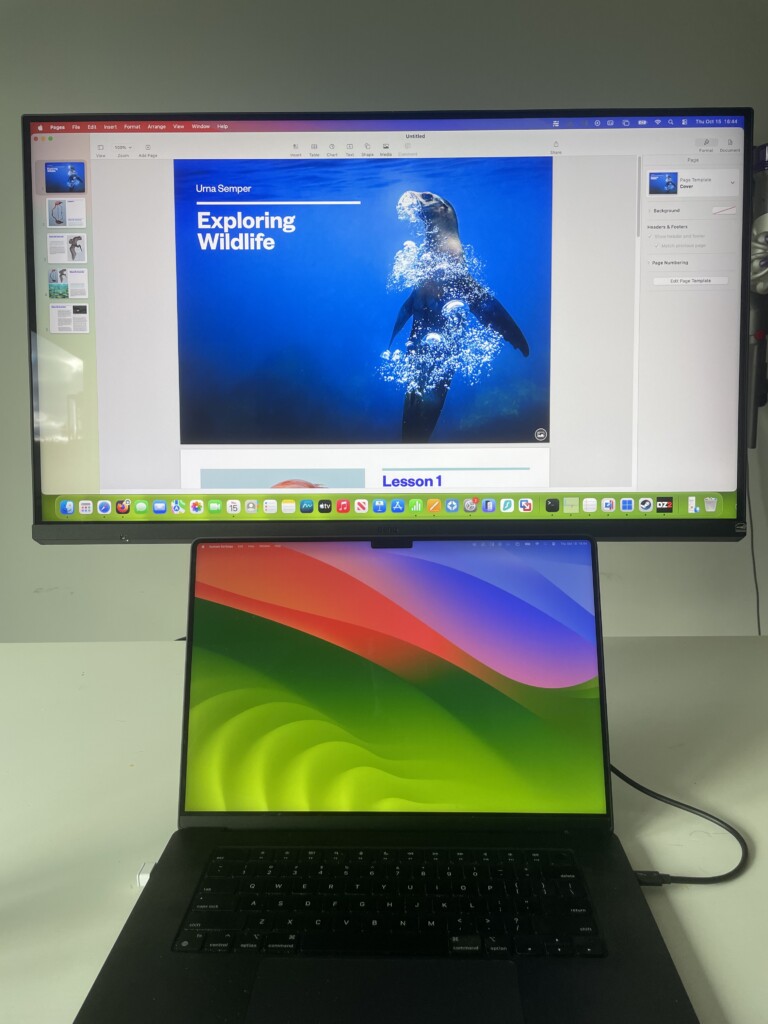
The main physical difference is the stand. The MA320UG offers 150mm of height adjustment, compared with 115mm on the MA320UP. That may not sound dramatic, but extra adjustment is useful with a 32-inch panel, especially if you switch between a MacBook on a stand and a desktop Mac or want the display high enough to sit comfortably at eye level.
The MA320UG is also slightly deeper and heavier because it includes more capable connectivity. In practice, both need a reasonably deep desk: a 32-inch 16:9 monitor is wide, tall and much more visually dominant than a 27-inch display.
If you only want the same attractive 32-inch glossy BenQ screen with a MacBook, there is no major aesthetic reason to pay extra for the MA320UG. The real differences start once you turn them on.
120Hz vs 60Hz: The Biggest Difference
The biggest difference between the MA320UG and MA320UP is not screen size, resolution or finish.
It is refresh rate.
The MA320UG runs at up to 120Hz, while the MA320UP is a 60Hz monitor.
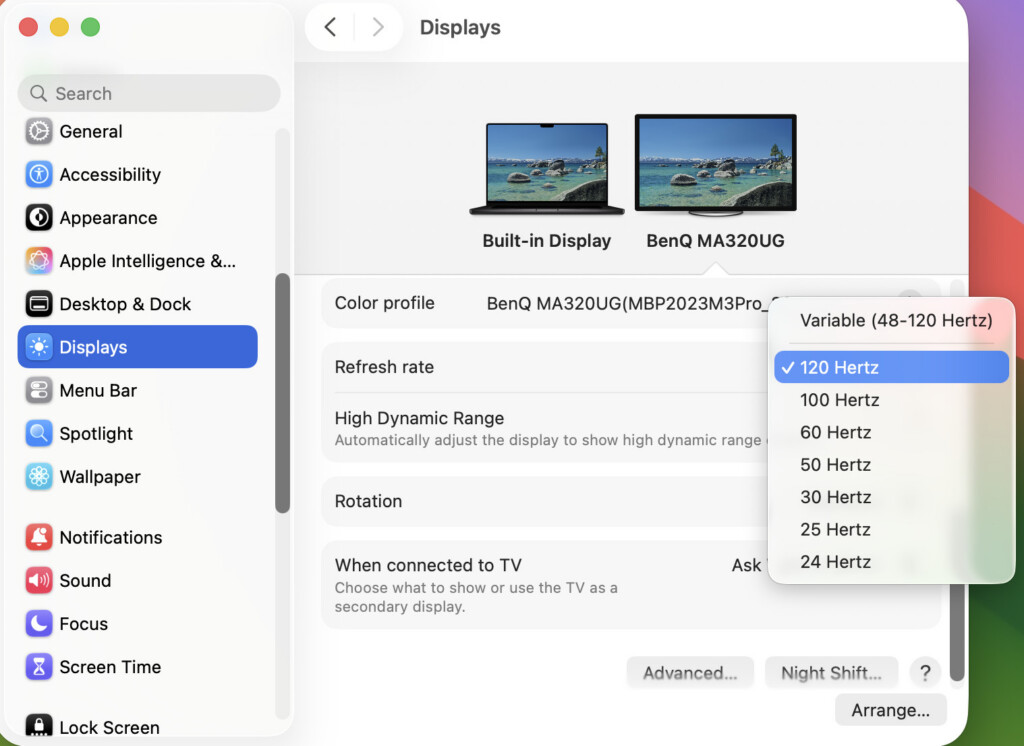
That means the MA320UG can update the image twice as often. It does not make the screen sharper, but it makes movement look and feel noticeably more fluid.
When I used the MA320UG with an M3 MacBook Pro, scrolling through long web pages, moving windows around the desktop and navigating timelines all felt appreciably smoother than on a conventional 60Hz display. It is not just a gaming specification: once you are used to ProMotion on a MacBook Pro, returning to a 60Hz external monitor can feel slightly sluggish.
The MA320UP is not a poor choice because it is 60Hz. For email, documents, spreadsheets, web browsing, writing, photo work and most day-to-day creative tasks, 60Hz remains perfectly usable. It simply does not preserve the same sense of responsiveness you get from a ProMotion MacBook Pro or the MA320UG.
The difference matters most if you:
- use a 120Hz MacBook Pro display every day
- work with long web pages, code, documents or timelines
- edit video or move through media frequently
- use the monitor for a Mac and a PC or console
- value a desktop setup that feels as fluid as your laptop
For a static Mac mini or MacBook Air workspace, or if the monitor will mainly be used for office work and general creative tasks, the MA320UP’s 60Hz refresh rate is far less likely to be a deciding factor.
Display Quality
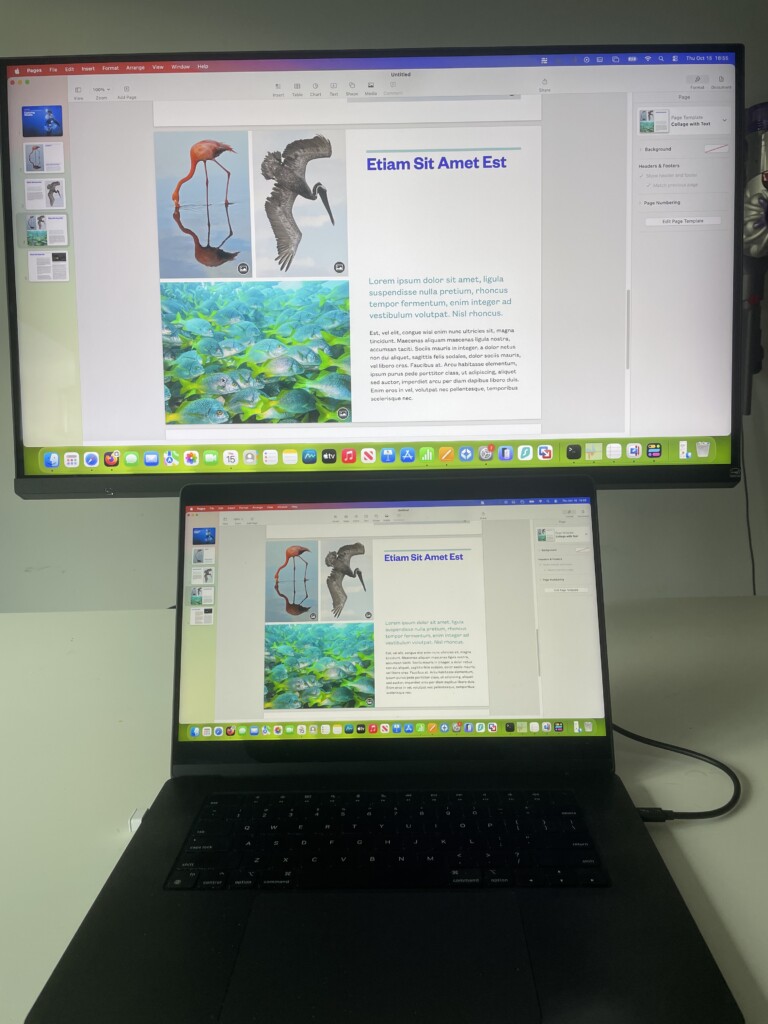
In terms of resolution and everyday text clarity, these monitors are equal.
Both use a 31.5-inch 4K panel with a pixel density of 140 PPI. This gives you a large, comfortable desktop canvas for multiple windows, documents, browser tabs and creative apps.
However, neither monitor has the Retina-style sharpness of a 27-inch 5K display such as the BenQ MA270S or Apple Studio Display. At 140 PPI, text and interface elements are still good, but they are not as crisp as a 218 PPI 5K panel when viewed at a typical desk distance.
That is important because there is no display-quality winner between the MA320UG and MA320UP on this point. Choosing the MA320UG will not make text sharper; both have the same resolution and screen size.
Nano Gloss on Both Displays
Both monitors use BenQ’s Nano Gloss coating, so both aim for the richer contrast, deeper-looking blacks and more vivid appearance that Mac users often prefer over a conventional matte panel.
The glossy finish is particularly appealing if you are coming from:
- a MacBook Pro or MacBook Air
- an iMac
- an Apple Studio Display
- a glossy LG UltraFine display
The trade-off is reflections. Glossy displays can look excellent in a controlled room, but windows, lamps and bright surfaces behind you can become distracting in darker content. Neither monitor solves this issue simply because both use the same Nano Gloss surface.
Brightness, Contrast and HDR
On paper, the MA320UP has the brightness advantage. It is rated at 550 nits typical brightness, with a 600-nit HDR peak and DisplayHDR 600 certification. The MA320UG is rated at 450 nits and DisplayHDR 400.
The MA320UG has the higher quoted native contrast ratio, however, at 2000:1 compared with 1300:1 on the MA320UP. It also has marginally wider P3 coverage: 98% rather than 97%.
Those figures suggest a sensible split rather than a universal winner:
- choose the MA320UP if you work in a brighter room and value the extra brightness
- choose the MA320UG if smoother motion, higher quoted contrast and Thunderbolt matter more than maximum brightness
Neither monitor should be bought solely for HDR. HDR support is useful for compatible video and media, but these are IPS Mac monitors rather than Mini-LED or OLED reference displays designed around high-end HDR performance.
Mac Features & Integration
This is an area where the two monitors are very closely matched.
Both are part of BenQ’s MA range, which has been designed specifically around Mac users rather than simply treating a Mac as another USB-C source. Both include Mac-focused colour modes, M-book mode, ICCsync support, Display Pilot 2 software and the ability to control display brightness and volume from a compatible Mac keyboard.
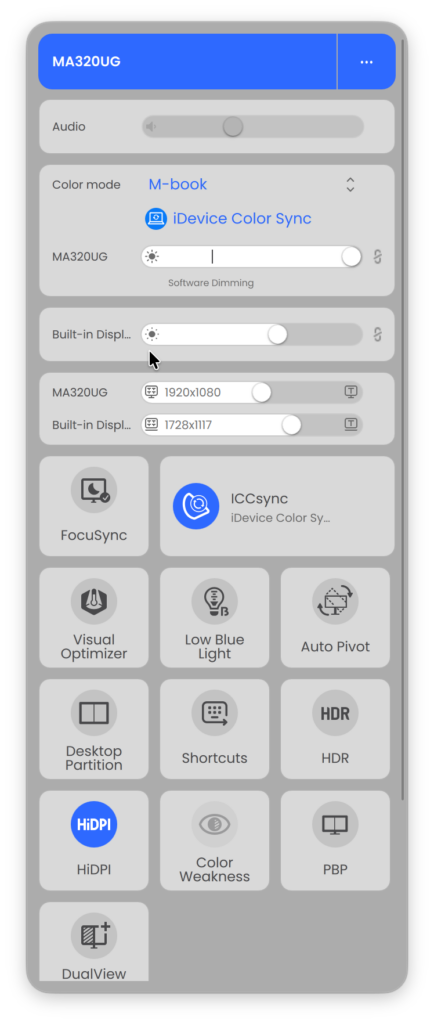
With the MA320UG, I found those touches make a genuine difference. The display felt less like a generic PC monitor connected to a Mac and more like an extension of the MacBook Pro. Brightness control and colour matching are particularly useful when you move between the MacBook display and the external screen throughout the day.
The MA320UP offers the same core Mac convenience. Its lower price does not mean you lose the features that make the MA range appealing in the first place.
The difference is that the MA320UG adds Smart KVM. With Display Pilot 2 installed on both systems, you can use one keyboard and mouse across a connected Mac and Windows PC, or between two compatible computers, without manually reconnecting peripherals.
If you use only one MacBook, Smart KVM may be a feature you never touch. If you work across a MacBook and desktop PC, or a MacBook and Mac mini, it can be genuinely useful.
Connectivity
Connectivity is the other major reason to choose the MA320UG.
| Connection | BenQ MA320UG | BenQ MA320UP |
|---|---|---|
| HDMI | 2 × HDMI 2.1 | 2 × HDMI 2.0 |
| Main laptop connection | Thunderbolt 4, 96W | USB-C with DisplayPort Alt Mode, 90W |
| Second Thunderbolt port | Thunderbolt 4 out, 15W | No |
| Extra USB-C | USB-C, 35W | USB-C downstream, 15W |
| USB-A | 2 × USB 3.2 Gen 2, 10Gbps | 2 × USB 3.2 Gen 1, 5Gbps |
| Daisy chaining | Yes, over Thunderbolt | No |
| Smart KVM | Yes | No |
The MA320UP is still a tidy one-cable MacBook setup. Connect one USB-C cable and it can carry video, data and up to 90W of power to a compatible MacBook. For many people, that is all they need.
The MA320UG is more of a desk hub. Its Thunderbolt 4 connection supplies up to 96W to a MacBook, adds a separate Thunderbolt output for a second display and provides faster USB ports for storage and peripherals. It also has an additional USB-C connection that can supply up to 35W.
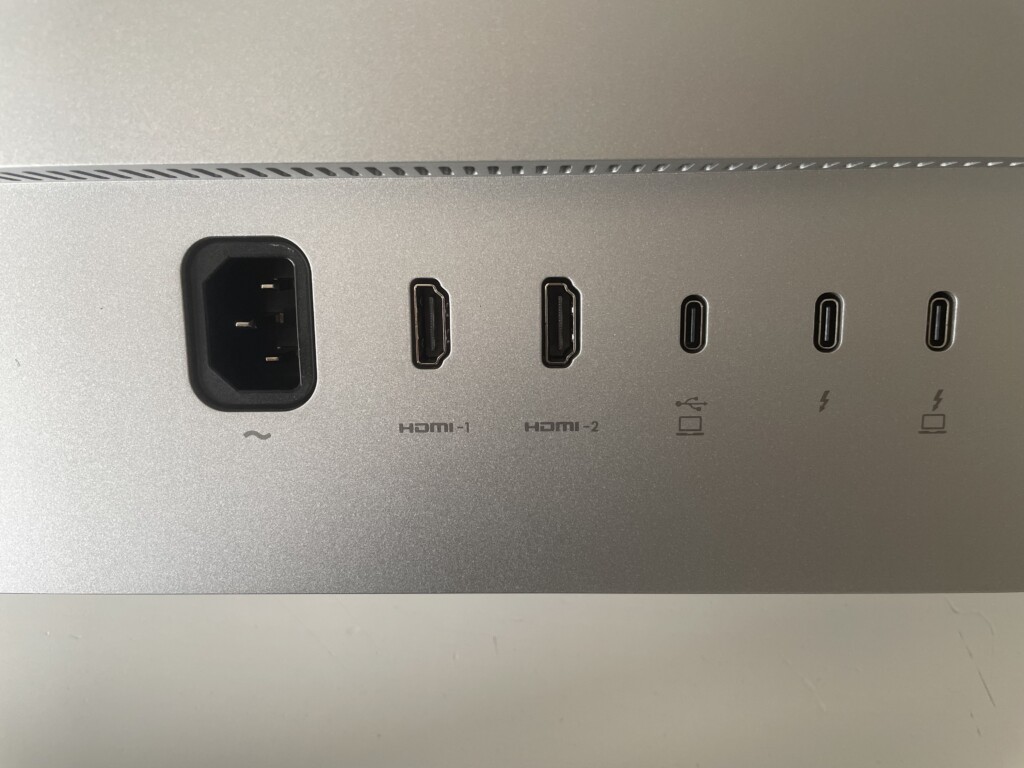
This makes the MA320UG the better choice if you have a more complicated setup, such as:
- a MacBook plus a Windows PC
- a MacBook plus Mac mini or Mac Studio
- fast external SSDs and several peripherals
- a second compatible 4K display
- a console connected alongside a Mac
Before buying for daisy chaining, check your exact Mac’s external-display support. A Thunderbolt 4 monitor cannot bypass the display limitations of the Mac connected to it.
Real World Usage
Coding & Productivity
For writing, coding, spreadsheets, browser work and general productivity, both monitors give you the same large 4K desktop and the same 140 PPI text rendering.
The MA320UP is the logical value pick for this use. It offers the same screen real estate, glossy finish and Mac integration for less, while its 550-nit brightness is useful in a light home office.
The MA320UG is better if you care about desktop fluidity. Its 120Hz refresh rate made scrolling, moving windows and navigating macOS feel more responsive in my testing, but it does not improve the underlying text sharpness.
Photo & Video Editing
Both monitors cover a wide P3 colour gamut and include Mac-focused colour matching, making them good choices for general photo editing, content creation and video work.
The MA320UG is the more appealing display for video editing because 120Hz makes timeline navigation and movement look smoother, while Thunderbolt, faster USB and Smart KVM suit a more demanding desk setup.
The MA320UP remains a good option for photographers and everyday creators who want a bright, glossy 4K canvas but do not need faster refresh rates or Thunderbolt expansion.
Neither is the natural first choice for colour-critical print, grading or reference work where factory certification, dedicated calibration controls and a controlled matte viewing environment are the priority. BenQ’s PD and SW ranges are better suited to those specialist workflows.
Gaming & Media Consumption
The MA320UG is clearly the better monitor for motion.
Its 120Hz refresh rate and FreeSync Premium support make it more capable for supported games, faster-paced video and general media. It is not a specialist gaming monitor, but it feels substantially more responsive than a 60Hz 4K office display.
The MA320UP can still look very good for films, YouTube and streaming thanks to its glossy finish, 550-nit brightness and DisplayHDR 600 support. It is simply not the display to choose if smooth motion is high on your list.
Mac and PC or Two-Computer Setups
This is where the MA320UG earns its premium most easily.
Smart KVM, Thunderbolt daisy chaining and the more capable USB hub make it much better suited to sharing a keyboard, mouse and peripherals between systems. If you routinely move between a MacBook and a Windows PC, the MA320UG can reduce cable swapping and desk clutter.
The MA320UP is still suitable for connecting more than one device through its HDMI and USB-C inputs, but it does not have the same integrated multi-computer workflow tools.
Problems & Drawbacks
No monitor is perfect, and both displays have compromises worth considering.
MA320UG Drawbacks
- Costs roughly £100/$130 more than the MA320UP at list price
- 4K at 31.5 inches is no sharper than the MA320UP and cannot match a 27-inch 5K display for text clarity
- 450-nit brightness is lower than the MA320UP’s 550-nit rating
- Glossy finish can show reflections in bright rooms
- No built-in webcam or microphones
- The 3W speakers are fine for basic audio but not a substitute for dedicated speakers
- Thunderbolt daisy chaining and Smart KVM may be unnecessary in a simple single-MacBook setup
MA320UP Drawbacks
- Limited to 60Hz, so it cannot match the MA320UG’s smoother scrolling and movement
- No Thunderbolt 4, daisy chaining or Smart KVM
- Slower USB hub and fewer expansion options
- Less stand-height adjustment
- Glossy finish can show reflections in bright rooms
- No built-in webcam or microphones
- The same 140 PPI limitation as the MA320UG for users who want 5K-level text sharpness
Which Monitor Should You Buy?
Buy the MA320UG If:
- you use a 120Hz MacBook Pro and want an external display that feels similarly fluid
- you want smoother scrolling, window movement, media and supported gaming
- you need Thunderbolt 4 and up to 96W charging
- you want to daisy-chain a second compatible display
- you work across a Mac and Windows PC, or two computers, and will use Smart KVM
- you connect fast external storage or several peripherals
- you want the most adjustable stand and the more capable long-term desk hub
Buy the MA320UP If:
- you want a large glossy 4K monitor for a MacBook, Mac mini or Mac Studio for less
- 60Hz is sufficient for your everyday work
- you mainly use one Mac and do not need Thunderbolt expansion or KVM
- you work in a brighter room and value the higher 550-nit brightness rating
- you want the same 32-inch 4K workspace, Nano Gloss finish and Mac-focused software features as the MA320UG
- you would rather put the price difference towards storage, a monitor arm, speakers or another part of your setup
Conclusion
For most Mac users, the BenQ MA320UP is probably the more sensible purchase.
It delivers the same large 31.5-inch 4K workspace, the same 140 PPI text clarity, a glossy Mac-like finish, Mac colour matching, Display Pilot 2 and one-cable USB-C charging for less money. It is also brighter on paper, which could matter in a light-filled room.
However, the MA320UG is not just a more expensive version of the same monitor.
Having used it with an M3 MacBook Pro, the difference that 120Hz makes to scrolling and window movement is immediately noticeable. Add Thunderbolt 4, daisy chaining, faster USB, Smart KVM and the more adjustable stand, and it is the better monitor for MacBook Pro owners, multimedia work and mixed Mac-PC setups.
Ultimately, the decision comes down to this:
- choose the MA320UP for a bright, large and good-value Mac workspace
- choose the MA320UG for 120Hz fluidity, Thunderbolt flexibility and a more ambitious multi-device desk setup
For more, see our full BenQ MA320UG review and our guide to the best 4K monitors for Mac.