

Finding the best trading software for Mac used to be frustrating. Many of the industry’s leading platforms were built primarily for Windows, forcing Mac users to rely on virtual machines, browser workarounds or outdated applications.
Fortunately, that’s no longer the case – in fact we think there are now many reasons why Macs are excellent for trading.
Today, many of the best trading platforms now offer native macOS apps, excellent browser-based platforms or full support for Apple Silicon Macs. Whether you’re investing in stocks, actively day trading, analysing charts or trading forex and cryptocurrencies, there are now plenty of excellent options that work smoothly on both Intel and M-series Macs.
The challenge isn’t finding software that runs on macOS – it’s choosing the platform that’s right for the way you trade.
Some applications specialise in technical analysis and charting, while others focus on trade execution through an integrated brokerage account. A few combine both exceptionally well.
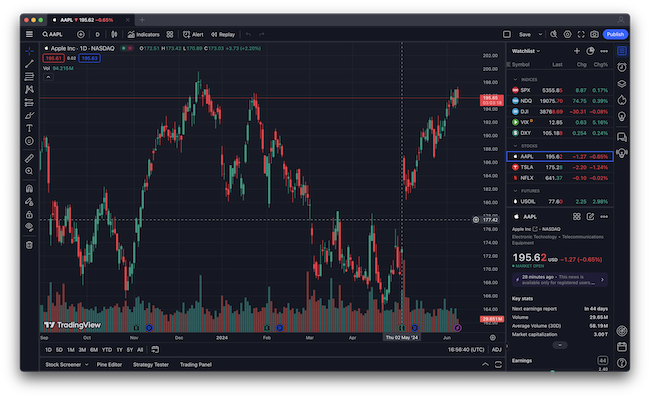
After researching and comparing the leading Mac-compatible platforms, TradingView (FREE) remains our overall pick as the best trading software for Mac. Its native Mac application, outstanding charting tools, broker integrations and ease of use make it suitable for almost every type of trader – and it offers a free version.
However, it isn’t necessarily the best choice for everyone.
Professional traders may prefer Interactive Brokers for its institutional-grade trading tools and access to global markets. UK and European investors will likely appreciate SaxoTrader’s excellent all-in-one platform, while traders who rely heavily on Elliott Wave analysis or advanced order flow tools may find MotiveWave a better fit.
In this guide, we’ll compare the best trading software and broker platforms for Mac, explain which type of trader each platform is best suited to, and highlight how well they perform on modern Apple Silicon Macs.
Disclaimer: This guide is intended for educational purposes only and should not be considered financial or investment advice. Trading and investing involve risk and you should always conduct your own research before making investment decisions.
Trading Platforms vs Investment Software
The software in this guide is designed for placing trades and analysing the markets. If you’re primarily a long-term investor looking to track the performance of your portfolio, dividends and asset allocation rather than actively buy and sell securities, you may find our guide to the Best Investment Portfolio Management Software for Mac more useful.
Quick Recommendations
If you’re short on time, these are our top picks depending on what you’re looking for.
| If you want… | Our recommendation |
|---|---|
| Best trading software for Mac overall | TradingView (FREE) |
| Best stock trading software | TradingView (FREE) |
| Best professional trading platform | Interactive Brokers |
| Best for technical analysis | MotiveWave |
| Best UK & European platform | SaxoTraderGO / PRO |
| Best free trading platform | Webull |
| Best for options trading | thinkorswim |
| Best AI-powered chart analysis | TrendSpider |
| Best US stock analysis | TC2000 |
| Best for beginners | eToro |
| Best for UK forex & CFDs | IG |
How We Evaluated the Best Trading Software for Mac
Unlike many comparison sites that simply rank the largest brokers, we looked specifically at how well each platform performs on macOS.
In our experience Macs are great for trading, but not all platforms and software perform as well on them.
In particular, we gave preference to software that works well on both Apple Silicon and Intel Macs without requiring Windows or a complicated setup.
Each platform was evaluated using the following criteria:
- Native macOS support
- Apple Silicon compatibility
- Performance on Intel Macs
- Availability of a desktop application
- Browser performance in Safari and Chrome
- Charting and technical analysis tools
- Trade execution and order management
- Paper trading and demo accounts
- Multiple monitor support
- Retina display optimisation
- Broker integrations
- Ease of use
- Pricing and overall value
Where a platform still relies on Windows software or requires tools such as CrossOver or a virtual machine, we’ve highlighted this so you know exactly what to expect before opening an account.
Trading Software vs Trading Platforms
One reason choosing trading software can be confusing is that the terms “trading software” and “trading platform” are often used interchangeably.
In reality, they’re slightly different.
Trading Software
Trading software focuses primarily on market analysis.
These applications are designed to help you identify trading opportunities through advanced charts, indicators, market scanners and backtesting tools. Many also connect to supported brokers so you can execute trades without leaving the software.
Examples include:
- TradingView
- MotiveWave
- TrendSpider
- TC2000
These are generally the best choice if technical analysis is a major part of your trading strategy.
Trading Platforms
Trading platforms are usually provided by brokerage firms and focus on executing trades and managing your portfolio.
Although most include charting tools, they’re primarily designed for buying and selling financial assets rather than analysing them.
Examples include:
- Interactive Brokers
- SaxoTrader
- Webull
- thinkorswim
- eToro
- IG
If your priority is placing trades efficiently through a regulated broker, these are generally the better option.
Increasingly, however, the distinction between software and platforms is becoming blurred. TradingView now supports direct broker integrations, while Interactive Brokers and thinkorswim both offer charting capabilities that rival many standalone analysis tools.
Which Trading Software Is Best for You?
The best platform depends largely on what you trade, rather than simply which application has the longest feature list.
Best for Stock Trading
If you’re primarily buying and selling individual stocks or ETFs, we recommend:
These platforms combine excellent charting with reliable execution and broad market coverage.
Best for Day Trading
Day traders require responsive charts, fast execution and sophisticated order management.
Our top picks are:
Best for Technical Analysis
If analysing charts is more important than executing trades, dedicated charting software remains the better option.
Our favourites are:
Best for Forex Trading
For forex traders we recommend:
Best for Options Trading
If you actively trade options, these platforms offer the strongest combination of options chains, probability analysis and advanced order types.
Best for Beginners
If you’re new to trading, these platforms are the easiest to learn while still providing room to grow.
Our Top Picks
The following trading software represents the best options currently available for Mac users, whether you’re using the latest M5 MacBook Pro or an older Intel-based Mac.
We’ll start with our overall favourite, TradingView, before looking at professional platforms, advanced charting software and broker platforms for different trading styles.
| Software | Native Mac App | Free Plan | Best For |
|---|---|---|---|
| TradingView | ✅ | ✅ | Overall trading & charting |
| Interactive Brokers | ✅ | ❌ | Professional & global trading |
| MotiveWave | ✅ | Limited | Advanced technical analysis |
| SaxoTraderGO | Web | Demo | UK & European traders |
| Webull | ✅ | ✅ | Free stock trading |
| thinkorswim | ✅ | ✅ | Options trading |
| TrendSpider | Web | ❌ | AI-powered analysis |
| TC2000 | Web | ❌ | US stock analysis |
| eToro | Web | Demo | Beginners & copy trading |
| IG | Web | Demo | Forex & CFDs |
1. TradingView — Best Trading Software for Mac Overall (FREE)
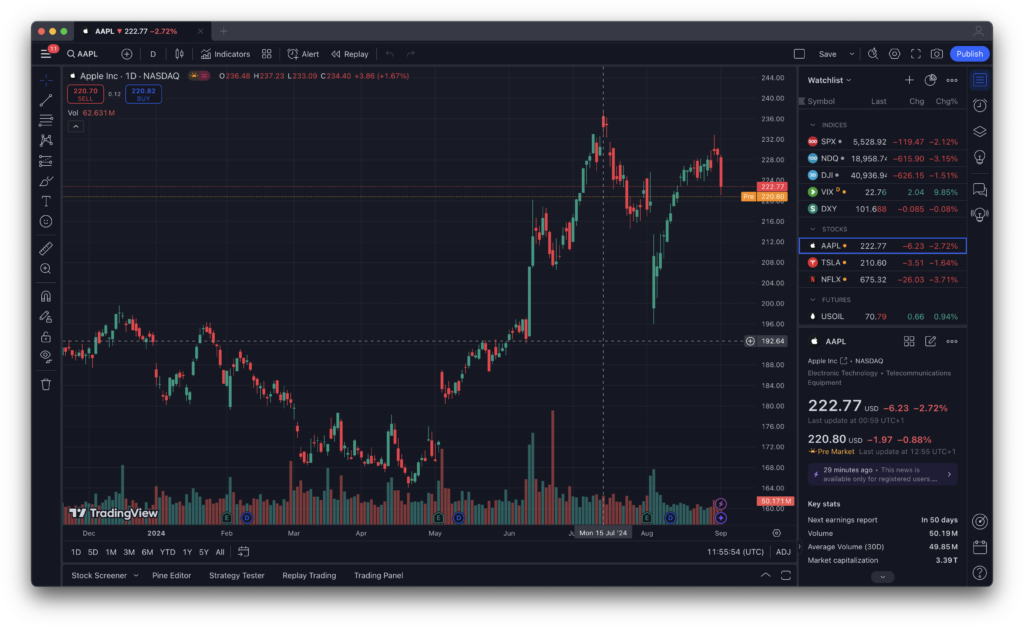
If we could only recommend one trading platform for Mac users, it would definitely be TradingView.
It’s one of the few applications that strikes an excellent balance between simplicity and professional-grade functionality. Whether you’re buying your first ETF, analysing candlestick patterns or building automated trading strategies using Pine Script, TradingView has enough depth to keep pace as your trading becomes more sophisticated.
Unlike many competitors, TradingView also feels genuinely at home on macOS.
Its dedicated desktop application runs natively on both Apple Silicon and Intel Macs, launches quickly and generally uses less memory than keeping several browser tabs open throughout the day. During our testing, it remained responsive even when displaying multiple charts, watchlists and news panels simultaneously, making it particularly well suited to MacBook users who value battery life and smooth performance.
The charting experience remains the biggest reason to choose TradingView.
There are hundreds of built-in indicators, thousands of community-created scripts and virtually every drawing tool an active trader is likely to need. Multiple layouts, stock screeners, heat maps and economic calendars are all integrated into a clean interface that never feels overwhelming.
Although TradingView started life as charting software, it’s increasingly becoming a complete trading platform.
Today it supports direct connections with a growing number of brokers, allowing you to analyse markets and execute trades without switching applications. That makes it one of the few platforms that genuinely bridges the gap between technical analysis software and brokerage platforms.
Another advantage is its enormous community.
Millions of traders publish charts, indicators and trading ideas every day, making it an excellent learning resource for beginners while also providing experienced traders with fresh perspectives and custom-built indicators that simply aren’t available elsewhere.
Why We Picked It
TradingView delivers the best overall experience for Mac users because it combines exceptional charting, a polished native macOS application, excellent Apple Silicon performance and broad broker support in a single platform.
For around 90% of traders, it’s the only trading software they’ll ever need.
Best For
- Stock traders
- Forex traders – in fact we think its better for Mac users than MetaTrader
- ETF investors
- Swing traders
- Technical analysts
- Long-term investors
- Beginners
- Experienced traders
Mac Compatibility
⭐⭐⭐⭐⭐ Excellent
- Native Apple Silicon support
- Native Intel Mac support
- Dedicated macOS desktop app
- Retina display optimised
- Excellent battery efficiency
- Excellent multi-monitor support
Pros
- Outstanding charting tools
- Native Mac application
- Runs exceptionally well on Apple Silicon
- Huge library of indicators and community scripts
- Paper trading included
- Supports multiple brokers
- Excellent free plan
- Beginner friendly but powerful
- Lots of TradingView Mac keyboard shortcuts
Cons
- Real-time market data often requires exchange subscriptions
- Premium plans become relatively expensive
- Not every broker is supported
Pricing
FREE plan available. Paid plans start from approximately $16.95 per month, with discounts for annual subscriptions.
More Info: See our full TradingView for Mac review
2. Interactive Brokers — Best Professional Trading Platform for Mac
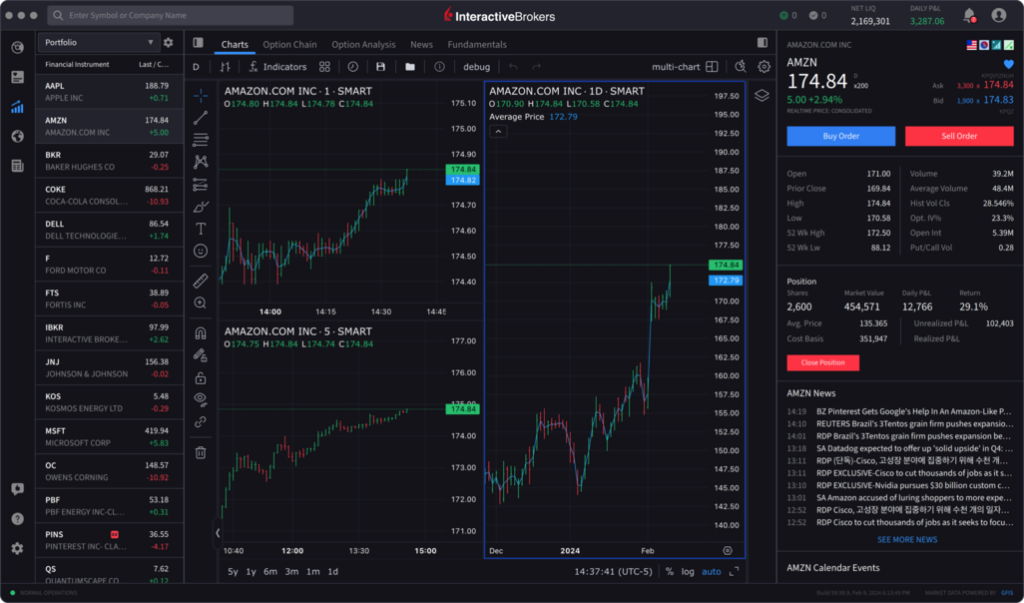
If TradingView is the best choice for most traders, Interactive Brokers (IBKR) is the platform we’d recommend for professionals and serious active investors.
Unlike many retail-focused brokers, Interactive Brokers was built around speed, flexibility and access to global markets. It supports trading across stocks, ETFs, options, futures, forex, bonds and many other asset classes from a single account, making it particularly attractive to experienced traders who want one platform capable of handling virtually every type of investment.
One of IBKR’s biggest strengths on macOS is that it no longer feels like a Windows application reluctantly adapted for Apple computers.
Its newer IBKR Desktop platform offers a modern interface that runs natively on Apple Silicon Macs, while the long-established Trader Workstation (TWS) remains available for traders who need every advanced feature imaginable.
Although Trader Workstation has a steeper learning curve than TradingView, it offers an extraordinary level of customisation.
Professional traders can create highly personalised workspaces with multiple monitors, complex watchlists, advanced scanners, sophisticated options strategies and algorithmic order routing. Few retail trading platforms come close to matching its capabilities.
Interactive Brokers also stands out for its extremely competitive pricing and direct market access.
Execution quality is consistently excellent and the platform is widely used by professional traders, hedge funds and financial advisers around the world.
The downside is complexity.
Beginners may find the interface intimidating, particularly when compared with TradingView or Webull. While IBKR Desktop has modernised the experience considerably, Trader Workstation still assumes a certain level of trading knowledge.
Why We Picked It
Interactive Brokers is the most capable professional trading platform available for Mac users, combining institutional-grade execution with access to markets in more than 150 countries.
If you actively trade multiple asset classes, it’s difficult to beat.
Best For
- Professional traders
- Active investors
- Options traders
- Futures traders
- International investing
- Algorithmic trading
Mac Compatibility
⭐⭐⭐⭐⭐ Excellent
- Native Apple Silicon support
- Native Intel support
- Modern macOS desktop application
- Excellent multi-monitor support
- Highly stable during extended trading sessions
Pros
- Professional-grade execution
- Access to global markets
- Extremely competitive commissions
- Excellent options and futures trading
- Powerful scanners and research tools
- Modern IBKR Desktop interface
- Extensive API support
Cons
- Steeper learning curve
- Trader Workstation can feel overwhelming
- Beginners may never use many of its advanced features
Pricing
No platform fee. Commissions vary depending on market, asset class and pricing plan selected.
3. MotiveWave — Best Technical Analysis Software for Mac
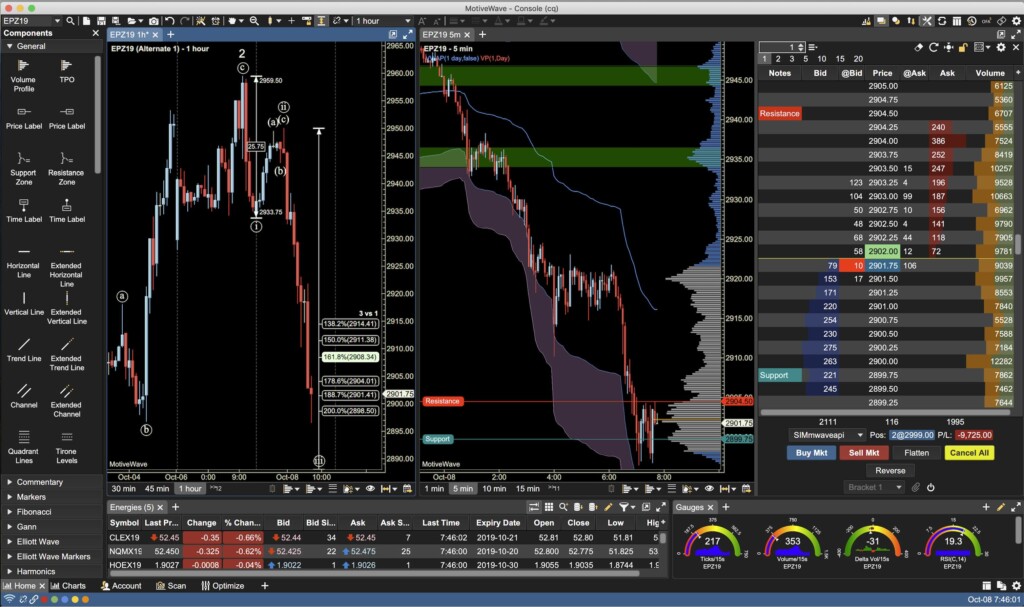
For traders who believe charts tell the whole story, MotiveWave is one of the most powerful technical analysis platforms available on macOS.
Unlike broker platforms that treat charting as a secondary feature, MotiveWave has been designed specifically for traders who rely on technical analysis to make trading decisions.
Its biggest strength is the depth of its analytical tools.
MotiveWave is particularly well known for its Elliott Wave analysis, automatically identifying wave counts that would otherwise take considerable time to analyse manually. It also includes sophisticated harmonic pattern recognition, Gann analysis, market profile tools, order flow visualisation and hundreds of built-in indicators.
This makes it especially popular among futures traders, forex traders and experienced technical analysts.
Performance on macOS is excellent.
The application runs natively on both Apple Silicon and Intel Macs and handles large datasets, multiple workspaces and several monitors without difficulty. During testing it remained responsive even when displaying numerous charts simultaneously.
Although MotiveWave isn’t a broker itself, it integrates with a wide range of trading services including Interactive Brokers, CQG, Rithmic and several specialist futures brokers, allowing traders to execute orders directly from the platform.
Compared with TradingView, MotiveWave is less polished and requires more time to learn.
However, traders who rely on advanced technical analysis will often find its specialist tools well worth the additional complexity.
Why We Picked It
Few trading platforms offer the same level of technical analysis as MotiveWave. If Elliott Wave analysis, harmonic patterns or advanced futures trading form part of your strategy, it’s one of the best native Mac applications available.
Best For
- Elliott Wave traders
- Futures traders
- Forex traders
- Advanced technical analysts
- Professional chartists
Mac Compatibility
⭐⭐⭐⭐⭐ Excellent
- Native Apple Silicon application
- Native Intel support
- Excellent multi-monitor support
- Retina display optimisation
- Stable with large workspaces
Pros
- Outstanding Elliott Wave analysis
- Advanced harmonic pattern recognition
- Excellent futures trading support
- Professional charting tools
- Replay mode and strategy testing
- Native Mac application
Cons
- Considerably steeper learning curve
- Interface feels less modern than TradingView
- More expensive than many competitors
Pricing
A limited Community Edition is available free of charge. Paid licences start from around $295, with higher editions adding increasingly advanced professional features.
More Info: See our full MotiveWave review
4. SaxoTraderGO — Best All-in-One Trading Platform for UK & European Traders
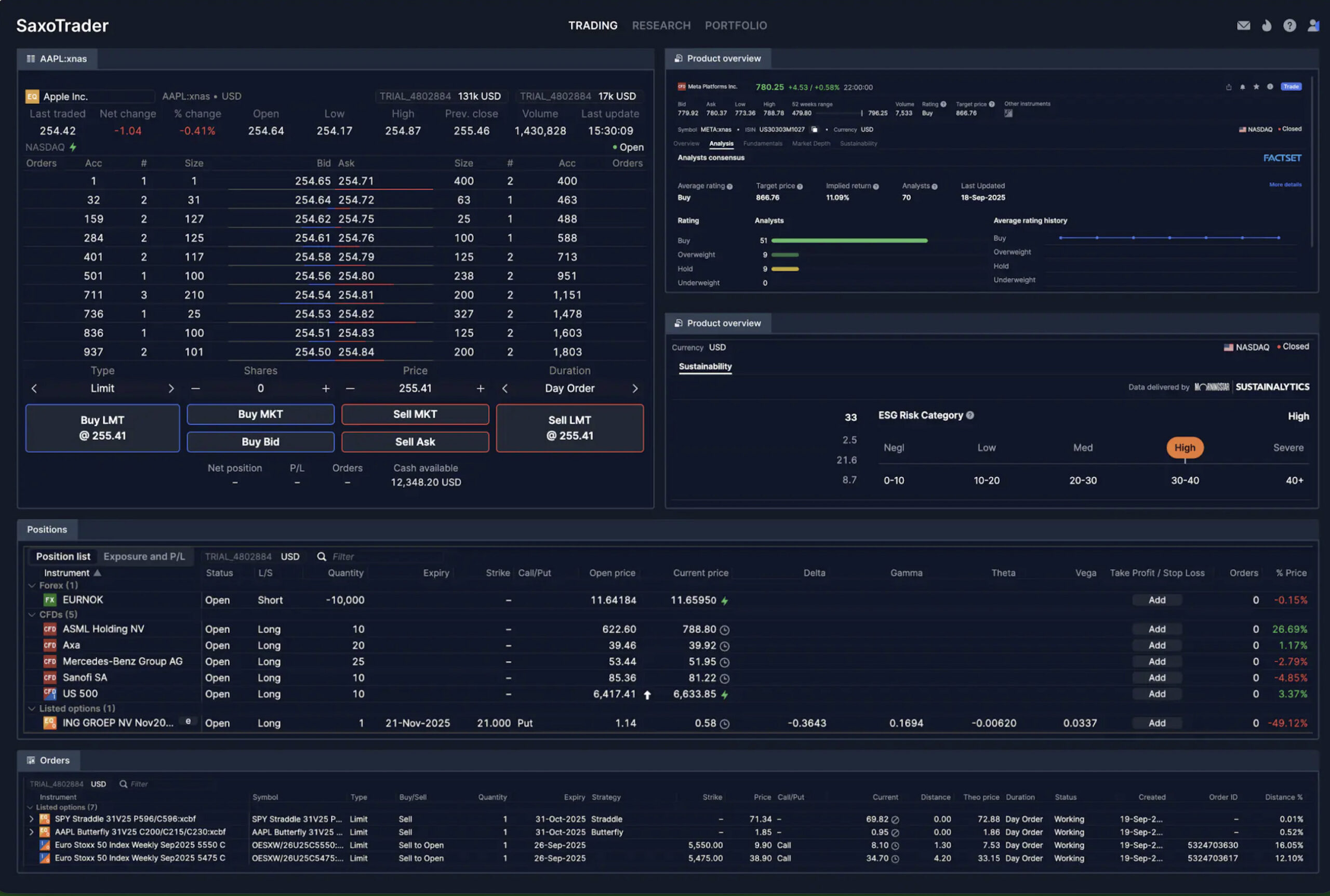
If you’re based in the UK or Europe and want a single platform that combines investing, trading and market research, SaxoTraderGO is one of the best options available for Mac.
Unlike many competitors that focus primarily on technical traders, Saxo has built a platform that appeals to both active traders and long-term investors. You can trade shares, ETFs, forex, CFDs, bonds, options and futures from a single account while benefiting from integrated market research and portfolio management tools.
Although Saxo previously offered the desktop-based SaxoTraderPRO, its modern web platform has become the primary experience for most users. Fortunately, that’s not a disadvantage for Mac owners.
The browser-based interface feels remarkably close to a native application, working smoothly in both Safari and Chrome without requiring plugins or Windows compatibility software. Layouts are highly customizable, charts are responsive, and it’s easy to switch between different markets and watchlists.
Research is another area where Saxo excels.
Market commentary, analyst ratings, economic calendars and news are all built into the platform, reducing the need to rely on separate websites while researching trades.
Compared to Interactive Brokers, Saxo is easier to learn and offers a more polished interface. Compared to TradingView, however, its charting tools aren’t quite as extensive, particularly for traders who rely on custom indicators or advanced technical analysis.
Why We Picked It
SaxoTraderGO combines an excellent Mac experience with professional trading tools, making it one of the strongest all-in-one platforms available for UK and European traders.
Best For
- UK investors
- European traders
- Multi-asset investing
- Long-term portfolio management
- Forex traders
Mac Compatibility
⭐⭐⭐⭐⭐ Excellent
- Runs perfectly in Safari and Chrome
- Fully compatible with Apple Silicon Macs
- Excellent Retina display support
- No software installation required
- Synchronises across desktop, iPad and iPhone
Pros
- Excellent web platform
- Wide range of global markets
- Strong built-in market research
- Professional order types
- Intuitive interface
- Excellent mobile apps
Cons
- Charting isn’t as advanced as TradingView
- Minimum funding requirements vary by region
- Primarily aimed at UK and European clients
Pricing
No platform fee. Trading commissions and spreads depend on the asset class and your region.
5. Webull — Best Free Trading Platform for Mac
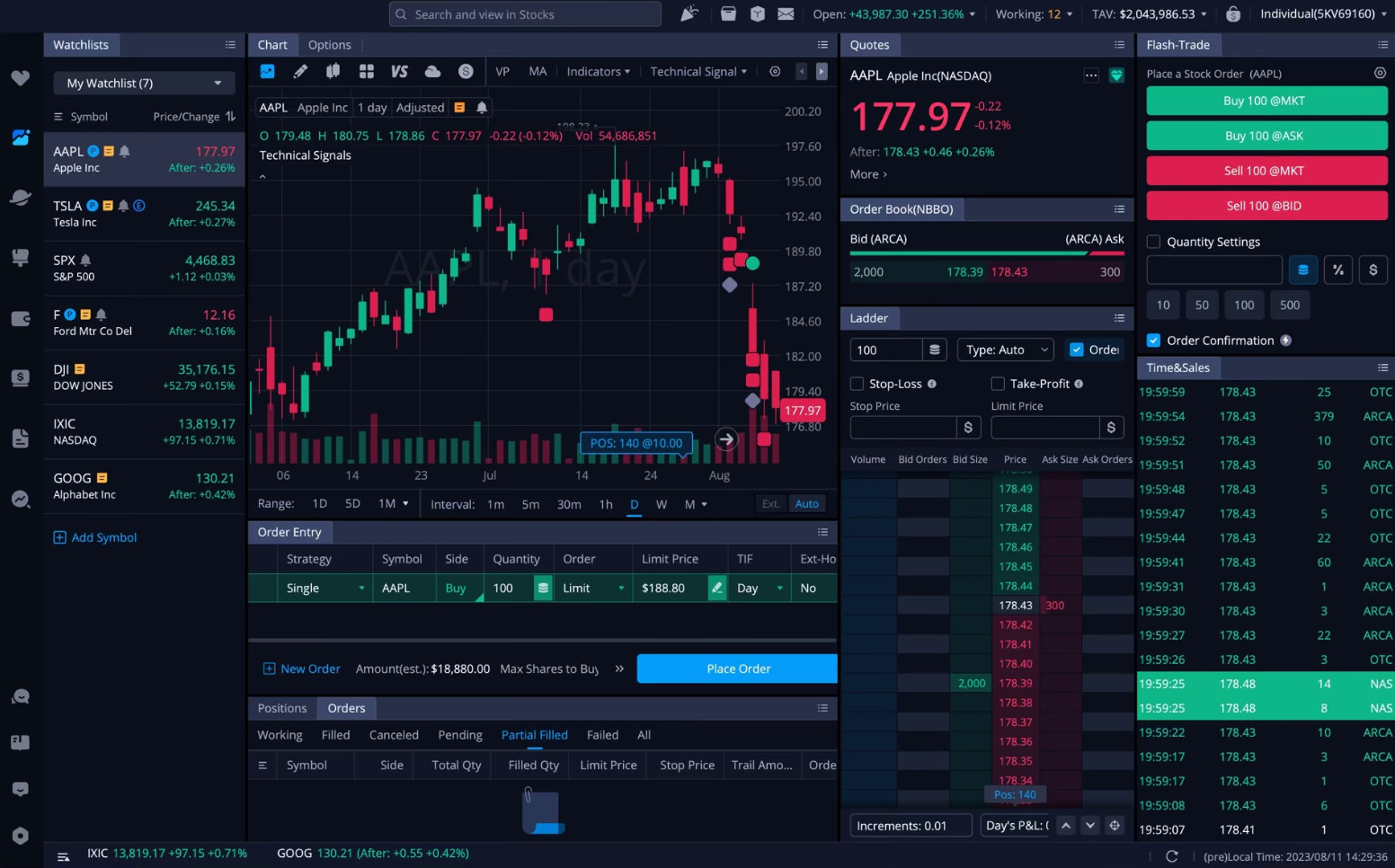
For traders looking for a capable platform without paying monthly subscription fees, Webull is one of the strongest options currently available.
Originally launched as a commission-free brokerage, Webull has evolved into a surprisingly capable trading platform with charting tools that rival some paid software. It’s particularly appealing to newer traders who want more sophisticated analysis than Robinhood offers without the complexity of Interactive Brokers.
Unlike many free brokers, Webull also provides a dedicated macOS desktop application that runs natively on Apple Silicon Macs.
The desktop experience is clean, responsive and noticeably more capable than its mobile counterpart. Multiple watchlists, Level II market data (with subscription), screeners, options chains and extended-hours trading are all integrated into a modern interface that feels well suited to larger Mac displays.
Webull also includes paper trading, making it an excellent platform for learning how markets work before risking real money.
Where Webull falls slightly behind TradingView is in advanced charting.
Although it includes a solid range of indicators and drawing tools, it doesn’t offer the same depth of customization, community scripts or broker integrations.
Likewise, professional traders may eventually outgrow its research capabilities.
Nevertheless, for many retail investors, Webull offers one of the best free trading experiences available on macOS.
Why We Picked It
Webull provides an excellent balance of usability, modern design and advanced trading features without charging subscription fees, making it one of the best free trading platforms for Mac users.
Best For
- Beginner traders
- Stock investing
- Options trading
- Active retail traders
- Paper trading
Mac Compatibility
⭐⭐⭐⭐⭐ Excellent
- Native Apple Silicon application
- Native Intel support
- Responsive desktop interface
- Excellent Retina optimisation
- Strong multi-monitor support
Pros
- Excellent native Mac application
- Commission-free trading
- Paper trading included
- Good charting tools
- Stock screeners
- Modern interface
Cons
- Limited international availability
- Advanced technical analysis trails TradingView
- Research tools aren’t as comprehensive as larger brokers
Pricing
No platform fee. Commission-free stock and ETF trading, with optional subscriptions for premium market data and additional features.
6. thinkorswim — Best Options Trading Platform for Mac

For serious options traders, thinkorswim remains one of the most sophisticated trading platforms available.
Originally developed by TD Ameritrade and now owned by Charles Schwab, thinkorswim has built a loyal following thanks to its outstanding options analysis tools, flexible charting and professional-level order management.
Unlike many broker platforms, thinkorswim places a strong emphasis on analysis rather than simply executing trades.
Its customizable workspaces allow traders to display multiple charts, option chains, watchlists, scanners and news feeds simultaneously, making it particularly well suited to larger Mac displays or multi-monitor setups.
The platform also offers one of the best paper trading environments available.
Using its PaperMoney simulator, traders can practice complex options strategies without risking real capital, making it valuable for both beginners and experienced traders testing new approaches.
Performance on modern Macs is generally very good.
The desktop application runs smoothly on Apple Silicon and Intel Macs, although it can consume more memory than TradingView or Webull when several workspaces are open.
Outside the United States, however, thinkorswim’s availability is more limited, making it less practical for international readers.
Why We Picked It
Few platforms provide the same depth of options analysis as thinkorswim. If options are your primary focus, it’s one of the best desktop trading platforms available for Mac.
Best For
- Options traders
- Active stock traders
- Technical analysis
- Paper trading
- US investors
Mac Compatibility
⭐⭐⭐⭐☆ Very Good
- Native macOS application
- Apple Silicon compatible
- Excellent multi-monitor support
- Optimised for Retina displays
- Higher memory usage than some competitors
Pros
- Outstanding options tools
- Excellent paper trading
- Powerful scanners
- Highly customizable layouts
- Extensive educational content
- Reliable execution
Cons
- Steeper learning curve
- Primarily available to US traders
- Uses more system resources than TradingView
Pricing
No platform fee. Commission-free stock and ETF trading, with standard options contract fees.
7. TrendSpider — Best AI-Powered Trading Software for Mac
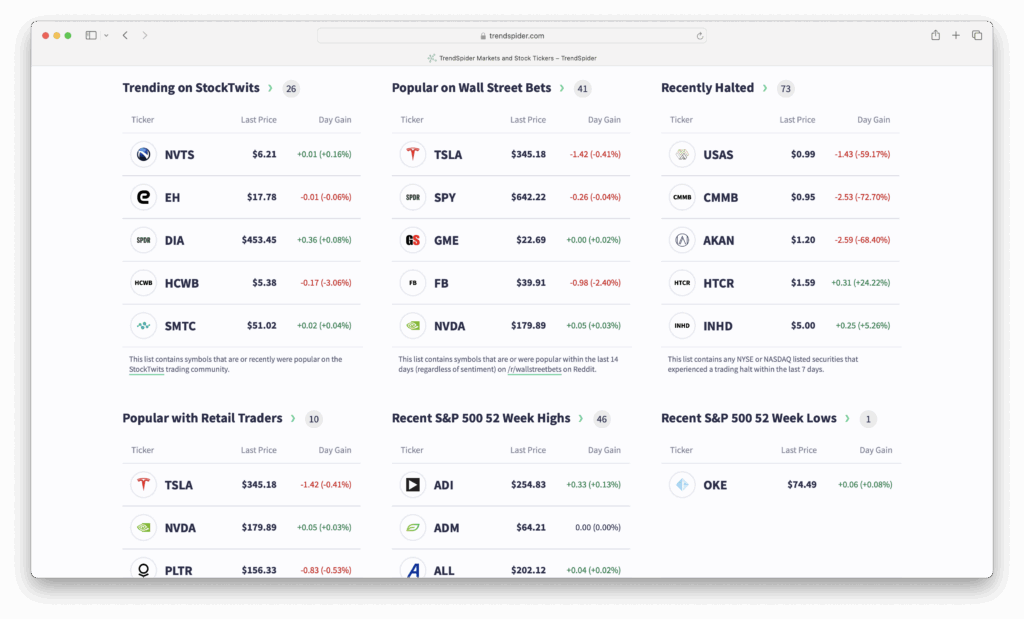
If your trading strategy revolves around technical analysis but you don’t want to spend hours manually drawing trendlines and scanning charts, TrendSpider is one of the most innovative trading platforms available.
Unlike traditional charting software, TrendSpider uses artificial intelligence and automation to identify technical patterns, highlight support and resistance levels, generate alerts and even backtest trading strategies.
Because it’s entirely browser-based, there’s nothing to install on your Mac. The platform runs smoothly in Safari, Chrome and Edge, making it fully compatible with both Apple Silicon and Intel Macs.
Where TrendSpider really stands apart is automation.
Instead of manually searching hundreds of stocks for trading opportunities, you can create automated market scanners that continuously monitor thousands of securities based on your own criteria. The platform can automatically detect trendlines, candlestick patterns, Fibonacci levels and dozens of other technical signals that would normally take significant time to identify manually.
This makes it particularly attractive to swing traders and technical analysts who analyse large numbers of stocks every day.
The downside is that TrendSpider isn’t designed to replace a brokerage account.
Although it integrates with several brokers, it’s primarily an analysis platform rather than an execution platform. Many traders therefore use it alongside Interactive Brokers or TradingView rather than instead of them.
Why We Picked It
TrendSpider is one of the smartest chart analysis platforms available today. Its AI-powered automation can dramatically reduce the amount of manual chart analysis required each day.
Best For
- Swing traders
- Technical analysts
- Stock screening
- Strategy development
- Automated market scanning
Mac Compatibility
⭐⭐⭐⭐⭐ Excellent
- Works in any modern browser
- Fully compatible with Apple Silicon
- Excellent Retina display support
- No installation required
- Works equally well on MacBooks and desktop Macs
Pros
- AI-powered technical analysis
- Automatic trendline detection
- Powerful stock scanners
- Strategy backtesting
- Highly customizable alerts
- Excellent browser performance
Cons
- Subscription is relatively expensive
- Less suitable for beginners
- Requires a separate broker for most trading
Pricing
Plans start from approximately $39 per month when billed annually.
More Info: Read our full TrendSpider review
8. TC2000 — Best for US Stock Analysis
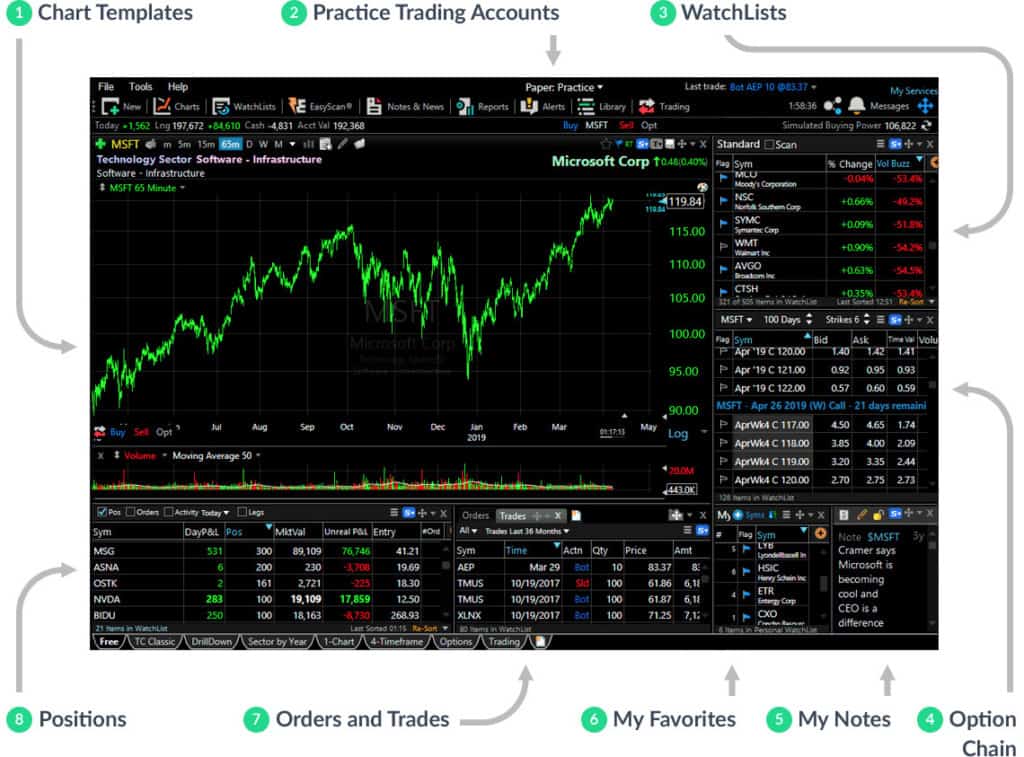
For decades, TC2000 has been one of the most respected stock analysis platforms among US traders.
While it isn’t as well known internationally as TradingView, it offers an impressive combination of charting, stock screening and trading tools that continue to make it popular with active equity traders.
Unlike earlier versions that relied heavily on Windows, TC2000 is now easily accessible from Macs through its web platform, allowing Apple users to benefit from virtually the same experience without installing Windows.
Its greatest strength is stock screening.
TC2000 allows traders to build highly detailed scans based on technical indicators, price action, volume, fundamentals and custom conditions. If your trading strategy depends on quickly finding stocks that match specific criteria, few platforms do it better.
Charts are fast and responsive, while watchlists and workspaces remain easy to organise.
Compared with TradingView, however, TC2000 feels more specialised.
It focuses primarily on US equities and options rather than providing the broad multi-asset coverage offered by Interactive Brokers or SaxoTrader.
Why We Picked It
TC2000 remains one of the best stock screening platforms available and is particularly well suited to active traders focused on US markets.
Best For
- US stock traders
- Swing traders
- Stock screening
- Technical analysis
- Options traders
Mac Compatibility
⭐⭐⭐⭐☆ Very Good
- Excellent browser experience
- Apple Silicon compatible
- Retina display support
- No Windows installation required
Pros
- Outstanding stock scanner
- Excellent chart performance
- Easy workspace management
- Integrated brokerage available
- Strong educational resources
Cons
- Primarily focused on US markets
- Limited support for forex and crypto
- Less flexible than TradingView
Pricing
Plans start from approximately $20 per month, with additional data packages available.
9. eToro — Best Trading Platform for Beginners

Not every trader needs institutional-grade software.
If you’re just getting started with investing or want an uncomplicated platform that combines investing with social features, eToro remains one of the easiest platforms to recommend.
Its biggest differentiator is CopyTrader.
Rather than making every trading decision yourself, you can automatically mirror the portfolios of experienced investors, making it particularly attractive to beginners who are still learning about financial markets.
The platform supports stocks, ETFs, cryptocurrencies and other assets through a clean browser interface that works well on macOS.
Although its charting tools are perfectly adequate for casual investors, they don’t compete with TradingView or MotiveWave for serious technical analysis.
Likewise, experienced traders will probably find its research and order management tools relatively limited.
Where eToro succeeds is simplicity.
Opening an account is straightforward, navigation is intuitive and the virtual portfolio allows new investors to practise trading before risking real money.
Why We Picked It
eToro is one of the easiest trading platforms for beginners to learn, particularly if you’re interested in social investing and copy trading.
Best For
- Beginner investors
- Long-term investing
- Social trading
- Cryptocurrency investing
Mac Compatibility
⭐⭐⭐⭐⭐ Excellent
- Excellent browser platform
- Apple Silicon compatible
- Responsive interface
- No installation required
Pros
- Extremely beginner friendly
- CopyTrader social investing
- Virtual portfolio
- Commission-free stock trading in eligible regions
- Easy-to-use interface
Cons
- Basic charting compared to TradingView
- Limited advanced trading tools
- Spreads can be higher than specialist brokers
Pricing
Free account. Trading costs depend on spreads, overnight financing and the asset being traded.
Note: CFDs are complex financial instruments and carry a high risk of losing money. Availability varies by country.
10. IG — Best Forex & CFD Trading Platform for Mac
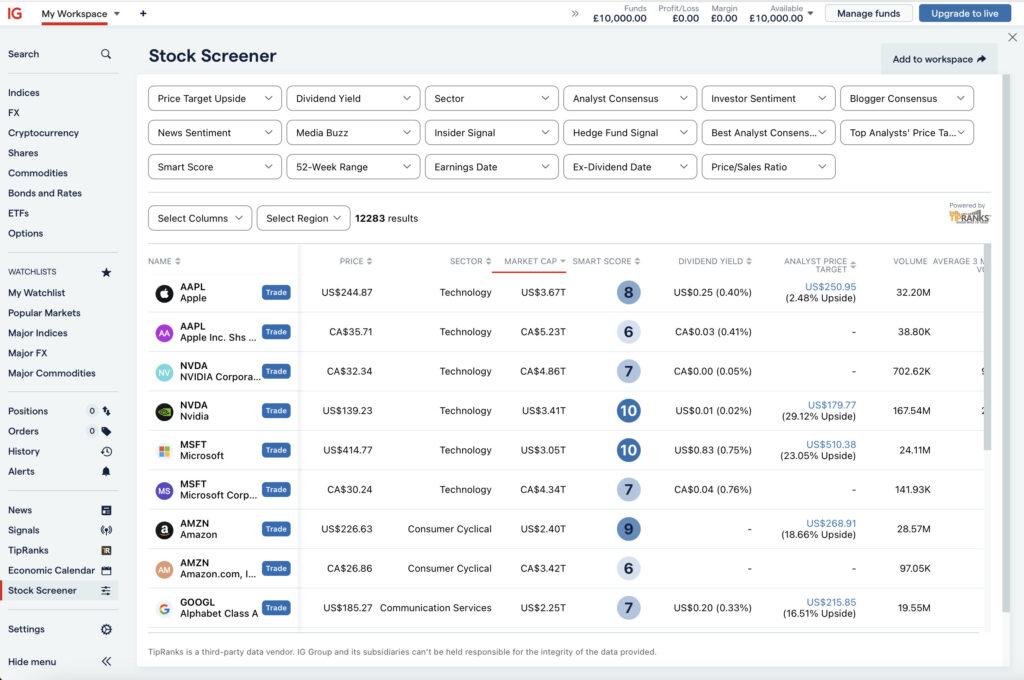
For traders based in the UK, IG remains one of the most established online trading providers.
With access to thousands of global markets—including forex, indices, commodities, shares and cryptocurrencies—it’s particularly well suited to traders interested in CFDs and spread betting.
Unlike some competitors that require downloadable desktop software, IG’s web platform performs exceptionally well on Mac.
It offers responsive charting, integrated market news, economic calendars and risk management tools while working smoothly in Safari and Chrome.
IG also provides one of the strongest educational offerings in the industry.
Its webinars, tutorials and market commentary make it an attractive choice for traders looking to improve their knowledge alongside their trading.
Compared with TradingView, the charting tools aren’t as advanced.
Likewise, traders who rely heavily on automated strategies or custom indicators may eventually prefer specialist platforms.
Nevertheless, for forex and CFD trading on macOS, IG remains one of the strongest broker platforms available.
Why We Picked It
IG combines excellent market coverage, strong regulation and an intuitive web platform, making it one of the best choices for UK-based Mac users trading forex and CFDs.
Best For
- UK traders
- Forex trading
- CFD trading
- Spread betting
- Market education
Mac Compatibility
⭐⭐⭐⭐⭐ Excellent
- Browser-based platform
- Fully compatible with Apple Silicon
- Excellent Retina support
- No Windows software required
Pros
- Huge range of markets
- FCA regulated
- Excellent educational resources
- Strong risk management tools
- Free demo account
Cons
- CFDs aren’t suitable for all investors
- Charting is less advanced than TradingView
- Some advanced features require additional platforms
Pricing
No platform fee.
Costs are based on spreads and commissions depending on the market being traded.
Risk Warning: CFDs and spread betting are leveraged products. Most retail investor accounts lose money when trading these instruments. Make sure you understand the risks before trading.
Other Trading Software Worth Considering
Although they didn’t make our main recommendations, the following platforms may still be worth considering depending on your trading style.
MetaTrader 4 & MetaTrader 5
Still among the world’s most popular forex trading platforms, particularly for automated trading using Expert Advisors (EAs). While MetaTrader now offers improved macOS support, many advanced users still prefer running the Windows version using compatibility tools for maximum plugin compatibility.
NinjaTrader
A favourite among futures traders thanks to its advanced order flow tools and market depth analysis. Although primarily Windows-based, Mac users can access it through browser-based services or compatibility solutions.
Quantower
A relatively new multi-asset trading platform that’s gaining popularity with futures and professional traders. Its modern interface and support for multiple brokers make it one to watch, although its Mac ecosystem isn’t yet as mature as TradingView or Interactive Brokers.
moomoo
An increasingly popular commission-free platform offering native Mac desktop software, advanced charting and Level II market data. While availability is currently limited in some regions, it’s quickly becoming a strong alternative to Webull for active retail traders.
How to Choose the Best Trading Software for Your Mac
The “best” trading software ultimately depends on how you invest and what markets you trade.
Some platforms excel at technical analysis, while others focus on fast execution, global market access or long-term investing. Before opening an account, it’s worth considering the following factors.
Native macOS Support
One of the biggest advantages of modern trading software is that many leading platforms now offer native Mac support.
Applications such as TradingView, Interactive Brokers, Webull and MotiveWave run natively on both Apple Silicon and Intel Macs, providing better performance, lower battery consumption and improved stability than software designed primarily for Windows.
Browser-based platforms such as SaxoTraderGO, TrendSpider and IG also perform extremely well on macOS and avoid the need for software installation altogether.
If a platform still recommends installing Windows or running a virtual machine, we’d generally consider it a disadvantage unless there’s a compelling reason to do so.
Apple Silicon Compatibility
If you’re using a Mac with an M1, M2, M3 or M4 chip, check whether the platform has been optimised for Apple Silicon.
Although Rosetta 2 allows most Intel applications to run well, native software generally launches faster, consumes less memory and offers noticeably better battery life during extended trading sessions.
Fortunately, most of the platforms in this guide now offer either native Apple Silicon support or browser-based alternatives that perform equally well.
What Markets Do You Trade?
Not every trading platform supports the same financial instruments.
For example:
Stock & ETF Trading
- TradingView
- Interactive Brokers
- Webull
- SaxoTrader
Forex Trading
- Interactive Brokers
- IG
- SaxoTrader
- TradingView
Options Trading
- thinkorswim
- Interactive Brokers
- Webull
Cryptocurrency
- TradingView
- eToro
- Interactive Brokers
Choosing software designed for your preferred asset class will usually provide a much better experience than trying to use a general-purpose platform.
Charting & Technical Analysis
If you rely heavily on technical analysis, charting quality should be one of your highest priorities.
Look for platforms offering:
- Multiple chart layouts
- Hundreds of indicators
- Custom drawing tools
- Stock screeners
- Backtesting
- Replay mode
- Custom alerts
- Multi-monitor support
For serious technical analysis, TradingView and MotiveWave remain our standout recommendations.
Paper Trading & Demo Accounts
If you’re learning to trade or testing a new strategy, paper trading can save you from making expensive mistakes.
Several platforms in this guide provide simulated trading accounts using virtual money, allowing you to practise placing trades and managing positions without risking real capital.
Our favourites include:
- TradingView
- Interactive Brokers
- Webull
- thinkorswim
- IG
Even experienced traders often use paper trading to refine new strategies before deploying them in live markets.
Pricing
The cheapest platform isn’t always the best value.
Some providers charge monthly subscription fees for advanced charting, while others generate revenue through trading commissions or wider spreads.
When comparing costs, consider:
- Platform subscription fees
- Trading commissions
- Market data subscriptions
- Margin interest
- Foreign exchange fees
- Withdrawal charges
Professional traders may benefit from paying for better tools if they improve decision-making and execution.
What We Looked For
To decide which platforms deserved a place in this guide, we focused specifically on the experience of trading on a Mac rather than simply ranking the largest online brokers.
Our evaluation included:
Native Mac Experience
We prioritised software that works well on macOS without requiring Windows virtualisation or complicated workarounds.
Apple Silicon Optimisation
Preference was given to applications that run natively on Apple’s M-series processors.
Ease of Use
Good trading software should be approachable for beginners while offering enough depth for experienced traders.
Technical Analysis
We compared:
- Chart quality
- Indicators
- Drawing tools
- Screeners
- Alerts
- Backtesting
Trade Execution
Broker platforms were evaluated on:
- Order types
- Speed
- Market access
- Portfolio management
- Risk management tools
Overall Value
Finally, we considered whether each platform justified its cost through better features, research or usability.
FAQ
What is the best trading software for Mac?
For most traders, TradingView is the best trading software for Mac thanks to its excellent charting tools, native macOS application and broad broker integrations.
Professional traders may prefer Interactive Brokers, while MotiveWave is better suited to advanced technical analysis.
What is the best stock trading software for Mac?
TradingView remains our top recommendation for stock trading thanks to its combination of market analysis, charting and broker connectivity.
If you’re looking for an integrated brokerage platform, Interactive Brokers and Webull are also excellent choices.
Can you trade stocks on a Mac without Windows?
Yes.
Most leading trading platforms now offer either native macOS applications or browser-based platforms that work perfectly on Apple Silicon and Intel Macs.
Very few traders now need to install Windows simply to trade.
Is there any trading software designed specifically for Apple Silicon Macs?
Several major platforms now offer native support for Apple Silicon, including:
- TradingView
- Interactive Brokers
- MotiveWave
- Webull
- thinkorswim
Browser-based platforms such as SaxoTraderGO and TrendSpider also perform exceptionally well on M-series Macs.
Is TradingView better than Interactive Brokers?
It depends on what you’re trying to achieve.
TradingView offers superior charting and technical analysis, making it our preferred choice for most traders.
Interactive Brokers provides significantly broader market access and more advanced order management, making it better suited to professional traders.
Many experienced investors actually use both platforms together.
What trading software do professional traders use?
Professional traders often use combinations of:
- Interactive Brokers
- TradingView
- MotiveWave
- thinkorswim
- SaxoTrader
The exact choice depends on the markets they trade and whether analysis or execution is their primary priority.
Can you use MetaTrader on a Mac?
Yes, although the experience isn’t as seamless as some native Mac applications.
MetaTrader can be accessed through browser-based solutions, compatibility layers or dedicated Mac installers depending on your broker.
If you’re primarily trading forex, however, platforms such as TradingView or Interactive Brokers often provide a better overall Mac experience.
What’s the difference between trading software and a trading platform?
Trading software focuses primarily on charting, technical analysis and market research.
Trading platforms are usually provided by brokers and are designed to execute trades and manage investment accounts.
Increasingly, however, many products combine both functions.
Can You Use iPad-Only Trading Apps on a Mac?
Some iPad trading apps appear in the Mac App Store, but this doesn’t mean they’re fully Mac-optimized.
For example:
- The eOption iPad app can be installed on macOS
- It is labelled “Not verified for macOS”
- This usually means poor keyboard/mouse support and awkward scaling
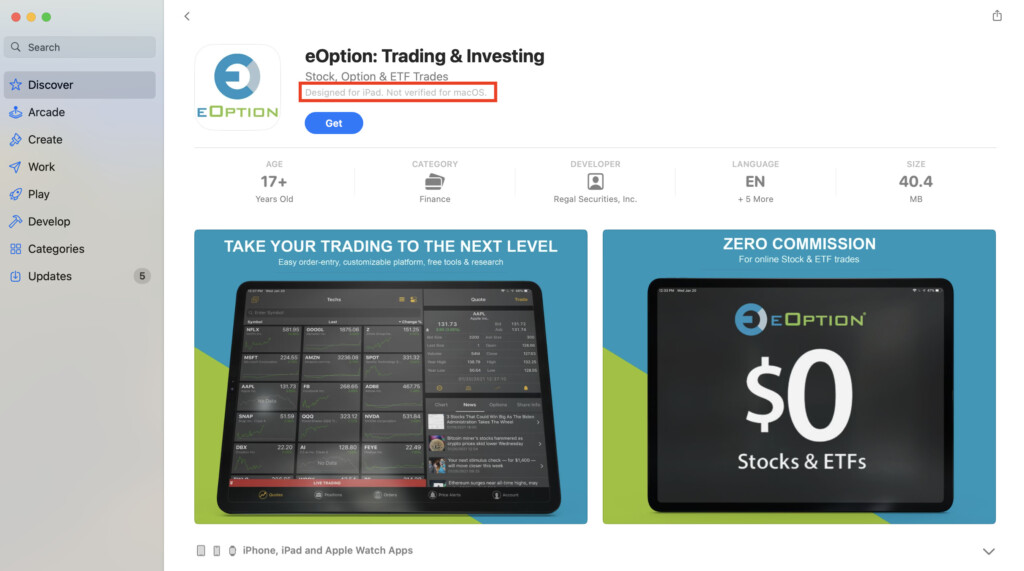
For serious trading, native Mac trading applications are a much better option.
Conclusion
Mac users no longer need to compromise when choosing trading software.
Today’s best platforms run exceptionally well on macOS, with many offering native Apple Silicon support and polished desktop or browser experiences that rival their Windows counterparts.
For most people, TradingView remains the strongest all-round recommendation thanks to its outstanding charting, intuitive interface and growing broker integrations.
If you trade professionally or require access to global markets, Interactive Brokers is difficult to beat.
Meanwhile, MotiveWave continues to stand out for advanced technical analysis, SaxoTraderGO is our favourite all-in-one platform for UK and European traders, and Webull offers one of the best free trading experiences currently available.
Whatever your experience level, choosing software that matches both your trading style and your Mac hardware will make a far bigger difference than simply selecting the platform with the longest feature list.