

If you manage staff from a Mac, the best employee scheduling software for most businesses is Deputy. It gives you a proper rota builder, time clock, leave management, shift swaps and labour-cost controls in a browser-based dashboard, without requiring a Windows PC or a native Mac app.
The best alternative depends on how your team works:
- Choose Connecteam for deskless, mobile or field-based teams.
- Choose 7shifts for a restaurant, café, bar or other hospitality business.
- Choose When I Work for a straightforward, good-value shift scheduling system.
- Choose Sling if you want a genuinely useful free scheduling plan.
- Choose Homebase if you run a small, U.S.-based hourly business and want scheduling, time tracking and payroll in one system.
This guide is specifically for scheduling employees’ shifts, rotas, availability and working hours. If you need to book appointments with customers instead, you need appointment scheduling software rather than workforce-management software.
The Best Employee Scheduling Software for Mac at a Glance
| Software | Best for | Why it stands out | Starting price or free plan* |
|---|---|---|---|
| Deputy | Most small and medium businesses | Strong rota, time clock and labour-management tools | From $5.00/£3.25 per user/month |
| Connecteam | Deskless and field teams | Excellent employee mobile experience with jobs, shifts and team communications | Free for up to 10 users; paid plans from $29/month |
| 7shifts | Restaurants and hospitality | Purpose-built scheduling, time-off, labour and tip-management support | Free Comp plan available |
| When I Work | Straightforward shift scheduling | Clear pricing and an uncomplicated scheduling, attendance and messaging package | From $2.50 per user/month for one location |
| Sling | Free scheduling for small teams | Free shift scheduling for up to 30 users | Free for up to 30 users |
| Homebase | U.S. small businesses with hourly staff | Scheduling, time tracking, hiring and payroll in one product | Free Basic plan; paid plans from $30/location/month |
*Prices were checked on 13 October 2026. They can vary by country, billing cycle, team size, location and add-ons, so confirm the current price and included features before subscribing.
Do You Need a Native Mac App?
No. Nearly all serious employee-scheduling systems are cloud services. Your Mac is normally the manager’s control centre, while employees use an iPhone or Android app to view shifts, request time off, swap a shift or clock in.
That is usually a better arrangement than installing a desktop app. You can manage the rota from Safari, Chrome or another current Mac browser, then give staff a mobile app that makes sense when they are away from a desk.
If you prefer an app-like experience, Safari can add a website to the Dock as a web app. It opens in its own window and can use notifications if the service supports them. Take advantage of a free trial first, especially if your company uses SSO, strict browser extensions, a shared iPad kiosk or unusual clock-in rules.
Why We Have Reduced This List to Six Choices
A list of 21 products makes it harder to choose and blurs the distinction between employee scheduling, project management, HR software and time tracking.
For 2026, we have kept only platforms whose core job is scheduling people and shifts. We have deliberately left out products such as Smartsheet, ClickUp, BambooHR and general time trackers: they may be useful alongside a rota tool, but none is the clearest first choice for managing an hourly workforce.
How to Choose Employee Scheduling Software on a Mac
Before starting trials, decide which of these problems you actually need to solve:
- Building rotas quickly: Look for templates, recurring shifts, availability rules, time-off requests and open shifts.
- Filling short-notice gaps: Shift swaps, approvals and replacement alerts matter more than a long feature list.
- Controlling labour costs: If you schedule by sales or demand, choose a tool that can show scheduled hours and labour cost before you publish a rota.
- Managing locations or field jobs: A shop, restaurant or clinic usually needs a rota. A cleaning, construction or home-service business may need job scheduling, location details and mobile forms as well.
- Moving hours into payroll: Check the exact payroll integration for your country. A product having “payroll” in its marketing does not mean it can run payroll where your business operates.
- Privacy and clock-in rules: If you plan to use GPS, biometrics or screenshots, get the employee-policy and local compliance position right before rollout.
1. Deputy — Best Overall Employee Scheduling Software for Mac
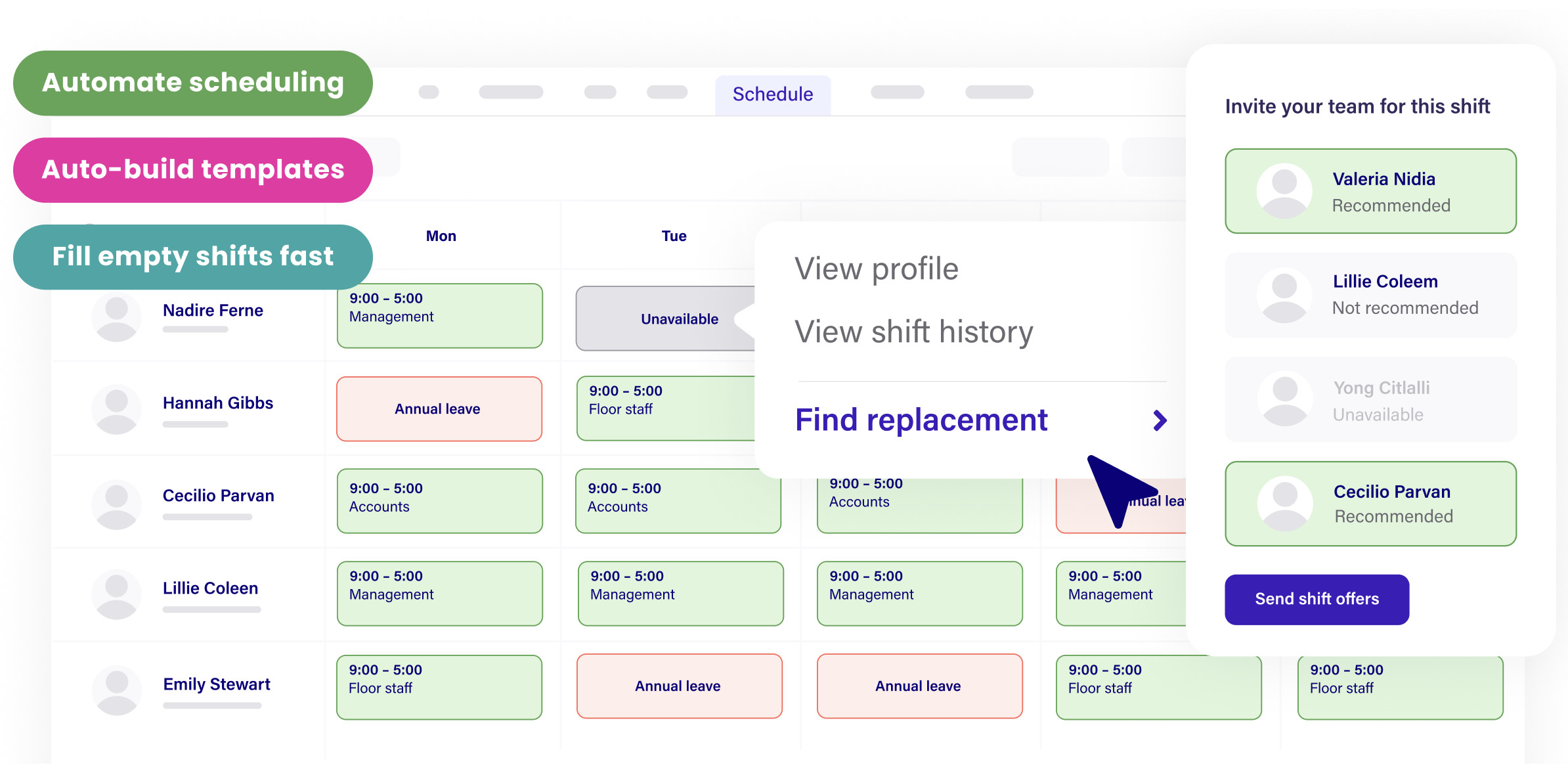
Deputy is our overall pick because it balances practical rota planning with the controls that become important once a business has more than a handful of shift workers.
Managers can create schedules around availability, leave, roles, wage costs and locations, then publish them through the web dashboard. Employees can view their rota, manage availability and use the mobile tools for day-to-day shift changes. Deputy also combines scheduling with timesheets, time clocking, messaging and payroll/HR integrations.
The higher plans are where Deputy becomes particularly useful for businesses with more complicated staffing: advanced scheduling, demand forecasting, labour budgets, auto-scheduling and more detailed compliance controls are not features to assume on the entry plan.
Best for: Retail, hospitality, healthcare, service businesses and multi-location teams that need more than a simple shared calendar.
Mac fit: The manager feature is web-based, so a MacBook, Mac mini or iMac is a perfectly practical place to build and approve rotas.
Pricing: Deputy lists Lite from $5.00 or £3.25 per user/month, Core from $6.50/£4.25 per user/month and Pro from $9.00/£6.50 per user/month, excluding applicable taxes. There is a minimum monthly spend, so check the total rather than multiplying the headline per-user price.
Deputy pros
- Covers scheduling, time tracking and communications in one system.
- Useful shift-swap and replacement support for last-minute changes.
- Better labour and compliance controls than basic scheduling tools.
- A sensible choice for businesses in the UK as well as larger international teams.
Deputy cons
- Advanced scheduling and forecasting cost more.
- It takes longer to configure than a simple rota app.
- Small teams may not need its full workforce-management feature set.
Choose Deputy if: You want one scheduling system that will still work when you add locations, roles, pay rates and more formal approval processes.
Skip Deputy if: You only need a free weekly rota for a small team, or your business needs field-job support rather than shift planning.
2. Connecteam — Best for Deskless and Field Teams
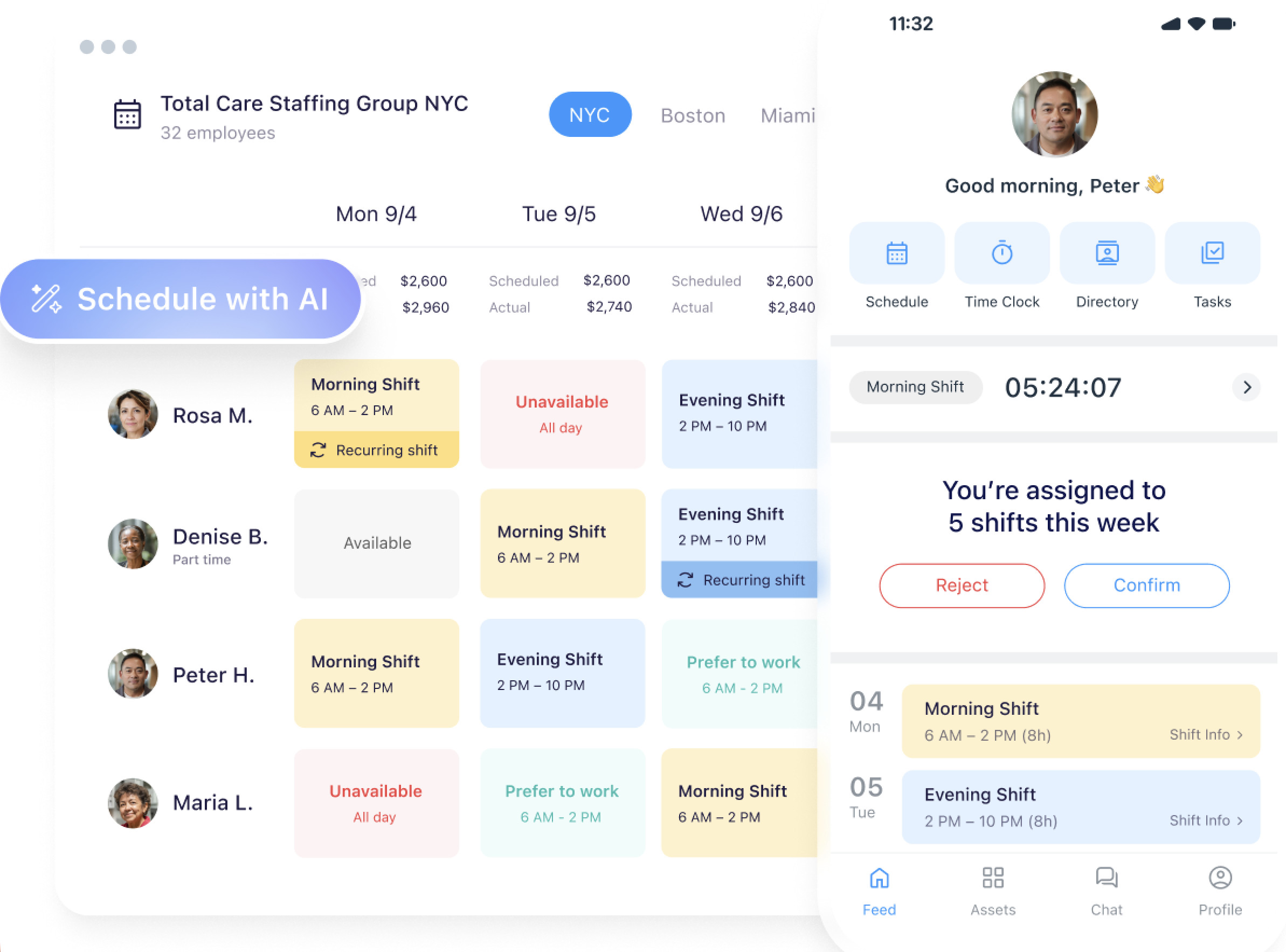
Connecteam is the strongest option here for businesses whose staff do not sit at a computer all day. Think cleaning companies, construction crews, care providers, delivery businesses, security teams and mobile service companies.
The manager creates schedules and job assignments from a web dashboard on a Mac. Staff use the mobile app to see shift information, receive updates, access documents, complete forms and communicate with managers. That split is much more useful for a mobile workforce than forcing everyone into a desktop-first scheduling system.
Connecteam can handle recurring shifts, templates, open shifts and scheduling by employee or job. Its wider platform also includes communication and operational tools, which can reduce the need for a separate staff chat or checklist app.
Best for: Mobile, non-desk and distributed teams.
Mac fit: The Mac acts as the planning and administration hub; the staff-facing experience is designed primarily for phones.
Pricing: The Small Business plan is free for up to 10 users. Paid plans start at $29 per month for up to 30 users, with pricing organised around product hubs and feature tiers.
Connecteam pros
- Much better fit than a conventional rota app for teams in the field.
- Strong shift details, employee communication and operational checklists.
- A useful free option for a very small business.
- Flat-price bundles can be easier to budget for than per-user billing.
Connecteam cons
- The wider platform can feel like more than you need if you only want a weekly rota.
- Make sure the plan includes the particular scheduling, time-clock and communication features you need.
- Managers should allow time to set up job templates, permissions and mobile adoption properly.
Choose Connecteam if: Staff work at different sites and need useful job information on their phones, not just a start and finish time.
Skip Connecteam if: Most of your team works at desks and your priority is sophisticated labour forecasting or restaurant-specific scheduling.
3. 7shifts — Best for Restaurants and Hospitality
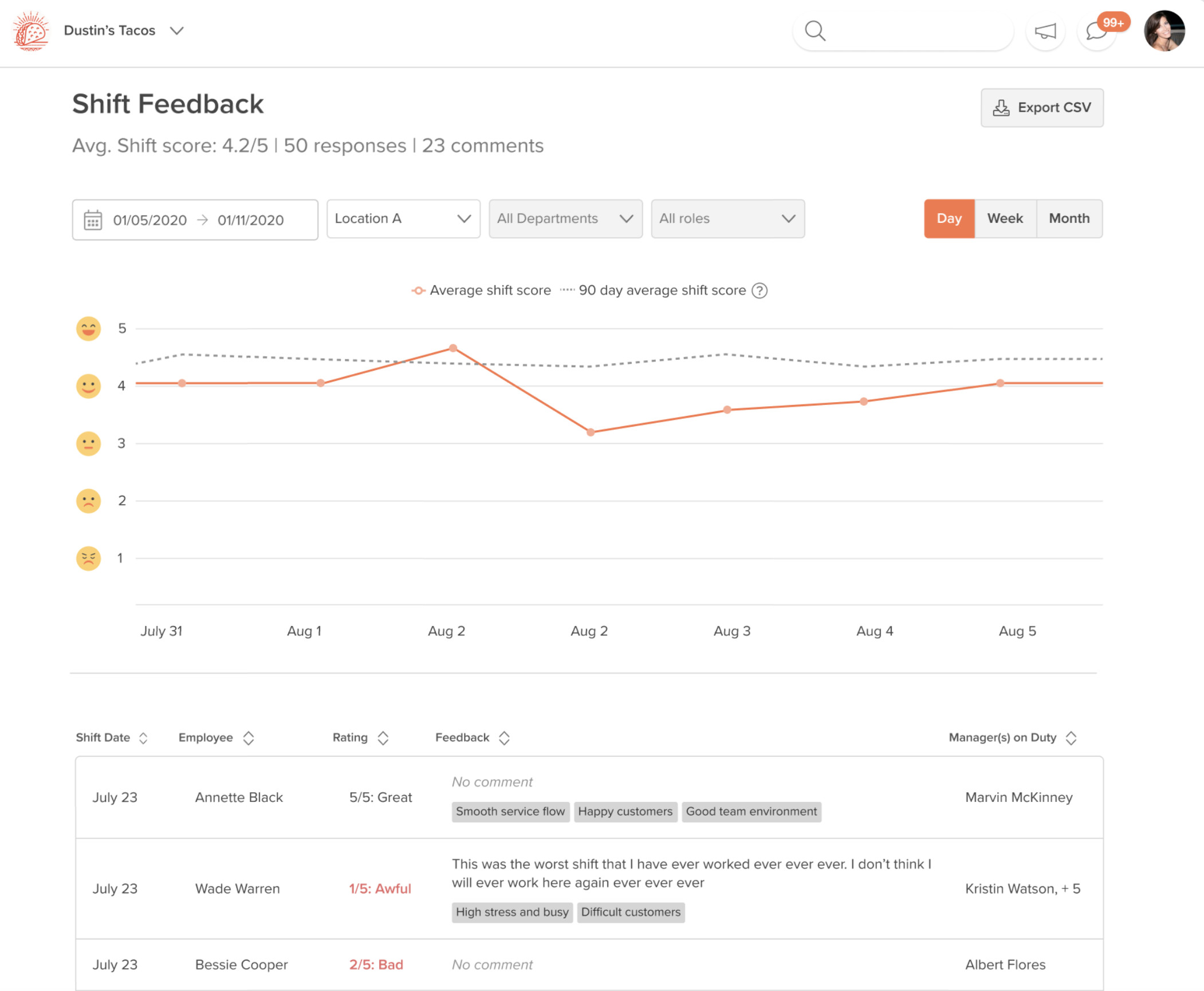
7shifts is built around the reality of restaurants rather than generic office scheduling. It handles staff availability, time-off requests, shift swaps, time clocking and team communication, then adds hospitality-specific tools such as labour costs, tip management, tasks and point-of-sale integrations on the appropriate plan.
That focus makes it a stronger option than an all-purpose scheduling platform when you need to manage front-of-house and back-of-house roles, changing sales patterns and a team that uses a phone rather than a desktop computer during service.
Best for: Restaurants, cafés, bars, pubs, quick-service venues and multi-location hospitality operators.
Mac fit: Managers work from the browser-based dashboard, while staff use the 7shifts mobile experience to check shifts, availability and time-off requests.
Pricing: 7shifts has a free Comp plan that includes basic scheduling, time-off requests and mobile access. Paid plans add more workforce, labour, compliance, tipping and payroll features. Check both the plan and your country before treating payroll as an included option.
7shifts pros
- Purpose-built for hospitality, rather than adapted from generic HR software.
- Strong fit for a business that manages roles, service periods and tips.
- Free plan gives a small restaurant a sensible place to start.
- Useful step up from a spreadsheet as a team grows.
7shifts cons
- Over-specialised for offices, agencies or field-service businesses.
- Some of its most valuable labour and payroll tools are paid extras or region-specific.
- A non-hospitality business can usually find a simpler option.
Choose 7shifts if: Your rota has kitchen, floor, bar or delivery roles and the schedule is closely tied to service levels and labour costs.
Skip 7shifts if: You need general workforce scheduling across offices, construction sites or remote employees.
4. When I Work — Best for Simple Shift-Based Teams
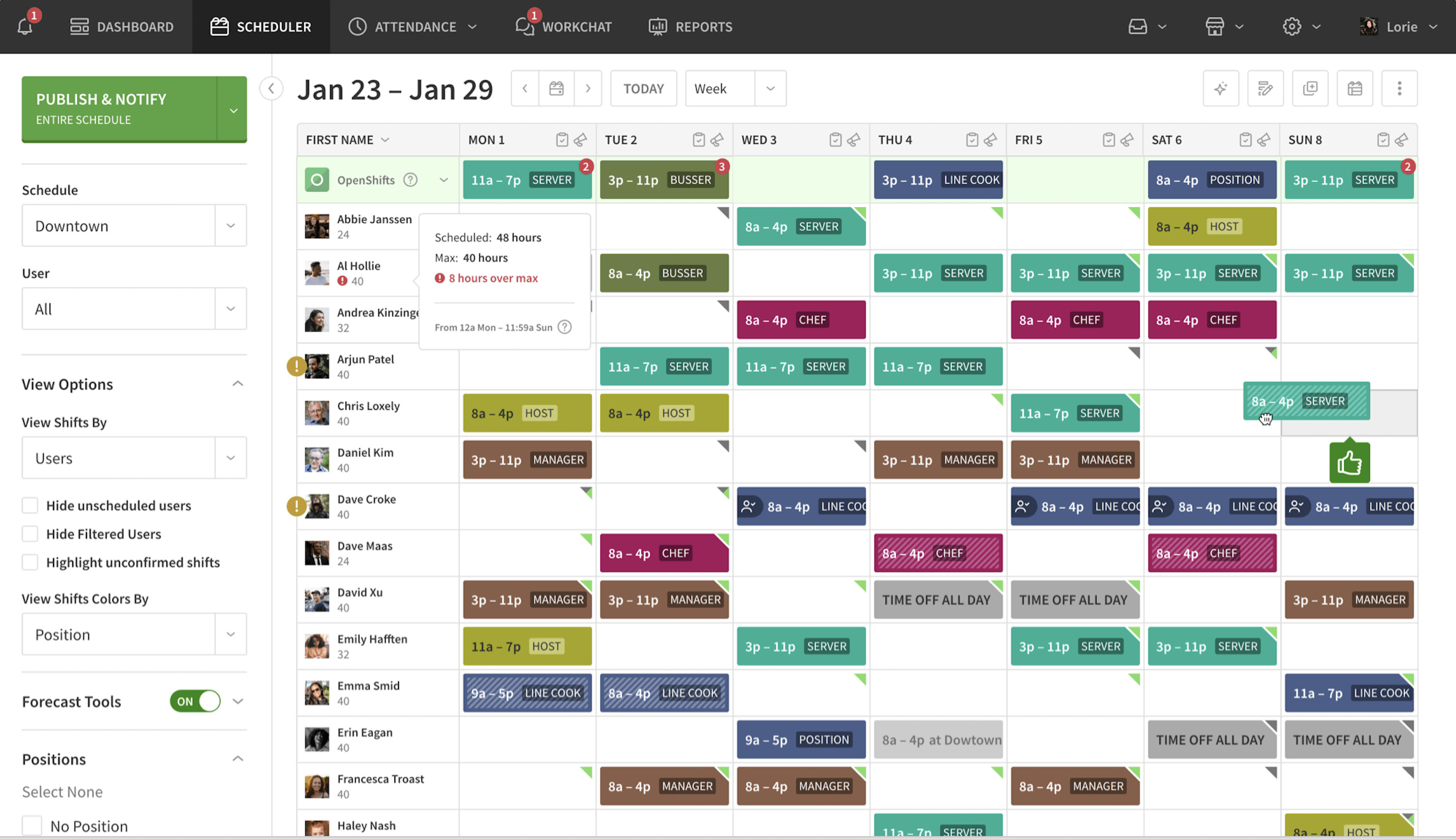
When I Work is a good choice when you want a clean, focused system for publishing shifts, collecting availability, approving time off and keeping the team informed without buying an oversized workforce-management platform.
Its pricing is unusually straightforward. The single-location plan starts at $2.50 per user/month, while multi-location businesses start at $5 per user/month. Both include employee scheduling, time and attendance, and team messaging according to the current pricing page.
Best for: Small and medium teams with regular shifts, especially those operating from one or a few locations.
Mac fit: It is a browser-based management product, which makes it simple to run from a Mac without a separate desktop client.
When I Work pros
- Clear, easy-to-understand scheduling proposition.
- Reasonable entry price for a single-location team.
- Includes time and attendance and team messaging rather than selling scheduling alone.
- Suitable for a broad range of shift-based businesses.
When I Work cons
- There is a free trial rather than a permanent free tier.
- It does not have the hospitality depth of 7shifts or the field-service depth of Connecteam.
- Costs rise with headcount and multiple locations.
Choose When I Work if: You want to replace a spreadsheet and staff WhatsApp group with one straightforward scheduling system.
Skip When I Work if: You need a very generous free plan, detailed job-management tools or highly specialised labour forecasting.
5. Sling — Best Free Employee Scheduling Software for Mac

Sling is the best starting point for a small team that needs online scheduling without paying immediately. Its free plan supports employee scheduling for up to 30 users, which is materially more useful than a short trial or a free tier limited to only a few people.
It covers the core tasks: create shifts, publish a rota, let employees see their schedule and reduce the confusion that comes from emails, paper rotas and group messages. Sling also has paid plans for businesses that need more advanced workforce features.
Best for: Small businesses that need an online rota and want to keep the initial cost to zero.
Mac fit: The service is cloud-based, so managers can build and share schedules from a Mac browser.
Sling pros
- Free scheduling for up to 30 users.
- Faster and more reliable than a shared spreadsheet or paper rota.
- Useful for retail, hospitality, care, education and other shift-based teams.
- A low-risk way to prove whether your staff will actually adopt scheduling software.
Sling cons
- You may outgrow the free plan as you need more time-clock, reporting or labour tools.
- It is less comprehensive than Deputy for larger or more regulated operations.
- Check paid-plan features closely rather than assuming every advanced feature is free.
Choose Sling if: Your immediate problem is replacing a manual schedule with an easy-to-share online rota.
Skip Sling if: You need complex multi-location compliance, field-job details or deeply integrated payroll.
6. Homebase — Best for U.S. Hourly Businesses

Homebase is particularly compelling for smaller U.S. businesses with hourly staff. It combines employee scheduling, time tracking, team messaging, hiring, HR support and payroll in one platform, so managers do not have to stitch together separate tools just to get from shifts to wages.
The scheduling feature is designed for familiar hourly-workforce use cases such as restaurants, retail, beauty and wellness, medical practices and home services. It can be a sensible all-in-one choice if its payroll and tax support matches your business.
Best for: U.S.-based small businesses that want scheduling and payroll close together.
Mac fit: Homebase is managed in the web browser; employees can use the web or mobiles for schedules and time clocking.
Pricing: Homebase has a free Basic plan. Its current paid platform pricing starts from $30 per location/month, while payroll is priced separately. Treat payroll as a U.S.-specific product unless Homebase confirms it supports your location and requirements.
Homebase pros
- Brings scheduling, time tracking, hiring, HR and payroll together.
- Price is based on location rather than each employee for the core platform.
- Strong match for a small employer with hourly staff.
- Free plan makes it easy to test the basic tools
Homebase cons
- Payroll and compliance features are not a reason for non-U.S. businesses to choose it without checking local availability.
- It can be more product than you need if you only want rotas.
- Total cost rises once you add payroll and paid platform features.
Choose Homebase if: You run a U.S. small business and want a simpler route from scheduling to timesheets and payroll.
Skip Homebase if: You operate outside the U.S. or want a more specialised hospitality, field-service or enterprise workforce platform.
Which Employee Scheduling Tool Should You Choose?
| Your situation | Best choice |
|---|---|
| You want one robust all-round scheduling system | Deputy |
| Your employees work in the field or at changing sites | Connecteam |
| You operate a restaurant, café, bar or pub | 7shifts |
| You want a simple paid scheduling tool | When I Work |
| You want a useful free rota for a small team | Sling |
| You are a U.S. small business wanting scheduling and payroll together | Homebase |
Related Software
Employee scheduling is only one part of a people-management stack. Depending on the gap you are trying to fill, these guides may be more useful:
- Best HR software for Mac
- Best payroll software for Mac
- Best time tracking apps for Mac
- Best employee monitoring software for Mac
- Best recruitment software for Mac
- Best project management software for Mac
FAQ
Does employee scheduling software work on a Mac?
Yes. The best current options are cloud-based, so managers can build schedules from a Mac browser rather than installing Windows software. Staff normally use the vendor’s iPhone or Android app for shift alerts, availability and clock-ins.
What is the best free employee scheduling software for Mac?
For a small general shift-based team, Sling is the strongest free starting point because it offers free scheduling for up to 30 users. Connecteam is free for up to 10 users and is a better fit for mobile or field teams. Restaurants should also consider 7shifts’ free Comp plan.
Is there a native employee scheduling app for macOS?
Most leading workforce-scheduling products do not need one. They are web apps designed for a Mac browser. You can add a compatible website to the Dock through Safari if you want it to launch like an app.
Can employees swap shifts themselves?
Most of the products above support shift swaps, open shifts or replacement requests, but the exact approval process depends on the plan. Test this carefully in a trial: it is one of the features that most directly reduces manager admin.
Can employee scheduling software run payroll?
Sometimes, but scheduling and payroll are not the same product. Some services have a built-in payroll option or an integration, while others export approved timesheets to a separate payroll system. Availability varies by country, so confirm your local payroll route before committing.
Can I use Apple Calendar or iCloud Calendar with these tools?
Do not assume it. Some platforms offer calendar feeds or integrations, but support and setup vary. The employee mobile app is normally the more reliable source of the live rota, especially when shifts change at short notice.
What should I trial before moving an entire team?
Build a real week’s rota, add availability and leave requests, publish an open shift, try a shift swap, test the time clock and export a timesheet. Include one manager and several employees using the devices they will genuinely use. This tells you far more than a feature checklist.
Final Verdict
For most Mac-based businesses, Deputy is the best employee scheduling software because it combines practical rota planning with time tracking, labour controls and room to grow.
If your staff spend their day on the road or at customer sites, choose Connecteam. If you run a restaurant or hospitality venue, choose 7shifts. If you simply want a clean, inexpensive way to replace a spreadsheet rota, try When I Work or Sling first.
The key point is not finding a native Mac app. It is choosing a scheduling system that managers can run comfortably from a Mac and that employees will actually use on their phones.