

Whether you’re taking lecture notes, organizing research, managing projects, or simply trying to keep your life organized, choosing the right note taking app can make a huge difference to your productivity.
While Apple Notes is now more powerful than ever and Microsoft OneNote remains popular, Mac users have an enormous range of alternatives to choose from. Some focus on simplicity, others on knowledge management, collaboration, privacy, AI features or document organization.
To help find the best option, we evaluated the leading note taking apps on Apple Silicon Macs, comparing ease of use, search capabilities, AI features, collaboration tools, offline access and overall value for money.
Contents
- At A Glance: The Best Note Taking Apps For Mac
- Quick Comparison
- How We Tested
- 1. Apple Notes — Best For Most Mac Users
- 2. Bear — Best For Writers
- 3. Obsidian — Best OneNote Alternative For Power Users
- 4. Notion — Best For Teams
- 5. Craft — Best Looking Note Taking App
- 6. NotePlan — Best For Productivity
- 7. DEVONthink — Best For Research
- 8. Evernote — Best For Web Clipping
- 9. Agenda — Best For Meeting Notes
- 10. Microsoft OneNote — Best For Microsoft 365 Users
- 11. UpNote — Best Value Note Taking App
- 12. Standard Notes — Best For Privacy
- Which Note Taking App Should You Choose?
- Native Mac Apps vs Electron Apps
- AI Features Comparison
- Summary
- FAQ
At A Glance: The Best Note Taking Apps For Mac
| If You Need… | Recommended App |
|---|---|
| Best overall | Apple Notes |
| Best OneNote alternative | Obsidian |
| Best for writers | Bear |
| Best for teams | Notion |
| Best for beautiful documents | Craft |
| Best for productivity | NotePlan |
| Best for research | DEVONthink |
| Best value | UpNote |
| Best for privacy | Standard Notes |
| Best for web clipping | Evernote |
Quick Comparison
| App | Free Version | AI Features | Offline Support | Best For |
| Apple Notes | Yes | Limited | Yes | Most users |
| Obsidian | Yes | Plugins | Yes | Knowledge management |
| Bear | Yes | No | Yes | Writers |
| Notion | Yes | Yes | Partial | Teams |
| Craft | Yes | Yes | Yes | Beautiful documents |
| NotePlan | Trial | Yes | Yes | Productivity |
| DEVONthink | Trial | Limited | Yes | Research |
| UpNote | Yes | No | Yes | Value |
| Standard Notes | Yes | Limited | Yes | Privacy |
| Evernote | Yes | Yes | Yes | Web clipping |
| Agenda | Yes | No | Yes | Meeting notes |
| OneNote | Yes | Yes | Yes | Microsoft users |
How We Tested
Every app featured here was tested on modern Apple Silicon Macs running macOS Golden Gate.
We evaluated each app based on:
- Ease of use
- Performance on Apple Silicon
- Search and retrieval capabilities
- Sync reliability
- Offline access
- Collaboration tools
- AI features
- Import and export options
- Long-term value
Our focus wasn’t simply on how easy it is to create notes, but how easily you can find and use information later.
All of the apps featured here are actively maintained and fully compatible with current versions of macOS.
1. Apple Notes — Best For Most Mac Users
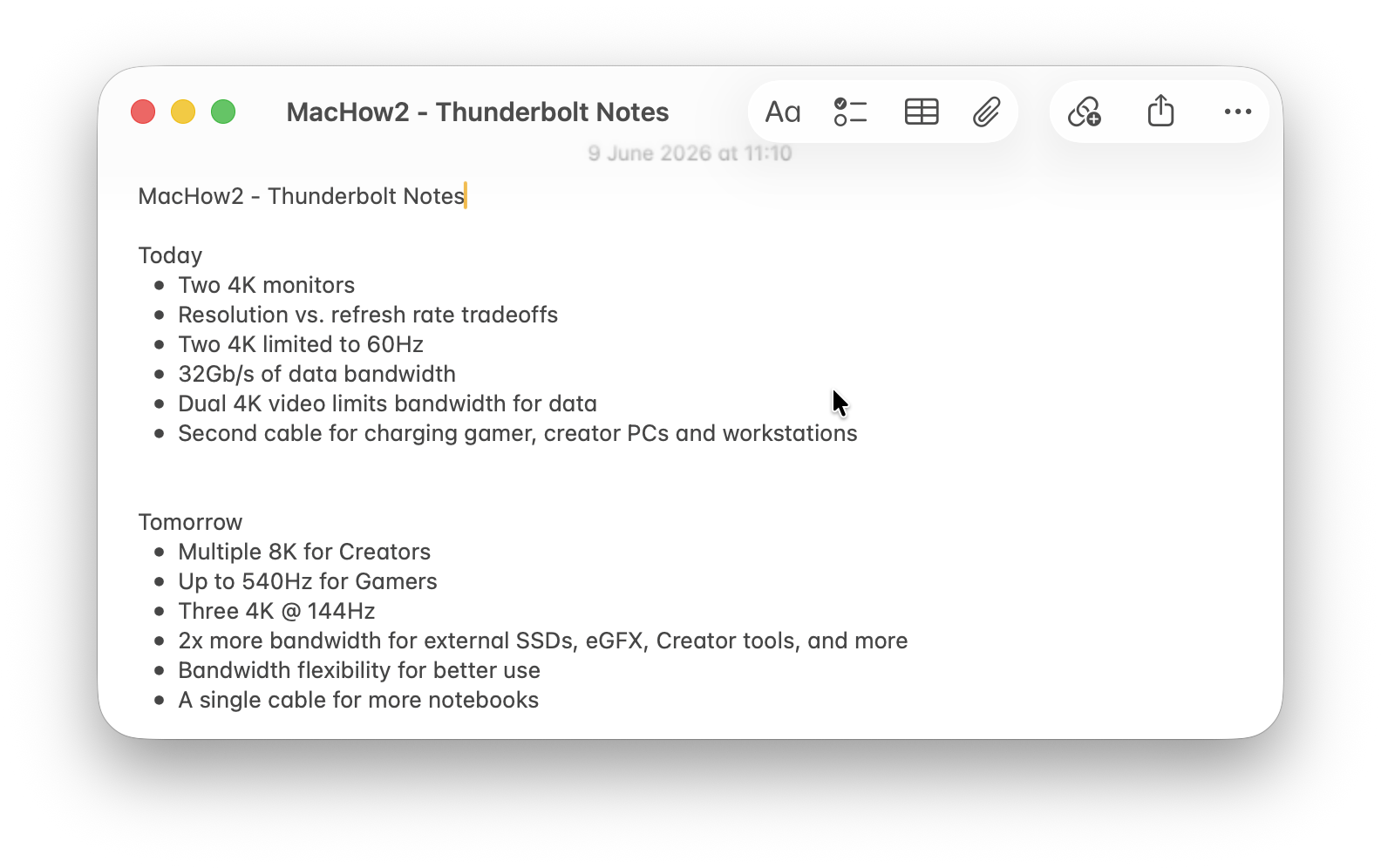
For many people, the best note taking app for Mac is already installed.
Apple Notes has evolved from a simple notebook into a surprisingly capable productivity tool. It supports folders, tags, Smart Folders, document scanning, PDF annotation, collaboration, Quick Notes, and seamless syncing across Mac, iPhone and iPad via iCloud.
The biggest advantage is how deeply integrated it feels within macOS. Notes can be accessed instantly from Spotlight Search, shared with other Apple users, and linked with reminders and other Apple services.
Best For
- Most Mac users
- Personal organization
- Students
- Everyday note taking
Pros
- Free on all Macs
- Fast and easy to use
- Excellent Apple ecosystem integration
- Document scanning and PDF markup
- Integrated with Apple Intelligence
Cons
- Limited customization
- Not ideal for complex knowledge management
- Collaboration features are basic compared to Notion
2. Bear — Best For Writers
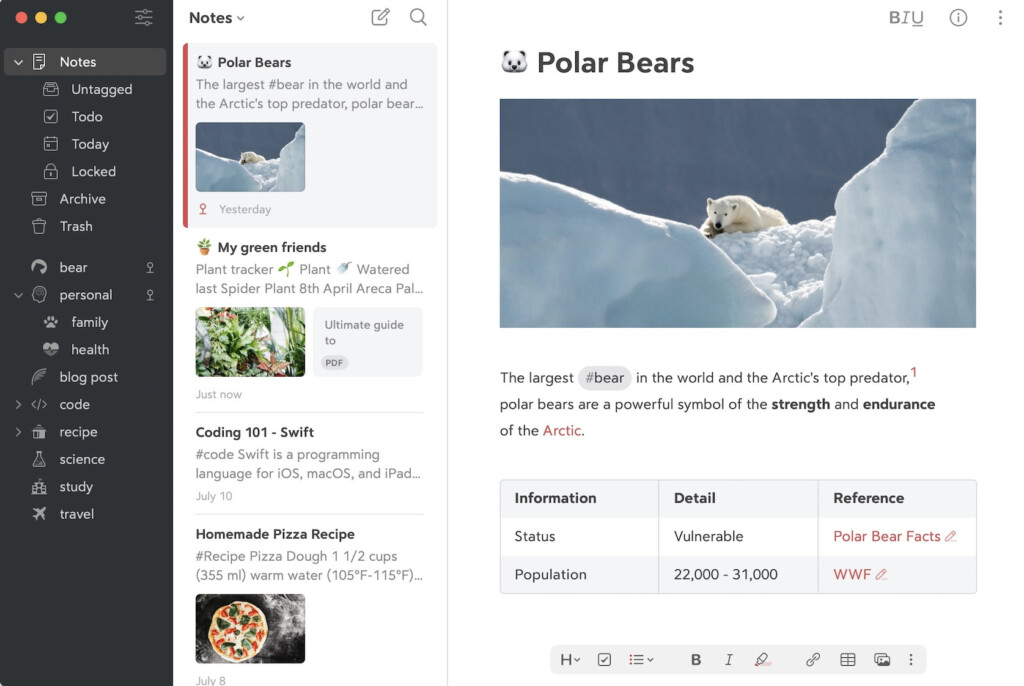
Bear remains one of the most beautifully designed note taking apps available on Mac.
Its clean interface, Markdown support and fast performance make it ideal for writers, students and anyone who prefers a distraction-free workspace.
Bear uses hashtags instead of folders for organization, making it easy to create flexible note structures without complicated setup.
Best For
- Writers
- Journal keeping
- Personal note taking
Pros
- Excellent writing experience
- Beautiful design
- Fast search and organization
- Markdown support
Cons
- Limited collaboration tools
- Not suitable for large team projects
3. Obsidian — Best OneNote Alternative For Power Users

If you’re looking for a serious replacement for OneNote, Obsidian is one of the most powerful options available.
Unlike cloud-based note apps, Obsidian stores notes locally as standard Markdown files. This means you always own your data and aren’t locked into a proprietary platform.
Its standout feature is the ability to connect notes using backlinks, creating a personal knowledge network that grows over time.
For researchers, students and professionals managing large amounts of information, Obsidian is hard to beat.
Best For
- Knowledge management
- Research projects
- Students
- OneNote replacements
Pros
- Local file storage
- Extremely customizable
- Thousands of plugins
- Powerful linking and knowledge management
Cons
- Learning curve for beginners
- Collaboration features require additional setup
4. Notion — Best For Teams

Notion combines note taking, project management, databases and collaboration into a single platform.
It can function as a personal notebook, company wiki, project tracker or content management system.
Its flexibility is both its greatest strength and biggest challenge. New users may find the interface overwhelming at first, but teams often find it replaces several separate productivity tools.
Best For
- Teams
- Businesses
- Project management
Pros
- Powerful collaboration
- Flexible databases
- Built-in AI tools
- Cross-platform support
Cons
- Can feel complex
- Performance can slow in large workspaces
5. Craft — Best Looking Note Taking App

Craft focuses on creating notes and documents that look as good as they read.
The app is especially popular among freelancers, consultants and creative professionals who regularly share documents with clients or colleagues.
Craft’s native Mac app feels fast and polished, while its AI tools help summarize content, generate ideas and improve writing.
Best For
- Client documents
- Creative professionals
- Shared workspaces
Pros
- Beautiful document design
- Excellent Mac app
- Strong sharing features
- Built-in AI assistance
Cons
- Some advanced features require a subscription
- Less flexible than Notion for databases
6. NotePlan — Best For Productivity

NotePlan combines note taking, task management and calendar planning.
Unlike traditional note apps, it focuses on helping you connect notes with dates, meetings, reminders and projects.
If you use your notes as part of a daily productivity system, NotePlan offers one of the most effective note taking available on Mac.
Best For
- Productivity enthusiasts
- Time blocking
- Daily planning
Pros
- Calendar integration
- Daily notes
- Task management
- Ideal for planning projects
Cons
- Subscription pricing
- Less suitable for general knowledge management
7. DEVONthink — Best For Research

DEVONthink remains one of the most powerful document and information management tools available for Mac.
It’s particularly popular with researchers, academics, lawyers and anyone handling large collections of PDFs, documents and reference material.
Its advanced OCR, intelligent organization features and document management capabilities make it much more than a simple note taking app.
Best For
- Researchers
- Academics
- Paperless offices
Pros
- Outstanding document organization
- Powerful search tools
- Advanced OCR capabilities
- Excellent for going paperless
Cons
- Steeper learning curve
- More complex than most users need
8. Evernote — Best For Web Clipping

Evernote pioneered many of the features now common in modern note taking apps.
Its web clipper remains one of the best available, making it easy to save articles, research and online content for later reference.
Recent updates have also added AI-powered search and productivity tools.
Best For
- Researchers
- Web clipping
- Information collection
Pros
- Excellent web clipper
- Strong search features
- Cross-platform support
Cons
- Subscription costs have increased
- Less appealing than newer competitors
9. Agenda — Best For Meeting Notes

Agenda takes a unique approach by organizing notes around dates and events.
This makes it particularly useful for professionals who regularly take notes during meetings, client calls or project reviews.
The ability to link notes directly to calendar events helps keep everything organized and easy to find later.
Best For
- Meeting notes
- Client work
- Project planning
Pros
- Excellent for meeting notes
- Calendar integration
- Clean interface
Cons
- Less flexible than general-purpose note apps
10. Microsoft OneNote — Best For Microsoft 365 Users

Despite its limitations on Mac, OneNote remains a strong option if you’re already invested in the Microsoft ecosystem.
Its freeform canvas, notebook structure and integration with Microsoft 365 make it especially useful for businesses, students and teams already using Outlook, Teams and Word.
The Mac version has improved considerably over recent years, although some advanced features still arrive on Windows first.
Best For
- Microsoft 365 users
- Businesses
- Students
Pros
- Free
- Excellent Microsoft integration
- Flexible notebook layout
Cons
- Not as polished as some Mac-native alternatives
- Requires Microsoft account integration
11. UpNote — Best Value Note Taking App

UpNote has quietly become one of the most popular note taking apps among Mac users.
It offers many of the features found in premium competitors while remaining affordable and easy to use.
The interface feels clean, responsive and much simpler than platforms such as Notion or Obsidian.
Best For
- Budget-conscious users
- Everyday note taking
- Former Evernote users
Pros
- Excellent value
- Fast performance
- Native Mac app
Cons
- Fewer advanced features
12. Standard Notes — Best For Privacy

If privacy is your top priority, Standard Notes is difficult to beat.
The platform emphasizes end-to-end encryption, security and long-term ownership of your data.
Unlike many competitors, privacy is central to its design rather than an afterthought.
Best For
- Privacy-conscious users
- Security professionals
Pros
- End-to-end encryption
- Open source
- Excellent security
Cons
- Basic interface compared to competitors
Which Note Taking App Should You Choose?
If you’re unsure where to start, these are our recommendations:
| Use Case | Recommended App |
| Most Mac users | Apple Notes |
| Writers | Bear |
| Students | Obsidian |
| Researchers | DEVONthink |
| Teams | Notion |
| Meeting notes | Agenda |
| Productivity planning | NotePlan |
| Beautiful documents | Craft |
| Microsoft users | OneNote |
Native Mac Apps vs Electron Apps
One factor many Mac users overlook is whether an app is built using native macOS technologies or Electron.
Native Mac Apps
- Apple Notes
- Bear
- Craft
- Agenda
- NotePlan
These typically feel faster, use less memory and integrate more naturally with macOS.
Electron-Based Apps
- Obsidian
- Notion
Electron apps often provide stronger cross-platform consistency but can use more system resources.
AI Features Comparison
AI has become a major consideration when choosing note taking software. Here’s a quick overview of which of the apps we tested feature AI tools.
| App | AI Features |
| Apple Notes | Apple Intelligence integration |
| Notion | AI writing, summaries and search |
| Craft | AI assistant |
| Evernote | AI-powered search |
| OneNote | Microsoft Copilot integration |
| Obsidian | Community AI plugins |
| Bear | No built-in AI |
Summary
For most Mac users, Apple Notes offers the best combination of simplicity, performance and integration with macOS.
However, users with more specialized requirements may find better options elsewhere. Obsidian is ideal for building a personal knowledge base, Notion excels at collaboration, Bear provides the best writing experience, and DEVONthink remains the ultimate research tool.
The right choice ultimately depends on how you take notes, organize information and collaborate with others.
FAQ
What is the best note taking app for Mac?
For most Mac users, Apple Notes is the best note taking app because it’s free, fast, easy to use, and deeply integrated with macOS, iPhone, and iPad. However, if you need advanced knowledge management features, Obsidian is often a better choice.
What is the best OneNote alternative for Mac?
Obsidian is currently one of the best alternatives to Microsoft OneNote for Mac. It offers local file storage, powerful search tools, note linking, and extensive customization through plugins. Other strong alternatives include Bear, Notion, Craft, and Apple Notes.
Is Apple Notes good enough to replace OneNote?
For many users, yes. Apple Notes now supports folders, tags, Smart Folders, document scanning, PDF annotation, collaboration, and syncing across Apple devices. However, users who manage large research projects or complex knowledge bases may prefer Obsidian or DEVONthink.
Which note taking app is best for students?
Obsidian, Apple Notes, and Notion are among the best note taking apps for students. Obsidian is excellent for linking ideas and building study notes, Apple Notes is simple and reliable, while Notion combines notes, tasks, and project management in one workspace.
Which note taking app is best for writers?
Bear is one of the best note taking apps for writers thanks to its clean interface, Markdown support, and distraction-free writing environment. Obsidian and Craft are also excellent options for longer writing projects.
Which note taking app is best for research?
DEVONthink is one of the most powerful research tools available on Mac. Its advanced OCR, intelligent search capabilities, and document organization features make it particularly useful for academics, lawyers, and researchers.
What is the best free note taking app for Mac?
Apple Notes is the best free note taking app for most Mac users. Other excellent free options include Obsidian, Notion, Joplin, Standard Notes, and OneNote.
Which note taking app has the best search features?
Obsidian, DEVONthink, and Evernote offer some of the most powerful search capabilities available. These apps make it easy to locate notes, PDFs, documents, and other information even within very large collections.
Are note taking apps safe for storing sensitive information?
Most modern note taking apps use encryption to protect your data. However, if security is a priority, Standard Notes is one of the best options thanks to its end-to-end encryption and privacy-focused design.
What is the best note taking app for Mac and iPad?
Apple Notes is the best choice for users who regularly switch between a Mac and iPad. It syncs instantly through iCloud and supports Apple Pencil features on iPad. Bear, Craft, Notion, and OneNote also offer excellent cross-device experiences.
Do note taking apps work offline on a Mac?
Most note taking apps support offline access. Apple Notes, Obsidian, Bear, DEVONthink, UpNote, Standard Notes, and OneNote all allow you to view and edit notes without an internet connection.
Which note taking apps support Markdown?
Obsidian, Bear, NotePlan, Joplin, and Standard Notes all support Markdown. This makes them particularly popular among developers, writers, and users who want portable plain-text notes.
Which note taking app is best for teams?
Notion is one of the best note taking apps for teams because it combines collaboration, project management, databases, and AI tools in a single platform. Microsoft OneNote and Craft are also strong options for collaborative work.
Is Evernote still worth using in 2026?
Evernote remains one of the best tools for web clipping, document storage, and information management. While it faces stronger competition than it once did, it continues to offer excellent search features and cross-platform support.
What is the difference between Obsidian and Notion?
Obsidian focuses on personal knowledge management and stores notes locally on your Mac, giving you complete ownership of your data. Notion is cloud-based and designed more for collaboration, project management, and teams.
Which note taking app is best for Apple Silicon Macs?
Apple Notes, Bear, Craft, UpNote, and Agenda are among the best optimized note taking apps for Apple Silicon Macs. They offer excellent performance, low memory usage, and a native macOS experience.
What should I look for in a note taking app?
The most important features to consider include ease of use, search capabilities, syncing, offline access, collaboration tools, AI features, export options, and long-term ownership of your data. The best app ultimately depends on how you plan to use your notes.