

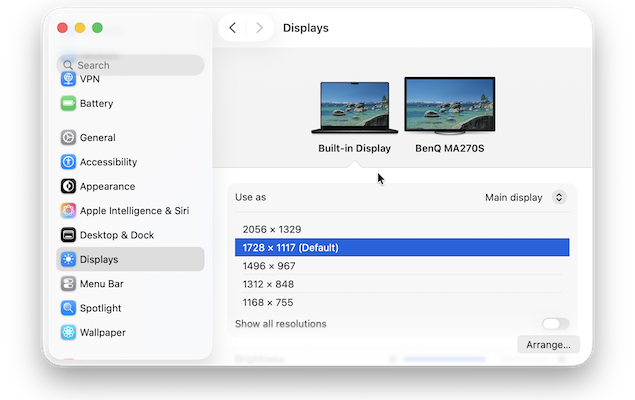
A while back, I reviewed BenQ’s first ever MA series monitor – the 27 inch 4K MA270U – and I was massively impressed at how well it matched the Retina quality display of MacBooks.
There was only one limitation though – it was still 4K.
For pixel perfect scaling with MacBook Liquid Retina displays, 5K resolution is required – which is where the new BenQ MA270S steps-in.
Unlike the MA270U, the MA270S benefits from true 5K resolution, allowing macOS to run at its native scaling without the softness often associated with 4K monitors.
At 27 inches, 5K delivers a pixel density of 218 PPI – the same as Apple’s 27-inch iMac – which allows macOS to scale perfectly without interpolation.
Not only this but it supports 99% P3 color coverage and contrast, which as I found, delivers incredibly good color reproduction.
I tested it out with a MacBook and here’s what I thought including how it compares to the best Mac compatible 5K monitors and whether it’s a serious alternative to the Apple Studio Display.
Contents
- BenQ MA270S Overview
- MA270S Key Specifications
- What Makes the BenQ MA270S “Mac Friendly”?
- What’s In The Box?
- Setup
- Connecting The Display
- Design & Build Quality
- Display Quality (5K Nano Gloss Panel)
- Color Accuracy & Mac Color Matching
- Performance on macOS
- macOS Display Presets on the MA270S
- Display Pilot 2 Software
- macOS Presets vs BenQ’s M-Book Mode: What’s The Difference?
- Adjustable Stand
- Speakers
- Pricing & Availability
- BenQ MA270S vs MA270U vs Studio Display
- Should You Buy the BenQ MA270S?
BenQ MA270S Overview
The BenQ MA270S is a 27-inch 5K monitor designed specifically for Mac users who want an external display that closely matches the look, color, and behavior of their MacBook’s built-in screen.
As part of BenQ’s Mac-focused MA Series, the MA270S builds on the design philosophy of the MA270U and MA320U, but steps up to a full 5K resolution that aligns perfectly with macOS’s native scaling.
At the same time as the MA270S, BenQ has also released the 32 inch 4K MA320UG although that is aimed more at gamers and video editors with support for a 120 Hz refresh rate.
In this review, we’re only focusing on the MA270S because it’s the one that can be directly compared in size and specs to the Apple Studio Display.
With a Nano Gloss panel, 99% DCI-P3 color coverage, 500 nits of brightness, and Thunderbolt 4 connectivity with 96W power delivery, the MA270S is aimed squarely at productivity-focused Mac users, creatives, and anyone frustrated by the scaling compromises of 4K monitors on macOS.
MA270S Key Specifications
Here are the most important specifications of the MA270S:
- Screen Size: 27-inch IPS (LED backlit)
- Resolution: 5K (5120 × 2880) – 218 PPI
- Refresh Rate: 70Hz
- Response Time: 5ms (GtG)
- Brightness: 450 nits (typical)
- Contrast Ratio: 2000:1
- HDR: HDR10 / VESA DisplayHDR 400
- Colour Gamut: 99% DCI-P3 / 99% sRGB
- Display Colours: 1.07 billion
- Screen Finish: Nano Gloss
Connectivity
- 2 × Thunderbolt 4 (40Gbps; up to 96W Power Delivery, daisy-chain support)
- 2 × USB-C (35W PD)
- 2 × HDMI 2.1
- USB hub (USB-A + USB-C downstream)
- 3.5mm headphone jack
Features
- Smart KVM
- Picture-by-Picture / Picture-in-Picture
- Display Pilot 2 (iKeyboard Control, Brightness Sync, FocuSync)
- Built-in speakers (2 × 3W)
Ergonomics
- Height adjustment (150mm)
- Tilt, swivel, and pivot (90° rotation)
What Makes the BenQ MA270S “Mac Friendly”?
One of the biggest issues with most third-party monitors is that they don’t fully match the look and behavior of Apple’s Liquid Retina displays. Colors often look slightly off, brightness doesn’t sync properly, and macOS scaling can feel compromised – especially on 4K panels.
Like many of BenQ’s monitors nowadays, the BenQ MA270S is designed specifically to address these issues. It uses BenQ’s Mac color-tuning technology to closely match the color output of MacBook Air and MacBook Pro displays, helping maintain visual consistency across screens without the need for manual calibration – and it does it really well.
Like other displays in the MA Series, the MA270S includes a dedicated Mac color mode that’s optimized for macOS. This reduces color shifts and ensures that the display looks natural straight out of the box, with minimal configuration required.
What also sets the MA270S apart is its system-level integration with macOS. Brightness and volume can be controlled directly from the Mac keyboard, making the monitor feel far more like a native Apple display than a traditional external screen.
What’s In The Box?
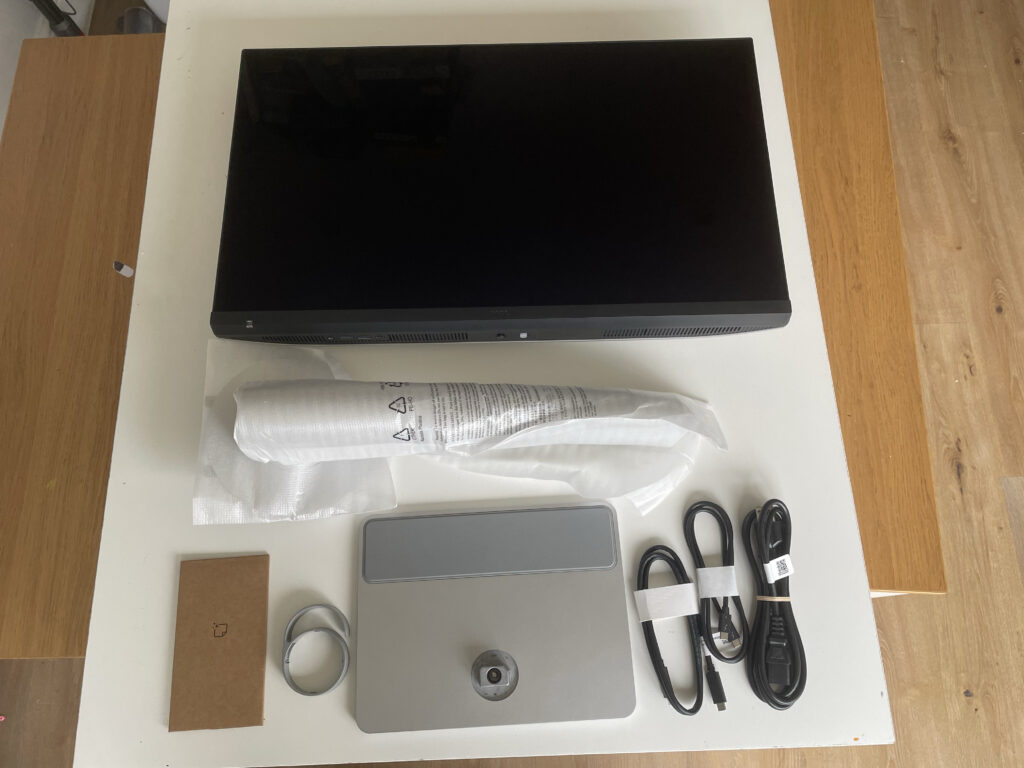
In the box of the MA270S there is:
- The MA270S screen
- Thunderbolt 4 and USB-C cable
- Power Cord
- Stand in two pieces
- Screen cleaner
- Cable tie
Setup
Putting together the stand of all BenQ’s monitors is extremely easy. No tools are required – just clip the main stand onto the back of the monitor:
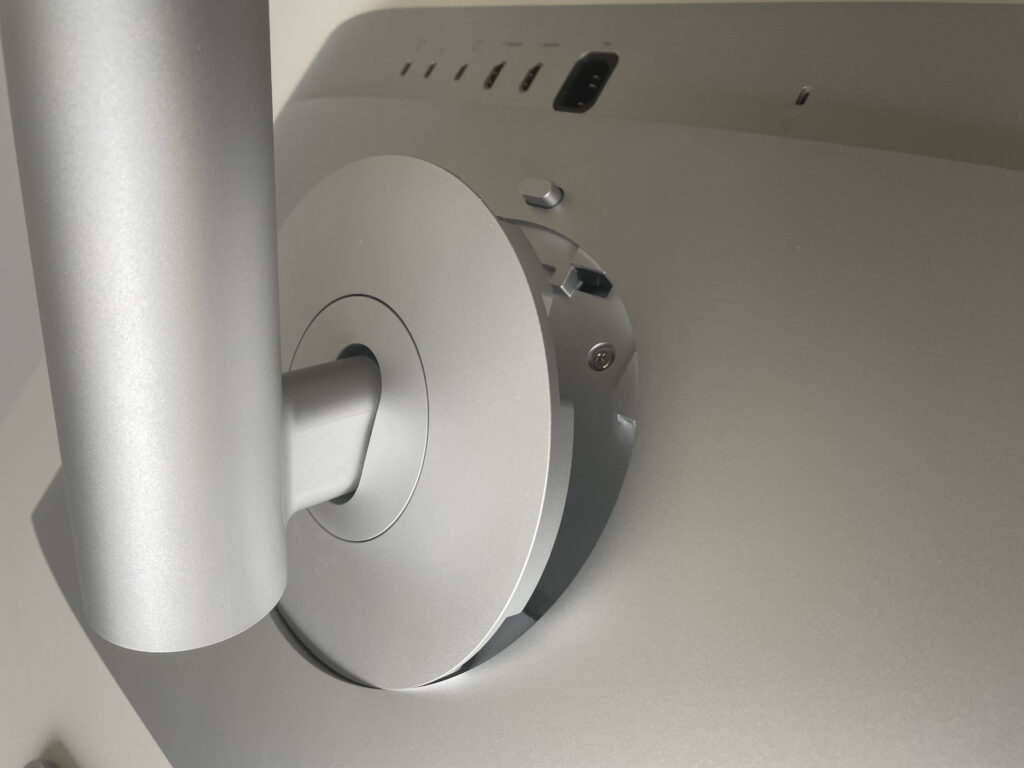
And the screw the base on using the turnkey on the bottom of the base.

Connecting The Display
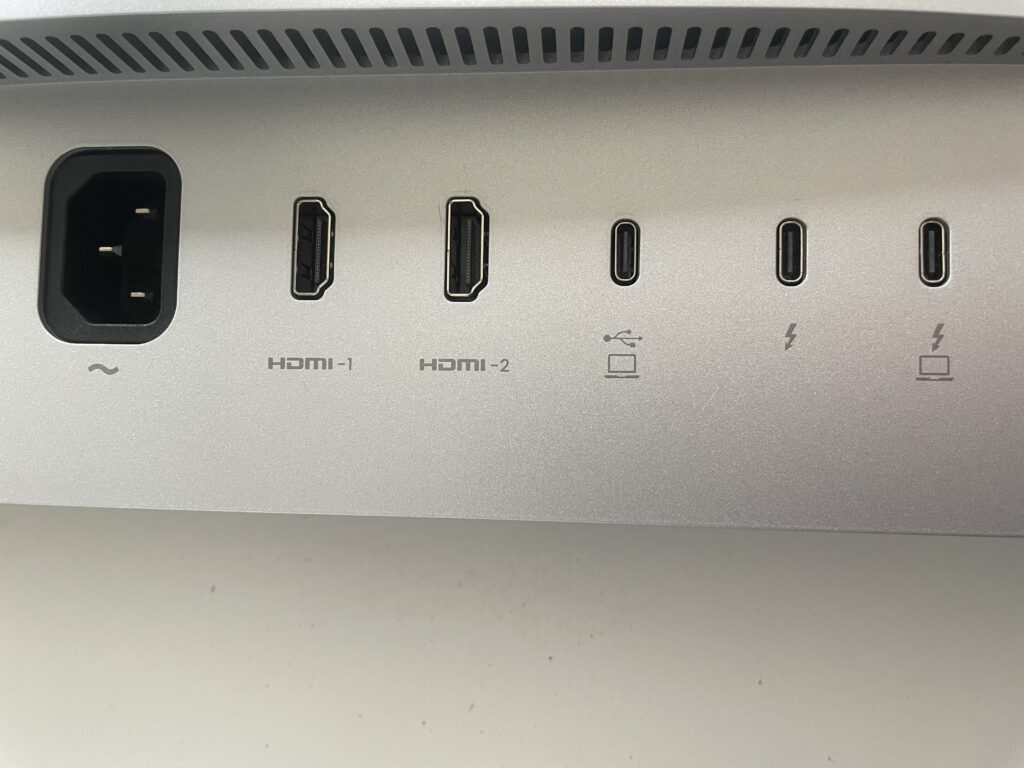
The best way to connect the monitor to a Mac is via the Thunderbolt 4 cable that comes included. This will also charge your MacBook while using the monitor and allows you to daisy chain other monitors to it with another Thunderbolt 4 cable.
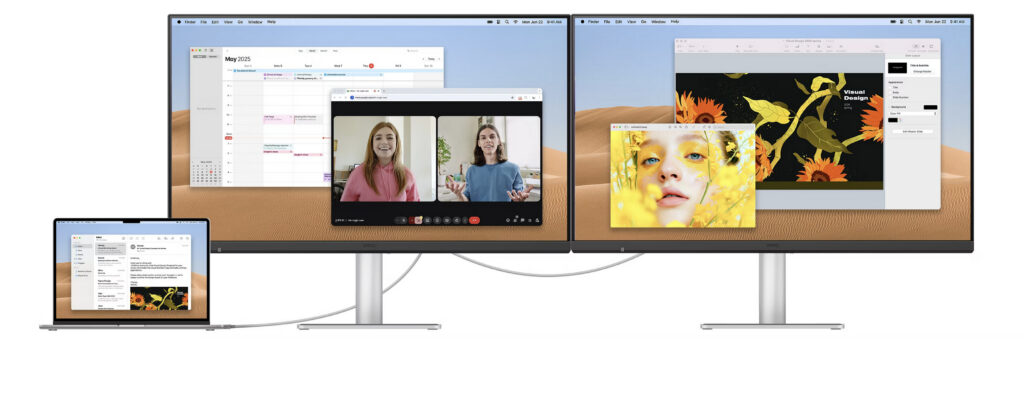
You also have other connection options though including a USB-C port and 2 HDMI ports.
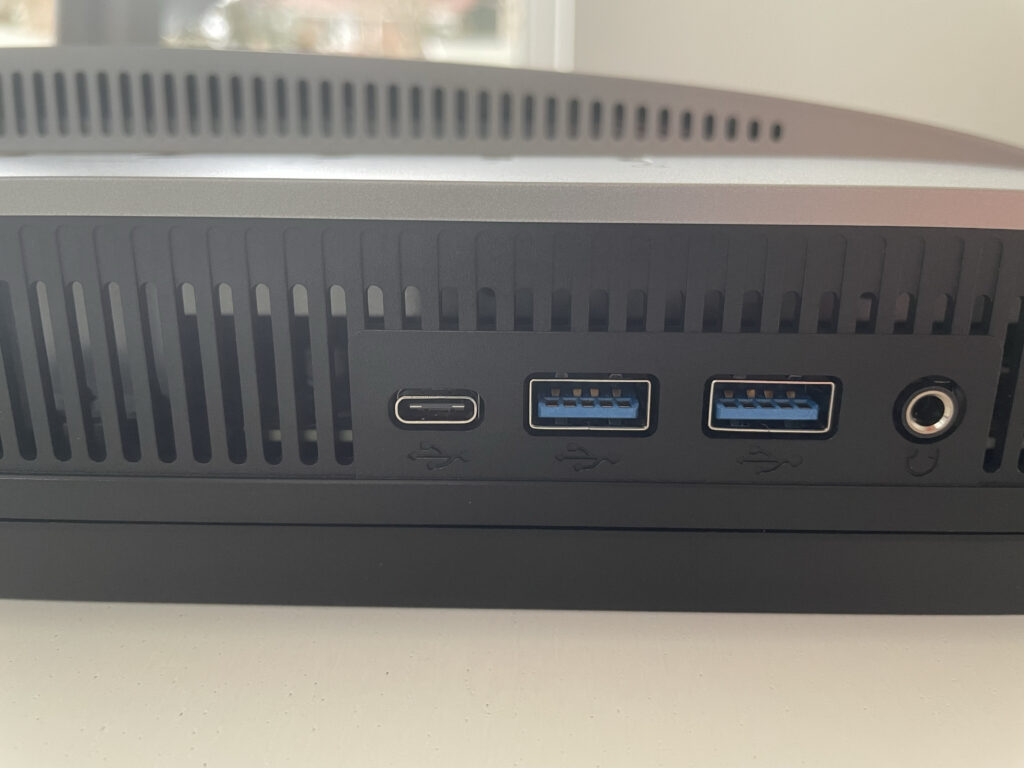
On the bottom side of the monitor are 2 USB ports and an extra USB-C port for connecting any hubs or peripherals. There’s also a headphone jack if needed.
Design & Build Quality
The MA270S follows a minimalist design language that closely mirrors Apple’s own hardware. Finished in silver on the rear and stand, the monitor is clearly intended to sit alongside MacBooks, Mac minis, and Mac Studios without looking out of place.
I would say the overall aesthetic is clean and understated.
A small but thoughtful addition is the rubber pad integrated into the base, which provides a safe resting spot for a MacBook or Apple accessories without risk of scratching.
Display Quality (5K Nano Gloss Panel)
The standout feature of the MA270S is its 27-inch 5K (5120 × 2880) resolution, which matches the pixel density macOS is designed around. This allows macOS to run at its native “looks like 2560 × 1440” scaling without any softness or UI inconsistencies, resulting in extremely sharp text and crisp interface elements.
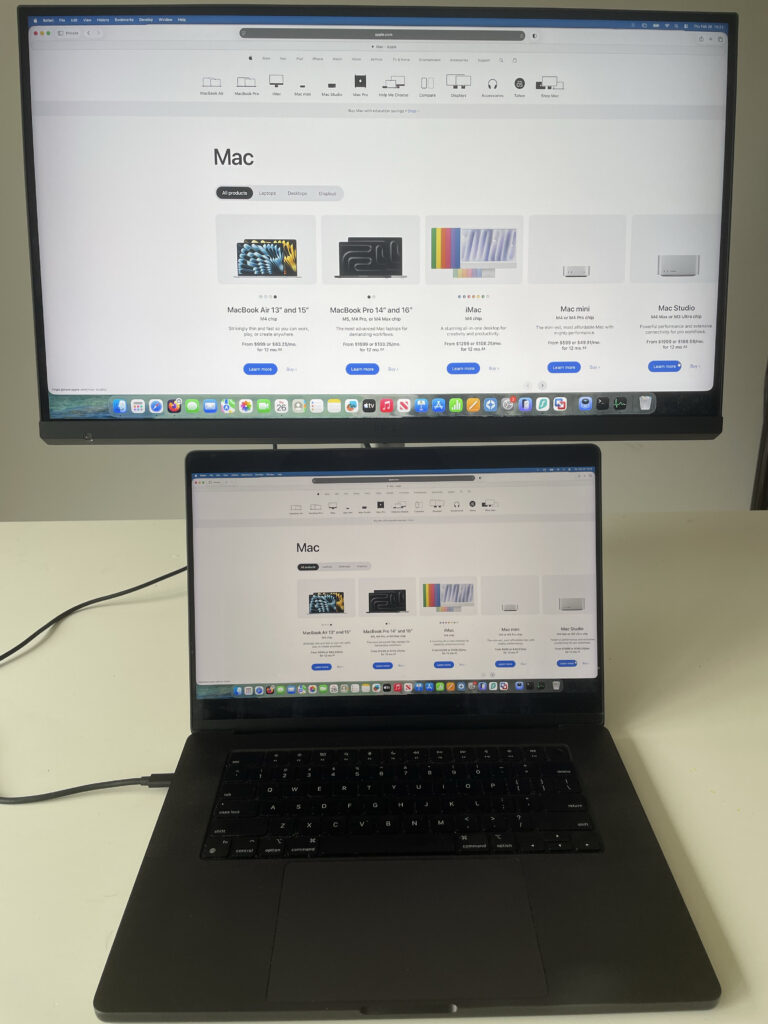
The Nano Gloss panel is designed for users who prefer a glossy display finish similar to Apple’s own screens.
According to BenQ, this panel is engineered to enhance perceived contrast and clarity while maintaining comfortable viewing angles and minimizing distracting reflections compared to traditional glossy coatings.
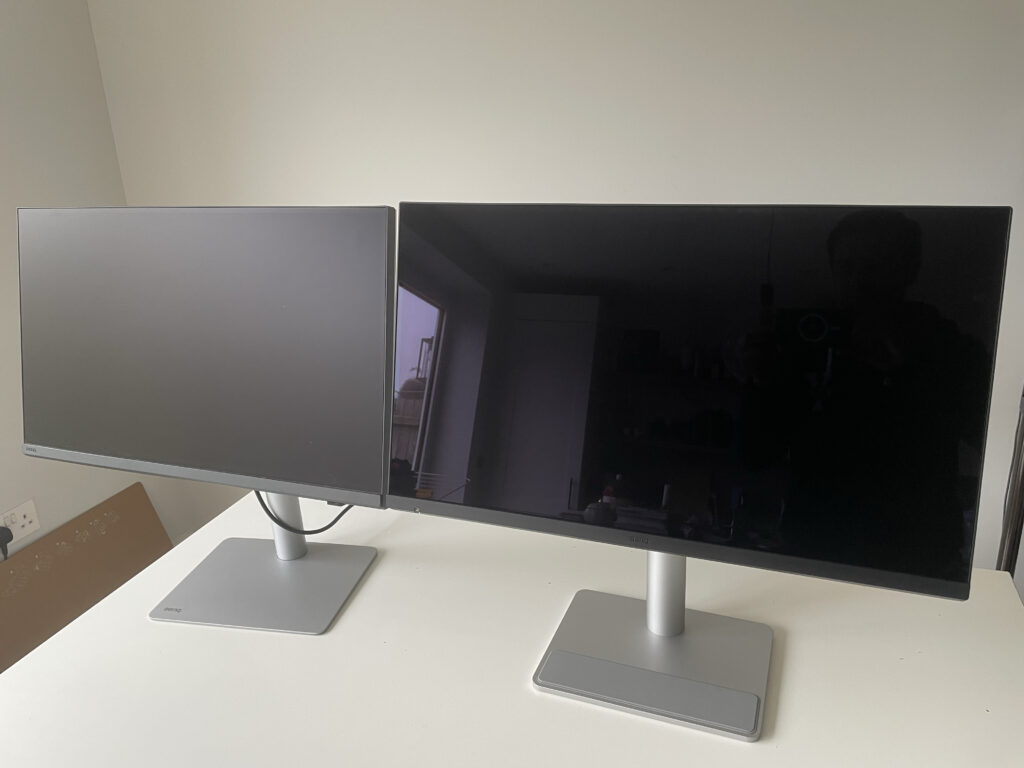
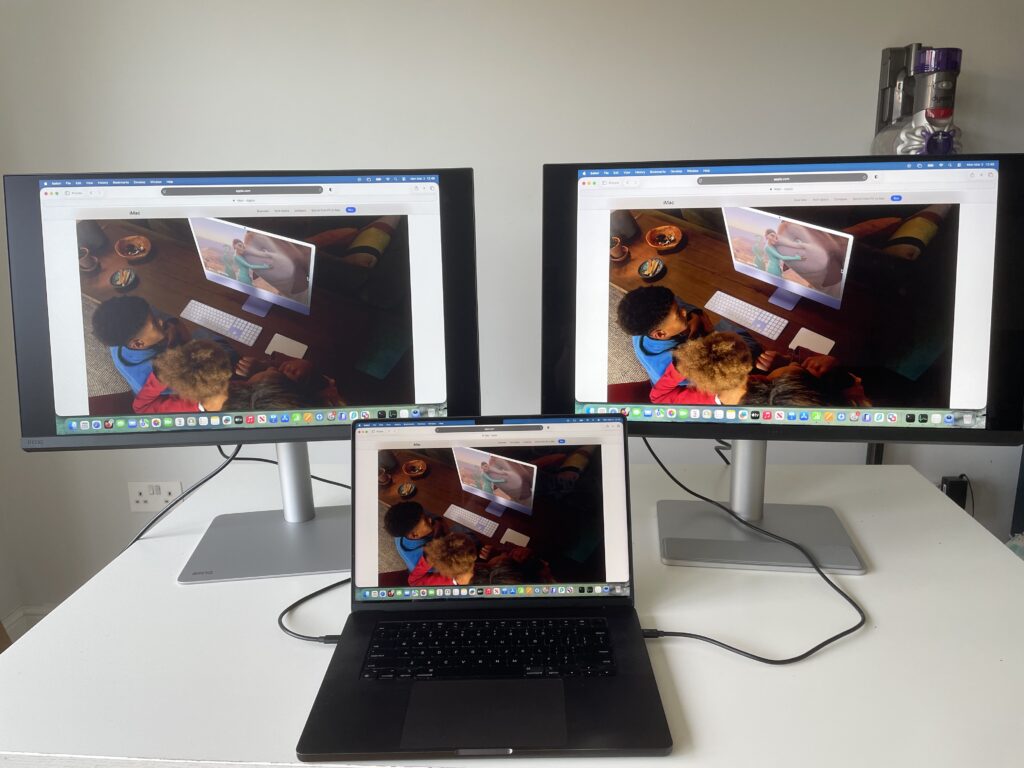
I personally like the glossy finish as for me, it makes the colors that little bit more brilliant than on matt displays. I put it side-by-side with the matt finish on the PD2730S to illustrate how different the two finishes are.
With a rated brightness of 500 nits (compared to 600 nits in the Apple Studio Display) and a 2000:1 contrast ratio, the MA270S should be well-suited to both brightly lit workspaces.
In normal working conditions, I didn’t notice any major difference in glare or reflection between the two monitors. What is noticeable is that the colors on the Nano Gloss finish on the MA270S appear as brighter and more intense than on the matt finish of the PD2730S.
Color Accuracy & Mac Color Matching
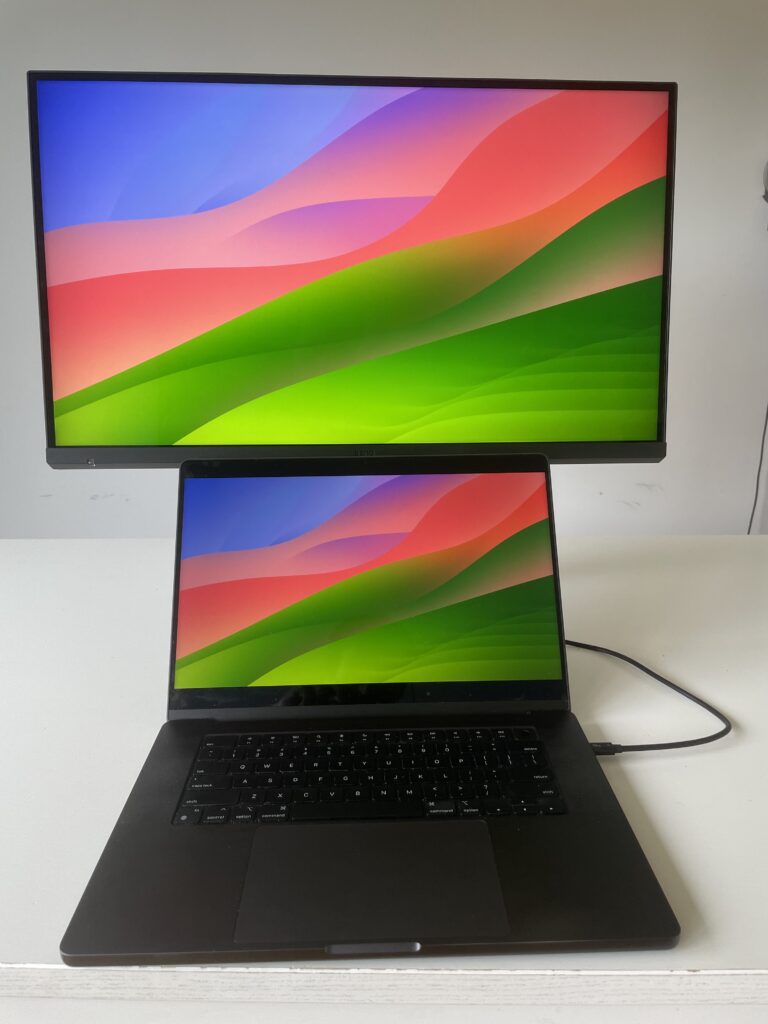
BenQ’s Mac Color-tuning technology is a central part of the MA270S’s appeal. The monitor is designed to deliver out-of-the-box color consistency with MacBook displays, reducing the poor visual reproduction that often occurs when using third-party monitors with macOS.
With 99% DCI-P3 and 99% sRGB coverage, the MA270S targets users such as those that use graphic design software who need reliable color reproduction for photo editing, design work, and general creative tasks. BenQ also includes iDevice Color Sync via Display Pilot 2, allowing color appearance to remain consistent across multiple Apple devices connected to the same setup.
Performance on macOS
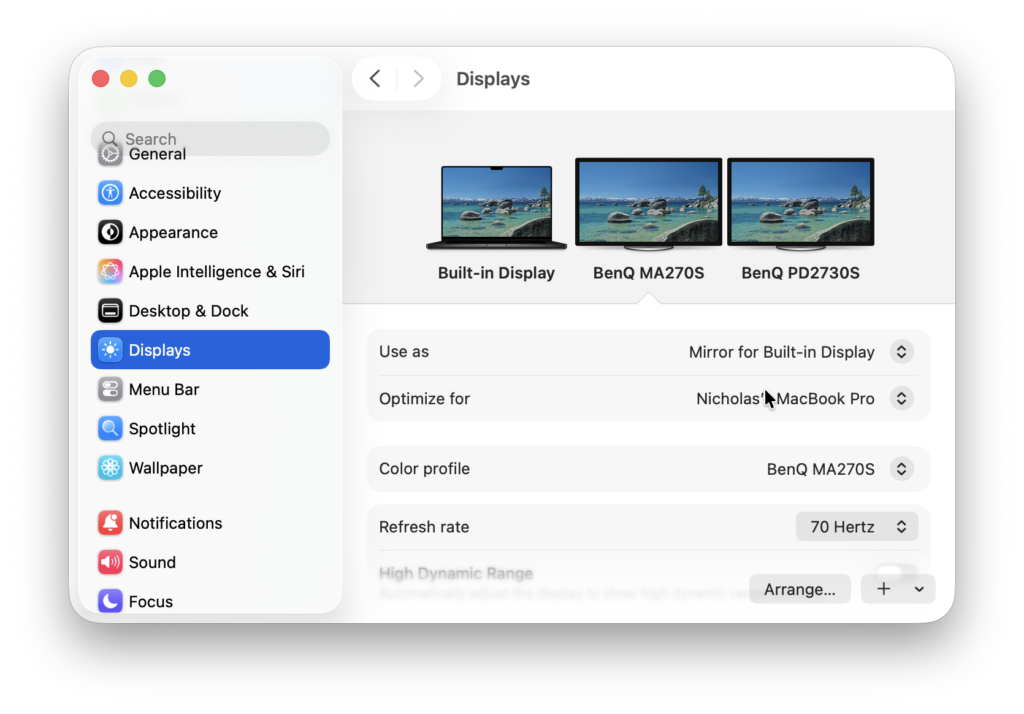
On macOS, the MA270S is designed to behave as naturally as a native Apple display. The 5K resolution ensures clean scaling, while the 70Hz refresh rate provides slightly smoother motion than standard 60Hz panels, particularly when scrolling or navigating the macOS interface.
In day-to-day use, the jump from 60Hz to 70Hz isn’t dramatic, but scrolling and animations do feel slightly smoother. It’s still not enough for serious gaming – for that you’ll need at least 120Hz which BenQ’s lower resolution 4K MA320UG does offer.
The monitor supports VESA DisplayHDR 400, although it is best viewed as a mild enhancement rather than a full HDR experience.
macOS Display Presets on the MA270S
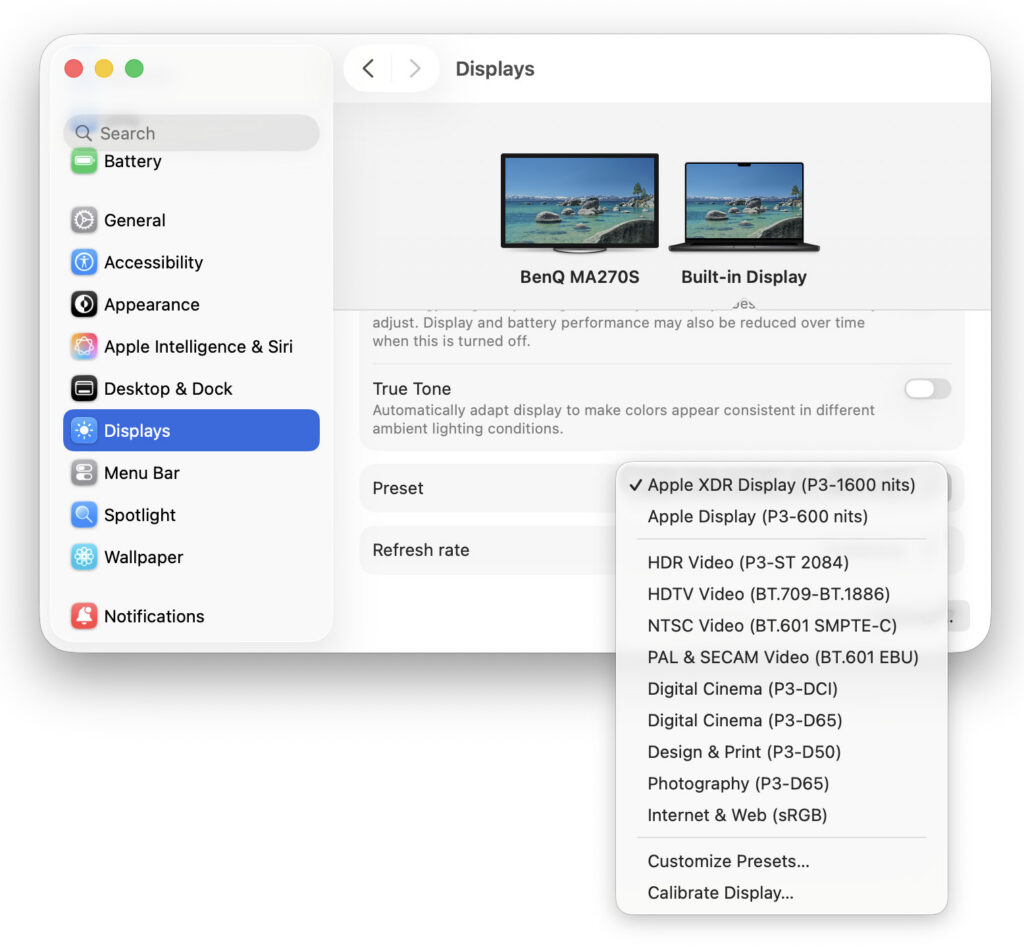
One advantage of using a true 5K display like the BenQ MA270S with macOS is that it supports Apple’s built-in display presets directly within System Settings.
When connected to the MA270S, macOS allows you to choose from several color presets under System Settings > Displays, including:
- Apple XDR Display (P3-1600 nits)
- Apple Display (P3-600 nits)
- HDR Video (P3-ST 2084)
- HDTV Video (BT.709-BT.1886)
- NTSC Video (BT.601 SMPTE-C)
- PAL & SECAM Video (BT.601 EBU)
- Digital Cinema (P3-DCI)
- Digital Cinema (P3-D65)
- Design & Print (P3-D50)
- Photography (P3-D65)
- Internet & Web (sRGB)
These presets are part of macOS’s system-wide color management and allow you to quickly switch between different industry-standard color spaces depending on your needs.
For example:
- Internet & Web (sRGB) is ideal for content destined for websites and general online publishing.
- Photography (P3-D65) and Digital Cinema (P3-DCI) are more suited to photographers and video editors working in wide color gamuts.
- Design & Print (P3-D50) targets print-oriented work where a warmer white point is preferred.
- HDR Video (P3-ST 2084) is designed for HDR content grading and playback.
Because the MA270S supports 99% P3 color and a 5K resolution aligned with macOS’s native scaling, these presets integrate cleanly into the system without requiring third-party calibration software. You can also create custom presets or manually calibrate the display directly from macOS if needed.
In practical terms, this means the MA270S behaves much more like the Apple Studio Display than most third-party monitors. Instead of relying solely on the monitor’s on-screen display (OSD) for color modes, you can manage color profiles directly from macOS, which simplifies switching for creatives and professionals.
Display Pilot 2 Software
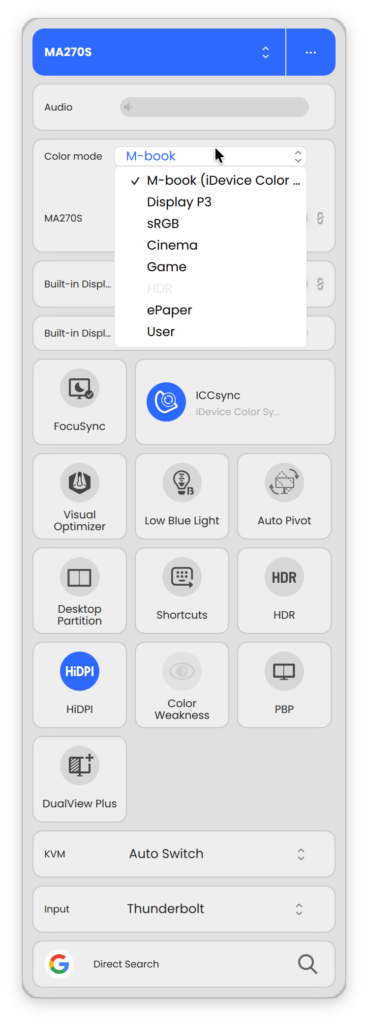
BenQ’s Display Pilot 2 software is central to the MA270S experience on macOS, providing Mac-style controls and system-level integration.
- iKeyboard Control allows brightness and volume to be adjusted directly from the Mac keyboard.
- Brightness Sync automatically matches the monitor’s brightness to the MacBook’s display using ambient light data.
- FocuSync links macOS Focus modes with display settings, adjusting color, brightness, and eye-care features automatically.
- Always-On Power Charging ensures connected devices continue charging even when the monitor is in standby.
- Smart KVM allows seamless control of two connected systems using a single keyboard and mouse.
This is also where you’ll find BenQ’s M-book mode which provides superior color matching with MacBooks than most non-Apple monitors.
macOS Presets vs BenQ’s M-Book Mode: What’s The Difference?
Although they both affect color, macOS presets and BenQ’s M-Book mode work in different ways.
The presets in System Settings > Displays are controlled by macOS itself. They adjust things like color space (P3 or sRGB), white point (D65 or D50), gamma, and HD behavior.
Switching to profiles such as Photography (P3-D65) or Internet & Web (sRGB) changes how macOS manages color across the system. These are useful if you need to match specific industry standards for web, print, or video work.
Meanwhile M-Book mode is built into the MA270S at the hardware level. It’s designed to closely match the look of a MacBook display, reducing color and brightness differences when using both screens side by side.
Rather than targeting a specific industry standard, it focuses on visual consistency with your Mac straight out of the box.
For everyday use, M-Book mode is the simplest way to make the MA270S feel like a natural extension of your Mac.
If you’re working to a specific output standard, switching to the appropriate macOS preset may make more sense.
Real-world testing will ultimately determine how closely M-Book mode matches Apple’s own displays compared to macOS’s default P3 profile.
Adjustable Stand
I like the fact that you get an easy to assemble adjustable stand with all BenQ monitors. No tools are ever required – its simply a case of clicking it into place and turning the key-screw on the base to secure it.
The stand is fully adjustable and includes height, tilt, swivel, and pivot controls, making it easier to achieve a comfortable ergonomic setup. A VESA attachment is also available for more flexibility.
It helps that the stand looks good with a brushed metal finish and a solid heavy metal base for stability.
Speakers
Like most non-Apple display monitor speakers, the two 3 Watt speakers in the MA270S aren’t amazing but they’re passable. The volume output levels are decent and the volume can be controlled from your Mac’s keyboard which is a nice touch.
You can hear them in action below.
Pricing & Availability
The BenQ MA270S is positioned as a premium, Mac-focused 5K monitor, and its pricing reflects that.
In the USA, the MA270S is priced at $999.99/£899.99, which places it significantly below the price of Apple’s own Apple Studio Display but noticeably above many 4K alternatives. In the UK, it’s priced at £999.99, again aligning it with the premium USB-C and Thunderbolt displays.
At this price point, the MA270S sits between high-end 4K monitors and ultra-premium all-in-one displays like the Apple Studio Display. What I think helps justify this positioning is the combination of true 5K resolution, Mac-tuned colour performance, and deep macOS integration, including features like M-Book mode, iKeyboard Control, and superb color accuracy.
For users who specifically need 5K scaling with macOS and want an Apple-like experience without paying Apple’s premium, the MA270S is excellent value. However, for those who don’t require native 5K resolution, there are more affordable alternatives that still offer excellent color and connectivity.
Note that at the moment, the $999.99 price quoted is available when buying from Amazon. If you buy directly from BenQ, the price is listed as $1099.99.
BenQ MA270S vs MA270U vs Studio Display
The most common monitors the MA270S will be compared to are BenQ’s older 4K MA270U and of course, Apple’s Studio Display.
Personally, I’d say definitely go with the 5K MA270S if your budget can stretch as it scales so much better than the 4K MA270U. Of course, it’s never going to beat the specs of the Apple Studio Display but you are saving almost $600!
Below you can see how these three models compare against each other.
You can also read our detailed look at the BenQ MA270S vs Apple Studio Display for a more in-depth analysis.
| Feature / Spec | BenQ MA270S | BenQ MA270U | Apple Studio Display |
|---|---|---|---|
| Price | $999.99 / £899.99 | $649–$799 | $1,599 / £1,599 |
| Resolution | 5K (5120 × 2880) | 4K UHD (3840 × 2160) | 5K (5120 × 2880) |
| macOS Scaling | Native (Retina-sharp) | Non-native; scaled | Native (Retina-sharp) |
| Panel | Nano Gloss | Matte | Gloss |
| Colour Gamut | 99% DCI-P3 / 99% sRGB | 99% DCI-P3 / 99% sRGB | Wide P3 |
| HDR Support | DisplayHDR 400 (basic) | – | HDR (Apple implementation) |
| Refresh Rate | 70Hz | 60Hz | 60Hz |
| Mac Integration | Keyboard brightness & volume control, Display Pilot 2, Brightness Sync, FocuSync, M-Book mode | Basic Mac color tuning | Fully native with True Tone |
| Thunderbolt / Power | Thunderbolt 4 with 96W PD + TB4 out | USB-C (power delivery varies by model) | Thunderbolt / USB-C with 96W PD |
| Smart KVM | ✔ | ✘ | ✘ |
| Picture-by-Picture | ✔ | ✘ | ✘ |
| Ergonomics | Height / Tilt / Swivel / Pivot | Height / Tilt / Swivel / Pivot | Tilt only (height stand optional extra) |
| Built-in Webcam | ✘ | ✘ | ✔ |
| Built-in Speakers | Basic (2 × 3W) | Basic | High quality spatial audio |
| Best For | 5K scaling, Mac integration, multi-device setups | Budget 4K Mac-friendly use | All-in-one Apple integration and design quality |
Should You Buy the BenQ MA270S?
The BenQ MA270S makes the most sense for Mac users who want a true 5K external display that behaves like a native macOS screen, without paying the premium typically associated with Apple’s own displays. Its resolution aligns perfectly with macOS scaling, making it particularly appealing for users who prioritize text clarity, UI sharpness, and visual consistency across multiple Apple devices.
If you’re currently using a 4K monitor with a Mac and are frustrated by scaling compromises, the MA270S represents a meaningful upgrade. It’s also well-suited to MacBook users who want a single-cable desktop setup with charging, color consistency, and system-level brightness and Focus mode controls.
However, if you already own a BenQ MA270U and are satisfied with 4K performance, the jump to 5K will primarily benefit users who are especially sensitive to text sharpness or spend long hours working with fine UI elements. Similarly, users who require high refresh rates, advanced HDR, or gaming-focused features may find better value elsewhere.
Overall, I’d say the MA270S is one of the best alternatives to Apple’s Studio Display I’ve tried, offering comparable resolution and color performance with greater flexibility and connectivity.