

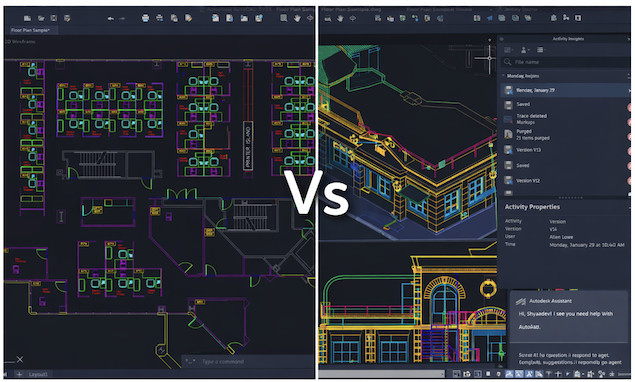
AutoCAD is without doubt one of the best CAD software for Mac but even after all this time on the market, it still lags behind the Windows version.
This isn’t unusual with Autodesk products. Applications like AutoCAD Architecture aren’t even available for Mac and so it’s clear that macOS is less of a priority for the company.
AutoCAD For Mac has actually been around since 1992 although Autodesk subsequently gave up on it and discontinued it for years until it suddenly brought it back from the dead in 2010.
But even now, there’s a lot lacking from the Windows version forcing some Mac users into the ludicrous situation of using a virtual machine or remote desktop software to use the Windows version of AutoCAD.
Autodesk plays this down somewhat on its official comparison page (which by the way, doesn’t seem to have been updated since AutoCAD 2023…) but does at least acknowledge that “AutoCAD products for Mac are not straight 1:1 ports of their Windows-based counterparts”:
AutoCAD products for Mac include the most popular functionality of the Windows versions of AutoCAD & AutoCAD LT. For both AutoCAD for Mac and AutoCAD LT for Mac, this includes 2D design, customization of the user interface, and much more. For full AutoCAD, support for LISP and ObjectARX/DBX applications, 3D design tools (including 3D free-form modeling), and 3D visualization are included. AutoCAD products for Mac also create files in the same native DWG file format as the Windows AutoCAD products. However, AutoCAD products for Mac are not straight 1:1 ports of their Windows-based counterparts. AutoCAD products for Mac have a look and feel that is familiar to Mac users and a feature set most appropriate for the macOS environment.
Kind of vague, right?
So to set the record straight, here’s everything you need to know to avoid disappointment when using AutoCAD for Mac.
First we’ll start off with a side-by-side comparison table before looking at some of these things in more detail.
Contents
AutoCAD For Mac vs Windows Comparison Table
| Feature | AutoCAD for Mac | AutoCAD for Windows |
|---|---|---|
| Primary Focus | 2D drafting & light 3D modeling | Full 2D & advanced 3D modelling |
| 3D Modeling | Yes (basic solids & surfaces) | Yes (advanced tools & workflows) |
| Built-in 3D Rendering | ❌ No | ✅ Yes |
| Specialized Toolsets (Architecture, Mechanical, Electrical, etc.) | ❌ Not available | ✅ Included |
| Plugin & Add-in Support | Limited (few native Mac plugins) | Extensive (full Autodesk App Store support) |
| Automation & Scripting | Limited (LISP only, reduced APIs) | Full support (LISP, VBA, .NET, COM) |
| AI & Smart Features | Yes (Smart Blocks, Markup Assist) | Yes (same AI features) |
| Performance on Native OS | Excellent on Apple Silicon Macs (M-series Pro chips or higher recommended) | Excellent on high-end Windows PCs |
| UI & Design | macOS-native, cleaner interface | Feature-dense, more complex UI |
| Best For | Architects, designers, 2D drafting on Mac | Power users, engineers, complex CAD workflows |
Now let’s take a deeper dive into some of these features.
1. Core Functionality & DWG Support

First things first, both AutoCAD for Mac and AutoCAD for Windows let you create, edit, annotate and share DWG drawings – which has long been the industry standard.
File compatibility between them is rock solid; a DWG drawn on Mac opens on Windows and vice‑versa with no corruption or formatting issues.
You can even open DWG files on a Mac for free with AutoCAD without even needing a subscription.
So if you’re worried about file compatibility and working between macOS and Windows, you don’t need to – it works really well.
It’s only when you start using AutoCAD for Mac that you start noticing all the differences starting with the most obvious one of all – the way it looks.
2. Interface
AutoCAD on Windows:

- Full Ribbon UI, extensive toolbars, rich palettes, and highly customizable workspaces.
- Designers can tailor almost every UI element and drag tools wherever they like.
AutoCAD on Mac:

- Uses macOS‑style menus and tool sets, not the Ribbon. Now while I think this is cleaner and more “native macOS”, I actually find it less efficient because functions are nested deeper. It takes longer to get to the tools and functions I use the most on the Mac version, although keyboard shortcuts can mitigate this. The other issue I have with it is that you can’t drag and drop tools around as easily as you can with the Windows version which is far more flexible.
- CAD design requires a lot of mouse work and for those that rely on using an Apple Magic Mouse, it can be a horrible experience as one Reddit user testifies:
“I have a Magic Mouse and totally gave up using it with this program… the scroll zoom conflict drove me nuts.”
For this reason, I’d strongly recommend a 3DConnexion SpaceMouse which is specially designed for CAD work and far superior to using the Magic Mouse or Trackpad.
Overall, Windows wins for professional control over AutoCAD. The Mac version feels more familiar to Mac users, but is less powerful and not very well integrated with Apple hardware.
3. Performance & Stability
Windows Version
- Better multi‑threaded performance. Generally more stable with large, complex drawings and heavy 3D graphics (more on 3D graphics handling below).
- Runs on a wide range of hardware from mobile workstations to powerhouse custom PC desktops.
Mac Version
- Now natively optimized for Apple Silicon (M1-M5), which perform much better than older Intel Macs. Anyone that’s used AutoCAD on the older Intel chip Macs and newer Apple Silicon chip Macs will tell you the difference is night and day.
- Still falls behind Windows when working with big projects, especially when doing 3D stuff. To me, 3D performance never feels as snappy despite the huge improvements in performance since Apple Silicon Macs were first released back in 2020.
You’ll also find plenty of forum threads such as this one saying it’s not even worth trying using AutoCAD for Mac.
When it comes the performance then, AutoCAD for Windows easily wins out over the Mac version, especially for 3D work.
4. 3D Modeling & Rendering
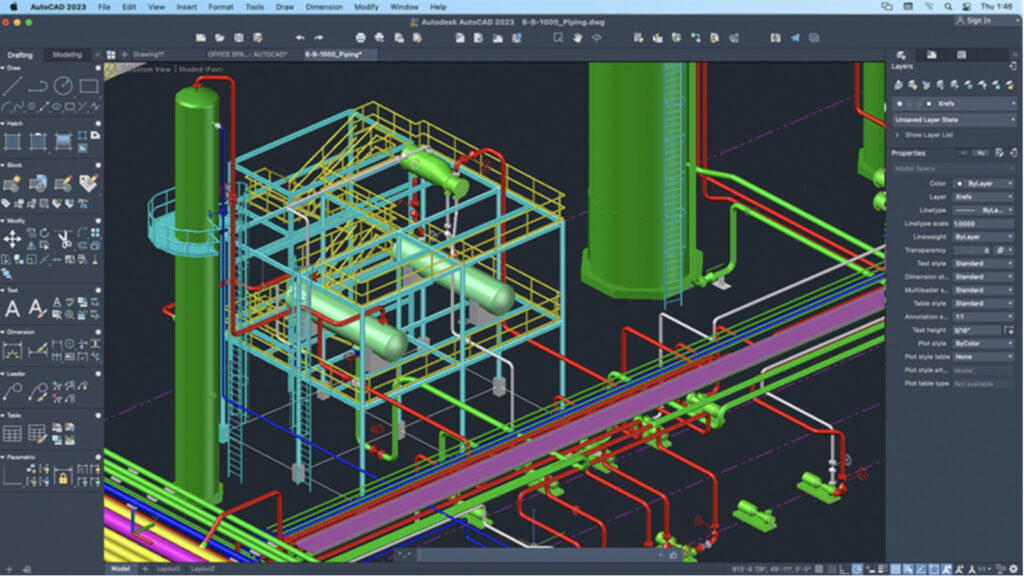
One of the biggest areas that AutoCAD for Mac lags behind the Windows version is in 3D rendering.
AutoCAD for Mac supports basic to intermediate 3D work, including:
- 3D solid and surface modeling
- Visual styles such as Wireframe, Shaded, Realistic, and Conceptual
- Basic materials, lighting, and shadow controls
- Simple built‑in render previews for conceptual visualization
For light 3D work, such as architectural massing, simple mechanical parts, or client mock‑ups, this is usually sufficient.
However, once projects become more complex, most users quickly hit the ceiling of what the Mac version can comfortably handle and some resort to using dedicated rendering software.
Compared to AutoCAD for Windows, the Mac version lacks:
- Advanced rendering engines available on Windows
- Detailed material editors and lighting controls
- Many automation and Express Tools used in 3D workflows
- Support for popular third‑party rendering plugins (such as V‑Ray for AutoCAD or Enscape)
- Consistent performance with large or complex 3D scenes
As a result, many Mac‑based CAD designers end up using a virtual machine to run AutoCAD for Windows but be warned, this requires a lot of processing power to both run the VM and render the 3D images and is a lot slower than using a PC.
5. Plugins

Windows: Vast Plugin & Toolkit Support
Because Windows supports .NET and ObjectARX, there’s a huge choice of plugins to extend AutoCAD: Architecture, Electrical, Civil 3D extensions – all designed for professional industries.
Mac: Limited Extensions
AutoCAD For Mac has far fewer plugins and popular productivity add‑ons simply don’t exist. For instance, there’s no Design Center in the Mac version of AutoCAD. There are some plugins that do work on Mac such as those with LISP routines (with some limitations) and a very small number of Mac-specific plugins written explicitly for macOS.
Windows easily wins for customization and extending the functionality of AutoCAD with plugins.
6. AI Features
AutioCAD now uses AI to help provide support and answers to questions within the app.
This is one area where there’s no difference between the Windows and Mac version. These are cloud-or service-based features, so Mac and Windows users get the same benefits:
- Smart Blocks (machine learning)
AutoCAD can recognize repeating geometry and suggest converting it into blocks automatically. - My Insights / Usage Insights
AI analyzes how you use AutoCAD and suggests productivity improvements, tips, or relevant features. - Markup Import & Markup Assist
Uses AI to interpret PDFs or image markups and help convert comments into editable CAD objects. - Trace & collaboration tools (cloud-assisted)
AI helps interpret changes and overlays when collaborating via Autodesk Docs.
So basically, if you want the latest in cutting-edge AI, you’ll get the same level of functionality in both AutoCAD for Mac and Windows.
7. Pricing & Licensing
Nowadays AutoCAD is a subscription product, and the cost doesn’t vary by platform. So whether you install on Mac or Windows, you’re paying for the same license.
An AutoCAD annual subscription is $1,865 per year, billed annually (standard price directly from Autodesk) or $235 per month (billed monthly).
These prices include access to:
- The core AutoCAD application.
- Both Windows and Mac installers.
- Updates released during the subscription term.
- Cloud storage and basic support.
But clearly from what we’ve discussed here, you’re getting a lot more for your money with the Windows version.
On Windows, you also get the full suite and access to specialized tools like AutoCAD Architecture and electrical wiring add-ons like AutoCAD Electrical.
FAQ
Is AutoCAD for Mac the same as AutoCAD for Windows?
No. While both versions use the same DWG file format and share the same core drafting tools, AutoCAD for Windows includes more advanced features, deeper customization options, and access to specialized tools and plugins that are not available on macOS.
Does AutoCAD for Mac support 3D modeling and rendering?
AutoCAD for Mac supports basic 3D modeling and visualization, including solids, surfaces, and visual styles such as Shaded and Realistic. However, it does not offer the same advanced 3D rendering tools or plugin support found in the Windows version. For professional 3D rendering workflows, Windows AutoCAD or dedicated 3D rendering software is usually preferred.
Can AutoCAD files be shared between Mac and Windows users?
Yes. AutoCAD for Mac and Windows use the same DWG file format, and files can be shared without compatibility issues. However, drawings that rely on Windows-only features, plugins, or specialized tools may not behave the same way when opened on a Mac.
Are AutoCAD plugins supported on Mac?
AutoCAD for Mac supports a limited number of plugins, mainly LISP-based or macOS-specific extensions. Most plugins available in the Autodesk App Store rely on .NET or ObjectARX, which are Windows-only, meaning the majority of AutoCAD plugins do not work on macOS.
Are AutoCAD’s specialized tools available on Mac?
No. AutoCAD’s specialized toolsets – including Architecture, Mechanical, Electrical, Map 3D, and Plant 3D – are only available on Windows. Mac users get the core AutoCAD application without these industry-specific extensions.
Is AutoCAD for Mac slower than the Windows version?
Performance depends on the task and hardware, but in general AutoCAD for Windows performs better with large drawings, complex 3D models, and automation heavy design. AutoCAD for Mac runs well on Apple Silicon for 2D drafting but can struggle with more demanding projects.
Does AutoCAD for Mac support data extraction and CAD standards checking?
AutoCAD for Mac lacks several advanced productivity tools available on Windows, including full object data extraction to tables and CAD standards enforcement and monitoring. These features are important in larger or collaborative projects.
Is AutoCAD pricing different for Mac and Windows?
No. AutoCAD uses a single subscription license that works on both Mac and Windows. Pricing is the same regardless of platform, but the features you get depends on the operating system.
Can I run AutoCAD for Windows on a Mac?
Yes. Many Mac users run AutoCAD for Windows using Parallels Desktop on Apple Silicon Macs to access the full feature set, plugins, and specialized toolsets that are unavailable in the macOS version. You can also use remote desktop software to connect remotely to a Windows PC although this may result in poorer performance due to latency over the connection.
Is AutoCAD for Mac good for students?
AutoCAD for Mac is suitable for learning 2D drafting and basic 3D concepts, especially for students who already use a Mac. Students can also get AutoCAD for free with an Educations License. However, students planning to work in professional CAD environments may benefit from learning AutoCAD for Windows, which is more commonly used in industry.
Which version of AutoCAD should professionals choose?
- Choose AutoCAD for Windows if you rely on plugins, specialized tools, advanced 3D, or industry-standard workflows.
- Choose AutoCAD for Mac if you mainly do 2D drafting, prefer macOS, and don’t depend on advanced extensions.