

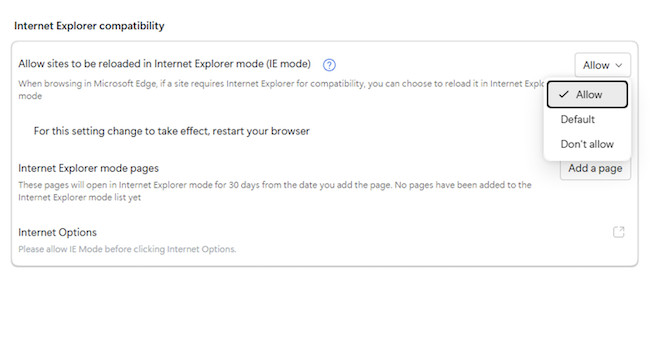
If you’ve recently switched from Windows to macOS, you may have discovered that Internet Explorer does not exist on Mac – and in 2026, that’s no longer just a limitation, it’s a hard stop.
Some legacy corporate intranets, government portals, HR systems, or industrial web apps were built specifically for Internet Explorer, often relying on outdated technologies like ActiveX. Unfortunately, Internet Explorer has now been fully retired and replaced by Microsoft Edge, making access increasingly difficult, especially on a Mac.
For everyday, secure browsing, modern browsers such as Safari, Chrome, or Edge should always be used.
That said, there are still a few ways Mac users can access IE-dependent websites – but many older tricks no longer work.
Key Facts About Internet Explorer
Before looking at workarounds, it’s important to understand the current status of Internet Explorer:
- Internet Explorer for Mac was officially discontinued in 2003
- Microsoft fully retired Internet Explorer 11 in 2022
- Internet Explorer no longer exists as a standalone browser on any platform
- Any site offering “Internet Explorer for Mac” downloads should be avoided – these are usually scams or unsafe software
What You Should Not Do
- Do not download “Internet Explorer for Mac” from third-party websites. The last version of Internet Explorer that worked on Mac was for OS X 10.6.8 Snow Leopard which is now obsolete so don’t be fooled by any site that claims you can still download it!
- Do not rely on browser emulation tricks that usually don’t work
- Do not assume Microsoft Edge for Mac includes IE Mode (it doesn’t but the Windows version of Edge does).
Use Internet Explorer on a Mac with a Virtual Machine
IE Mode is the only official way Microsoft supports Internet Explorer compatibility today.
However, it’s important to be aware that IE Mode only works in Microsoft Edge on Windows – not on macOS.
Microsoft Edge for Windows includes an Internet Explorer compatibility mode that uses the original IE rendering engine to load legacy websites. This is essential for sites that rely on ActiveX, VBScript, or other IE-specific behavior.
But to use IE Mode on a Mac, you must first run Windows on your Mac using a Virtual Machine.
Running Windows in a VM is the most reliable and future-proof way to access IE-only websites on macOS.
Virtual machines allow macOS and Windows to run side by side without rebooting.
The most popular and widely used Mac compatible virtual machines are:
I used Parallels to run Edge in IE mode as its by far the best way to run Windows on a Mac and details of how to use it can be found here.
Once Windows is installed in the virtual machine, to access Internet Explorer on a Mac using Edge’s IE mode, just follow these instructions:
- Open Microsoft Edge in Windows on your Mac.
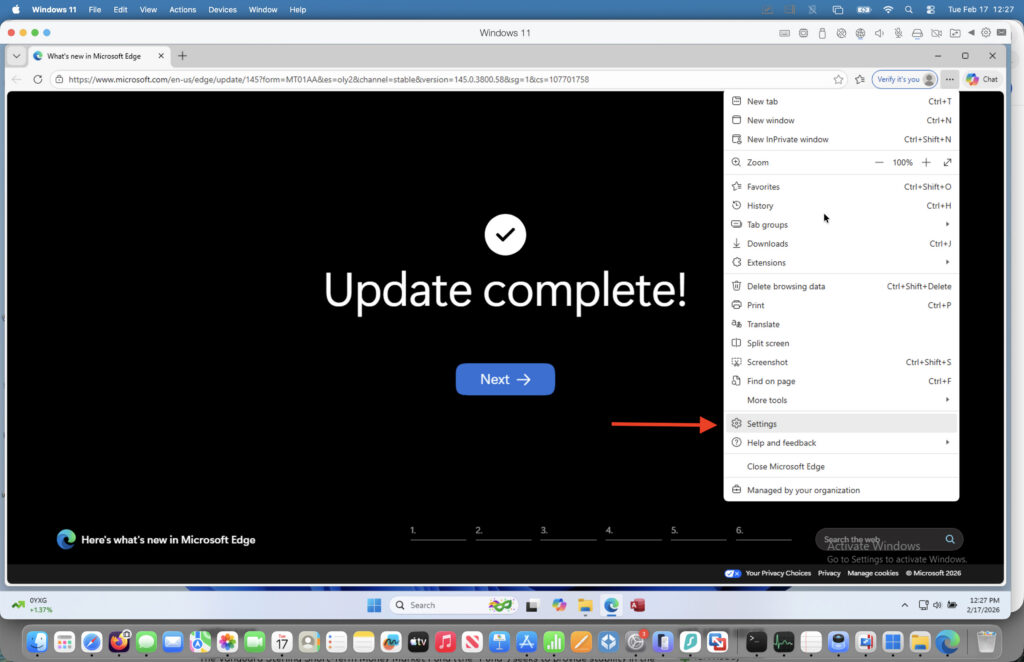
- Go to the three dots in the top right corner and select Settings from the drop down menu.
Select “Default Browser” along the left hand margin.
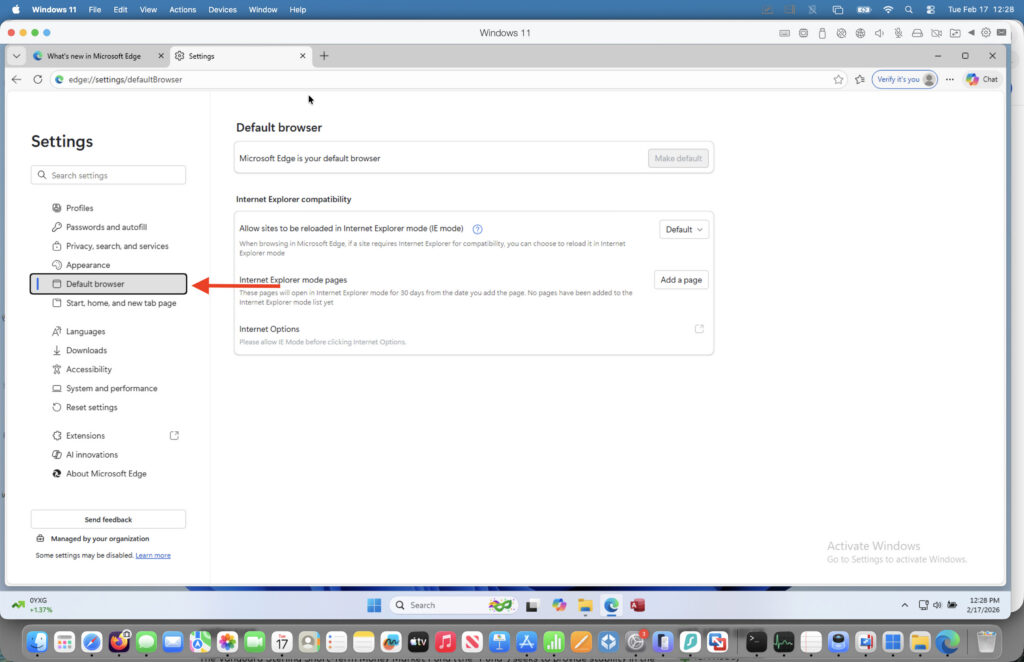
Change the setting in “Allow sites to be reloaded in Internet Explorer (IE mode)” to Allow.

Then simply click on Restart browser to restart in IE mode on your Mac.
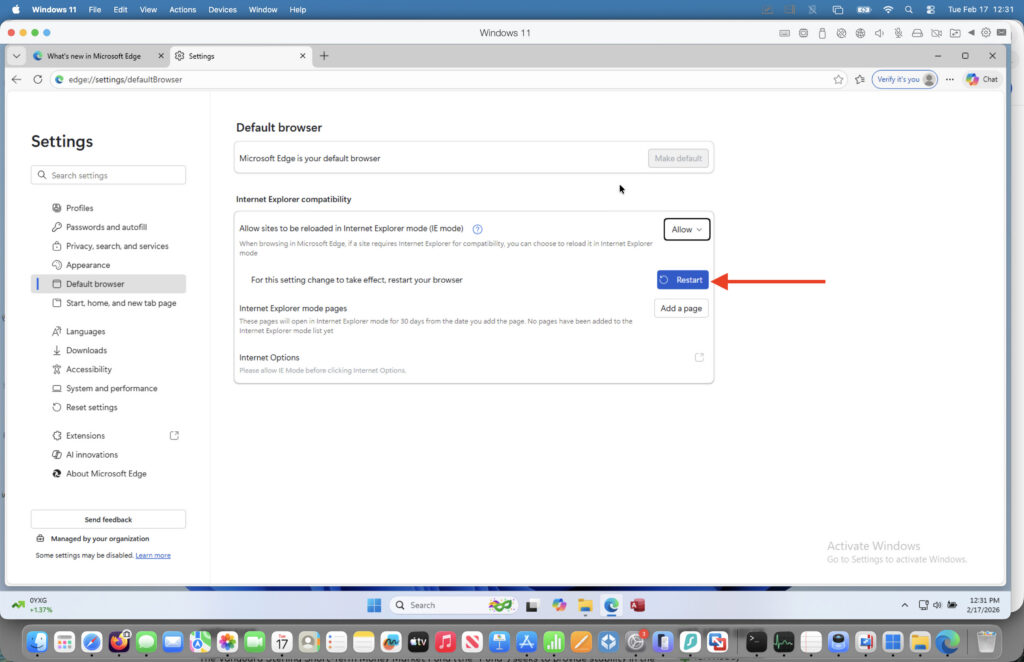
This method works on both Intel and Apple Silicon Macs and is the only solution that reliably supports accessing sites that require IE to work.
Other Methods
Another way to access Internet Explorer from a Mac is to use remote desktop software. They allow you to connect to a Windows PC remotely and then access applications on it.
This would enable you to access the IE mode in the Windows version of Edge remotely for example.
To do this, your best bet would probably be the free Windows App (formerly Microsoft Remote Desktop for Mac) although most other remote desktop software would support this.
Another option is using cloud-based browser testing platforms that provide remote access to legacy browsers.
One example is TestMU AI which allows you to open Internet Explorer in a browser window streamed from a remote Windows machine.
Limitations of cloud-based solutions
- Designed primarily for testing, not daily use
- Often read-only or limited interaction
- May not support file uploads, downloads, or secure authentication flows
- Usually require a paid subscription
Cloud platforms can be useful for quick checks, but they are not ideal for regular access to corporate systems.
Can Safari Simulate Internet Explorer on a Mac?
No, not in any meaningful or reliable way.
Safari cannot run Internet Explorer, and it cannot truly simulate it either. Guides that claim you can fully “simulate” Safari to act like Internet Explorer are misleading in 2026. They are referring only to user-agent spoofing, not real Internet Explorer compatibility.
At best, Safari can change its user agent string so that some websites believe the browser is Internet Explorer.
The reason we strongly don’t recommend this method is:
- Safari uses Apple’s WebKit engine, not Internet Explorer’s Trident engine
- ActiveX, VBScript, and IE-specific APIs are not supported
- Modern versions of Safari no longer include Internet Explorer user agents by default
- Most genuine IE-only sites perform deeper checks and will still fail
Summary
In 2026, Internet Explorer cannot be installed or run directly on a Mac.
If you genuinely need IE compatibility:
- The Best solution: Windows in a virtual machine + Edge IE Mode
- Occasional access for development: Cloud-based testing services
- Not viable: Safari or browser emulation tricks
FAQ
Frequently Asked Questions (FAQ)
Can you install Internet Explorer on a Mac in 2026?
No. Internet Explorer was discontinued for Mac in 2003 and no longer exists as a downloadable browser on any platform. Any site claiming to offer “Internet Explorer for Mac” should be avoided, as these downloads are often unsafe or misleading. of Internet Explorer for macOS in 2026.
Does Microsoft Edge for Mac include Internet Explorer Mode?
No. While Microsoft Edge is available on macOS, Internet Explorer Mode only works in Edge on Windows. IE Mode is not included in Edge for Mac and cannot be enabled on macOS.
What is the best way to use Internet Explorer on a Mac?
The most reliable method is to run Windows on your Mac using a virtual machine, then use Microsoft Edge with IE Mode inside Windows. This is currently the only solution that supports genuine IE-only websites.
Can Safari simulate Internet Explorer?
Not effectively. Safari can no longer properly simulate Internet Explorer, and changing the user agent does not provide real IE compatibility. Safari does not support IE-specific technologies such as ActiveX or VBScript, so most legacy sites will still fail.
Do virtual machines work on Apple Silicon (M-series) Macs?
Yes. Virtualization software such as VMware Fusion and VirtualBox can run Windows on Apple Silicon Macs, allowing access to Internet Explorer compatibility via Edge IE Mode.
Is Boot Camp still an option for running Internet Explorer?
Only on Intel-based Macs. Boot Camp does not work on Apple Silicon Macs and requires rebooting to switch between macOS and Windows, making it less convenient than virtualization.
Can cloud-based services replace Internet Explorer on a Mac?
Cloud platforms such as Test MU AI provide browser-based access to Internet Explorer for testing purposes. However, they are not ideal for daily use, secure logins, or complex enterprise requirements.
Why do some websites still require Internet Explorer?
Many legacy corporate, government, or industrial systems were built specifically for Internet Explorer and were never updated. These sites often rely on deprecated technologies that modern browsers no longer support.
Is Internet Explorer still supported by Microsoft?
No. Microsoft fully retired Internet Explorer 11 in June 2022. IE is no longer updated, supported, or recommended for use, except through IE Mode in Microsoft Edge on Windows for legacy compatibility.
What browser should I use for normal browsing on a Mac?
For everyday use, it’s strongly recommended to use modern browsers such as Safari, Google Chrome, or Microsoft Edge, all of which are secure, supported, and regularly updated.
For a full list, check out our guide to the best browsers for Mac.