

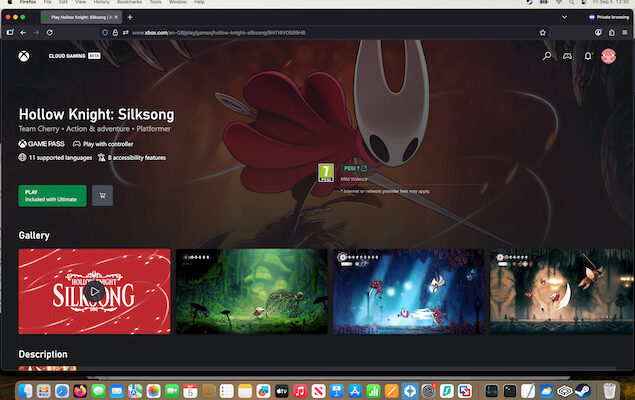
Hollow Knight: Silksong has finally been released, and the good news for Mac users is that there are several ways to play it – including instant access through Xbox Cloud Gaming with no downloads required. Whether you prefer native performance through Steam or streaming through the cloud, Silksong now runs perfectly on macOS.
After seven years of anticipation, the response to the game has been monumental. Upon release, digital storefronts like Steam, Nintendo eShop, Xbox Store, and PlayStation Store were overwhelmed with demand, causing widespread slowdowns and outages.
However, I’ve played it on a Mac using Xbox Cloud with absolutely no problems as you can see below.
How to Play Silksong on a Mac
There are three main options if you want to play the game on your Mac:
1. Xbox Cloud Gaming (Game Pass Ultimate)
If you have Xbox Game Pass Ultimate, you can stream Silksong directly in your browser on any Mac – Intel or Apple Silicon – without installing anything.
Pros:
- No 80GB+ download or storage required
- Works on older Macs
- Instant access
- Easy controller pairing (Xbox, PlayStation, 8BitDo)
This is the method I used and the easiest way to start playing immediately.
If you’re new to the service, I’ve also written a full review of Xbox Cloud Gaming on Mac, where I tested performance, latency, controller support, and system requirements.
2. Native macOS Version (Steam)
Silksong is also available as a native macOS app through Steam, meaning you can install and run it locally with full performance.
The System Requirements are typically:
- macOS Big Sur or newer
- 8GB RAM
- Metal-compatible GPU
- Sufficient storage (game size varies depending on updates)
Native play gives you the best possible responsiveness, but you do need free disk space.
3. Steam Remote Play / Remote Streaming
If you own Silksong on another device (Windows PC or Steam Deck), you can stream it to your Mac using Steam Remote Play.
This isn’t a native Mac experience, but it’s useful if you prefer running the game on dedicated hardware for max settings while streaming the output to your Mac.
Silksong Pricing
- Silksong costs $19.99 USD and is also available in many regions at €19.99, £16.75 or ¥2300 – that’s pretty reasonable by today’s big game pricing standards.
- For Xbox Game Pass subscribers which costs $29.99 or £22.99 per month (Microsoft increased its prices in October 2025), Silksong is included at no extra cost – a huge bonus if you’re already paying for the service.
How to Connect a Controller to a Mac for Silksong
Xbox Series X/S Controller
- Press and hold the Pair button until the Xbox logo flashes.
- On your Mac, go to System Settings > Bluetooth.
- Select Xbox Wireless Controller > Connect.
- It works instantly in Steam, Xbox Cloud Gaming, and browser-based play.
PlayStation 5 DualSense (PS5)
- Hold PS Button + Create Button until the light bar flashes.
- Open System Settings > Bluetooth on your Mac.
- Select DualSense Wireless Controller to pair.
- Steam supports full remapping for the DualSense.
PlayStation 4 DualShock 4 (PS4)
- Hold PS Button + Share Button until the bar flashes.
- Pair via System Settings > Bluetooth.
- Works natively in most macOS games and in Steam.
8BitDo / Other Bluetooth controllers
- Switch to XInput or macOS mode depending on the model.
- Activate pairing.
- Connect via Bluetooth settings.
For the smoothest cloud experience, keep your controller within a meter or two of your Mac.
Troubleshooting: Silksong on Mac
If you’re having problems playing Silksong on your Mac using any of these methods, here’s a few tips.
Cloud gaming feels laggy or pixelated
- Use a 5GHz Wi-Fi network instead of 2.4GHz.
- Close other streaming/download apps.
- Try a wired Ethernet connection if possible.
- In Chrome/Edge, enable Hardware Acceleration in settings.
Steam doesn’t detect my controller on macOS
- In Steam, go to Settings > Controller > General Controller Settings and enable the appropriate controller type.
- Disconnect and reconnect the controller via Bluetooth.
- Restart Steam after pairing.
- For DualSense/DualShock controllers, disable PlayStation Remote Play if it’s running in the background (it hijacks controller input).
Controller input is reversed or mapped incorrectly
- Open Steam Input and go to configure layout manually.
- Turn off “Desktop Mode” inputs in Steam to avoid conflicts.
- Reset the controller by holding buttons (varies by model).
Silksong won’t launch on Steam for Mac
- Confirm you’re running macOS Big Sur or newer.
- Update your GPU drivers via macOS Software Update.
- Verify game files in Steam > Properties > Installed Files > Verify.
- Disable overlays (Discord/Steam FPS counter) if the game crashes at launch.
Cloud Gaming doesn’t recognize the controller
- Make sure the controller is paired before opening Xbox Cloud.
- Use Chrome, Edge, or Opera – Safari still has limitations with controller APIs.
- Toggle your controller off and on; Cloud Gaming usually picks it up instantly afterward.
FAQ
Can I play Silksong on an M1, M2, M3, M4 or M5 Mac?
Yes. Silksong runs natively on macOS, and Apple Silicon Macs can play it without Rosetta as long as your version of macOS meets the minimum requirements. Cloud gaming via Xbox Game Pass Ultimate also works on all Apple Silicon and Intel Macs.
Is Silksong available on the Mac App Store?
No. Silksong is not on the Mac App Store. The only native method is through Steam. Alternatively, you can stream it via Xbox Cloud Gaming.
Do I need a powerful Mac to play Silksong?
Not necessarily. Silksong is not a demanding game and runs smoothly on most Macs from the last decade. Cloud gaming also removes hardware requirements completely since all rendering is done on Microsoft’s servers.
Can I use a PlayStation, Xbox, or 8BitDo controller on a Mac?
Yes. macOS supports Bluetooth controllers across all modern brands, including Xbox Series X/S, PS5 DualSense, PS4 DualShock 4, and most 8BitDo models.
Does Silksong work on Intel Macs?
Yes – both the Steam version and Xbox Cloud Gaming work on Intel-based Macs running Big Sur or later.
Is Silksong free with Xbox Game Pass?
Yes. If you subscribe to Xbox Game Pass Ultimate, Silksong is included at no extra cost. Pricing varies by region and changes occasionally.