

If you’re looking for information on “macOS Golden Gate vs Copilot”, you are not quite comparing like with like.
macOS 27 Golden Gate is Apple’s Mac operating system. Apple Intelligence — including the new Siri AI experience — is Apple’s AI system built into Golden Gate. Microsoft Copilot is Microsoft’s AI assistant, available through its web experience and, more importantly for many Mac users, inside Microsoft 365 apps such as Word, Excel, PowerPoint, Outlook and Teams.
So the more useful comparison is Apple Intelligence vs Microsoft Copilot on a Mac.
The short answer is that Apple Intelligence is the better everyday AI companion if you have an Apple silicon Mac and primarily use Apple’s apps. Microsoft Copilot is the more useful choice if your work lives in Microsoft 365, particularly Word, Excel, PowerPoint, Outlook and Teams. They are not mutually exclusive: for many people, the best setup is to use Apple Intelligence throughout macOS and Copilot inside Microsoft’s apps.
Apple Intelligence vs Microsoft Copilot: Quick Verdict
| If you want… | Better choice | Why |
|---|---|---|
| AI integrated into macOS, Finder, Photos, Safari and Apple apps | Apple Intelligence | It is part of the operating system and can use relevant on-device context to help with everyday tasks. |
| The best AI help in Word, Excel, PowerPoint, Outlook and Teams | Microsoft Copilot | It is designed around Microsoft 365 documents, data and collaboration. |
| AI on an Intel Mac | Microsoft Copilot | Apple Intelligence requires an Apple silicon Mac, and Intel Macs cannot run macOS Golden Gate. |
| A privacy-led option for personal Mac tasks | Apple Intelligence | Apple uses on-device processing where possible and Private Cloud Compute for larger requests. |
| Presentation creation, spreadsheet analysis or company-wide workflows | Microsoft Copilot | Its Microsoft 365 integration, work context and business agents are more suited to this type of work. |
| The most useful overall setup on a modern Mac | Use both | Let Apple Intelligence handle system-level tasks and Copilot handle Microsoft 365 work. |
Why “macOS Golden Gate vs Copilot” Is the Wrong Comparison
Golden Gate is an operating system update, not an AI service that you subscribe to instead of Copilot. It changes the look, performance and capabilities of your Mac, while also introducing the next generation of Apple Intelligence and Siri AI.
Apple describes Siri AI in macOS Golden Gate as a conversational assistant that can understand personal context, take actions in supported apps, search for information online and work from a dedicated Siri app. It also adds Visual Intelligence on Mac, which lets you use a screenshot of an image or PDF as the starting point for a question, search or action. Apple’s Golden Gate overview is the best place to check the current feature list but there’s also an excellent overview
Microsoft Copilot does not replace macOS, nor does Golden Gate stop you using Copilot. You can update a compatible Mac to Golden Gate, turn on Apple Intelligence and continue using Copilot in a browser, in the Microsoft 365 Copilot app and in supported Microsoft apps.
The closer analogy is this:
| Apple | Microsoft |
|---|---|
| macOS Golden Gate | Windows / Microsoft 365 platform |
| Apple Intelligence | Microsoft Copilot |
| Siri AI | Copilot Chat, in broad assistant terms |
That is why this article focuses on Apple Intelligence rather than treating Golden Gate itself as Copilot’s rival.
What Apple Intelligence Adds to a Mac in Golden Gate
Apple Intelligence is not one app. It is a collection of AI features that appear across macOS and Apple’s apps. The value is less about opening a chatbot in a browser and more about reducing small bits of friction as you write, search, organise, create and automate.
Siri AI: Apple’s New Conversational Assistant
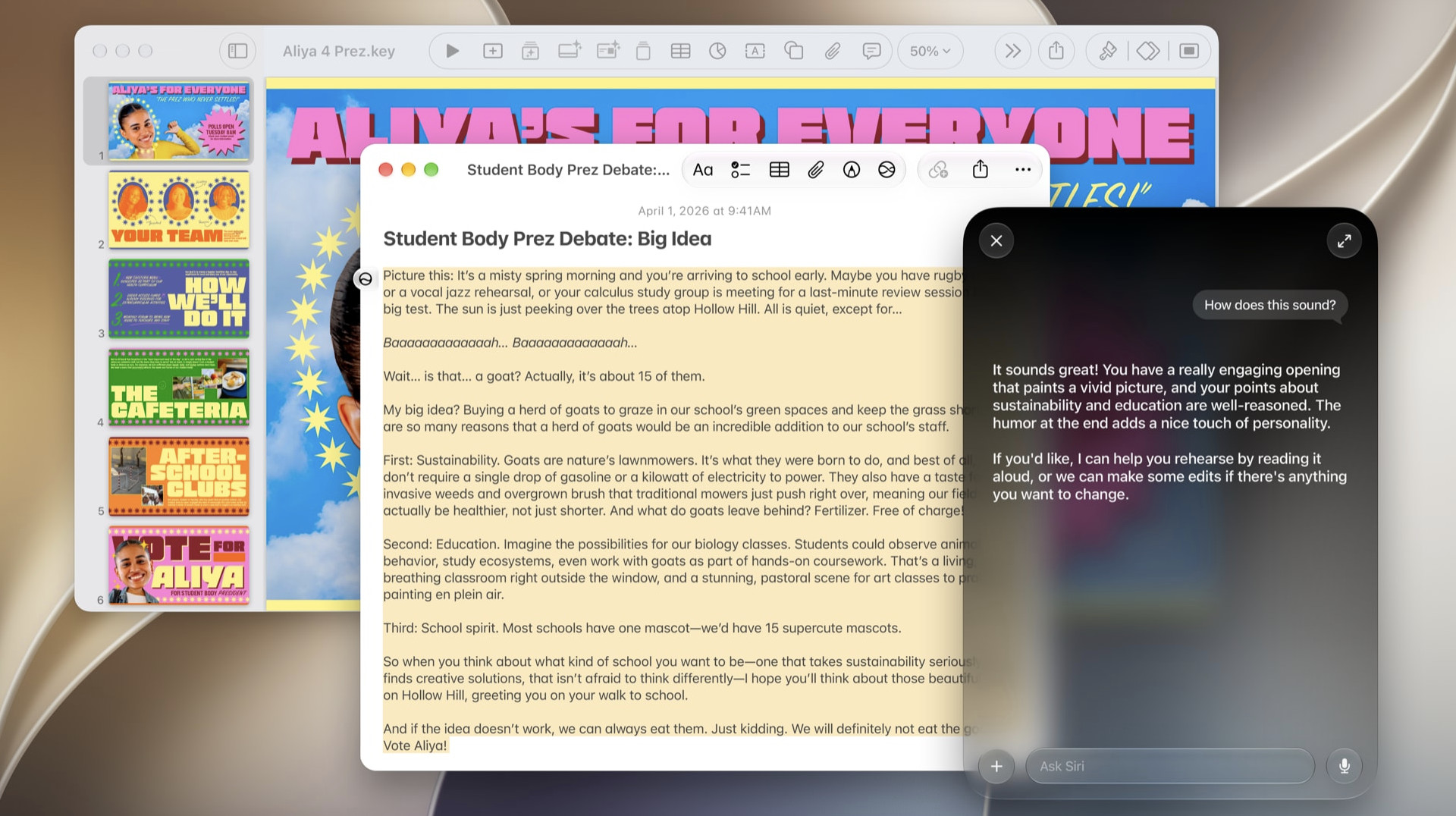
The biggest Golden Gate change is Siri AI. Apple says that it can handle more natural back-and-forth conversations, use personal context to locate relevant information and take actions in apps such as Messages, Music and Reminders.
On a Mac, this is potentially useful for requests such as:
- Finding a photo, note or email when you remember the subject but not the exact title.
- Turning a rough instruction into a reminder, calendar event or message.
- Asking for help drafting or refining a piece of text.
- Continuing a Siri conversation from an iPhone or iPad on your Mac.
- Asking a general question without first deciding which app to open.
It is important not to oversell it. Siri AI is rolling out in English, and availability still varies by feature, language and region. Apple also says that some server-based Apple Intelligence features are subject to daily usage limits. Treat it as a useful evolving assistant rather than an infallible replacement for search, judgement or checking your own work.
Writing Help Across macOS
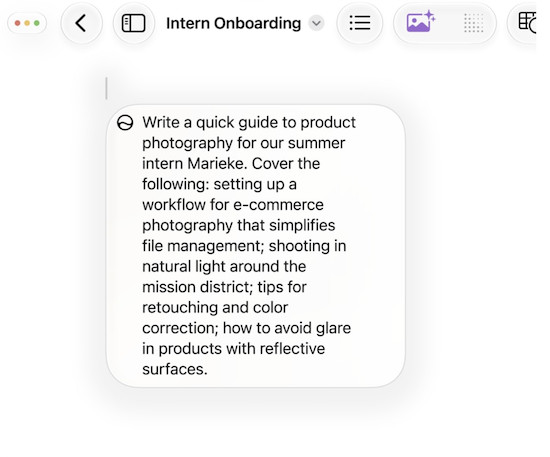
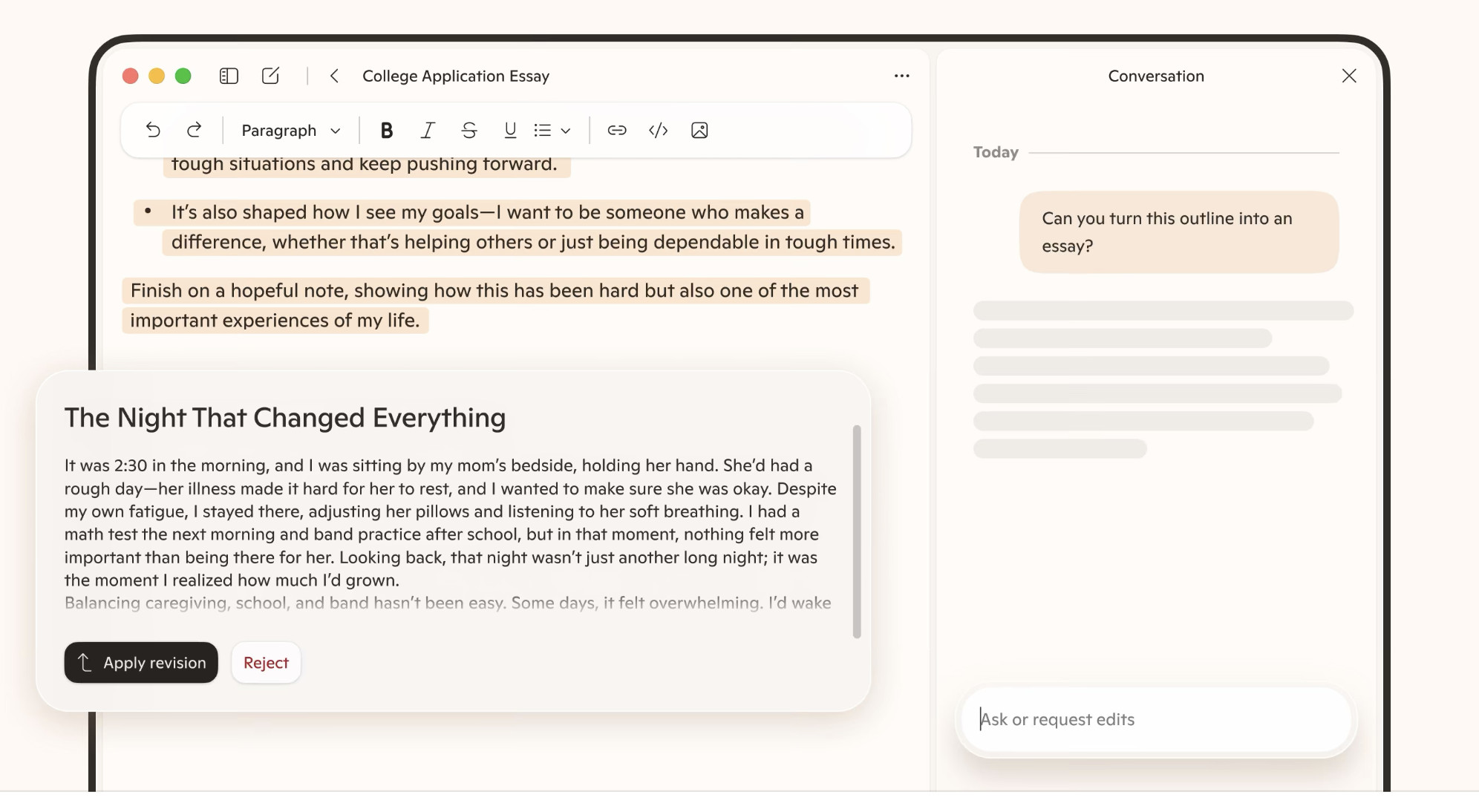
Apple Intelligence can proofread, rewrite, summarise and help compose text. In Golden Gate, Apple also promotes “Write with Siri”, which can generate a draft or offer feedback where you type.
This makes Apple Intelligence particularly handy for ordinary Mac writing: polishing an email, making an explanation shorter, changing the tone of a message or getting a first draft when you have a blank page. It is an advantage if you work in several apps rather than spending your day entirely in one Microsoft app.
However, Apple Intelligence does not make Microsoft Copilot redundant for a word processing. Copilot has the advantage when it can work directly with the document, spreadsheet, presentation or mailbox you already have open.
Visual Intelligence for Screenshots, Images and PDFs
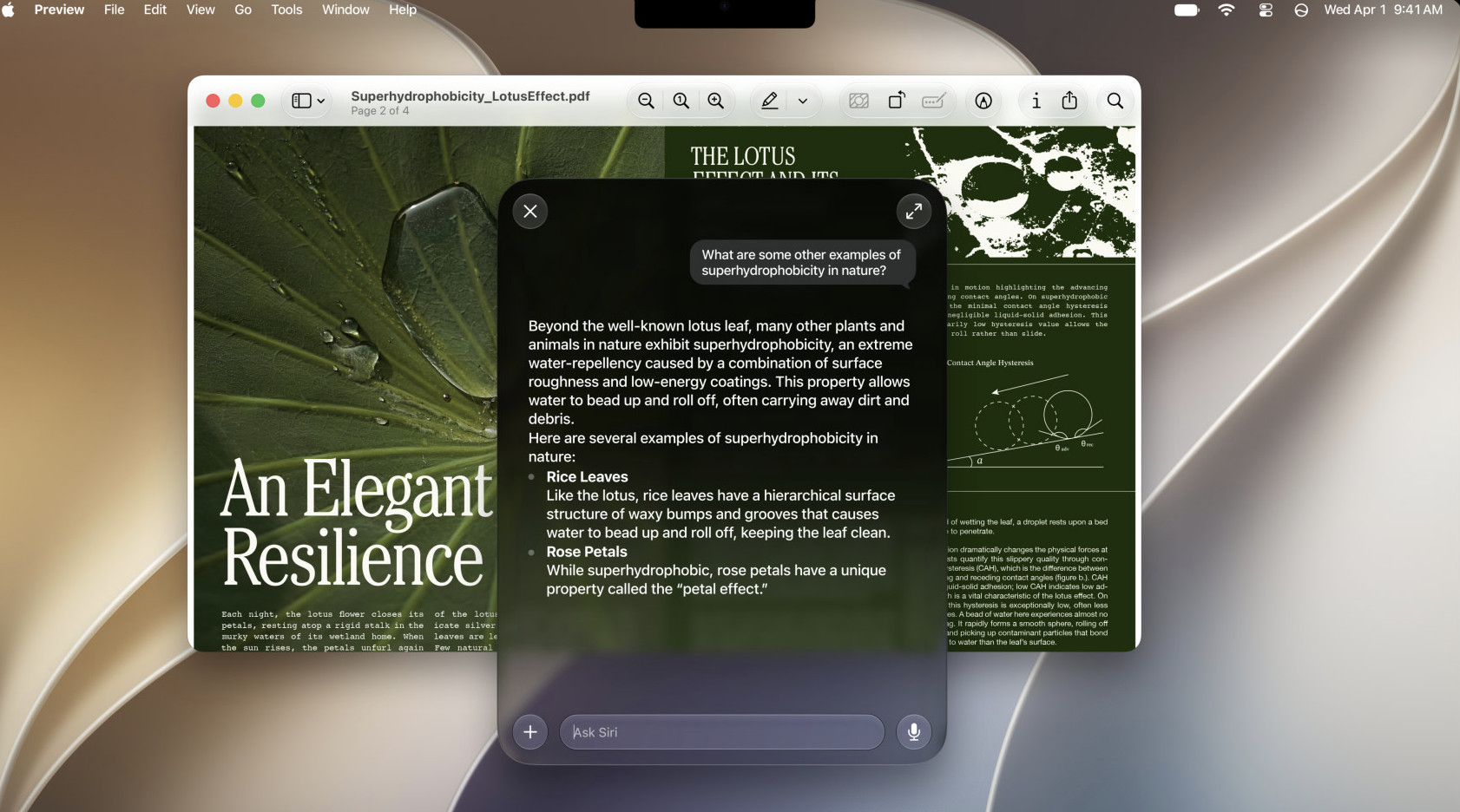
Golden Gate brings Visual Intelligence to the Mac. You can capture what is on screen — including an image or PDF — and then ask Siri AI about it, search for it or take a relevant action.
This is one of the clearest examples of Apple’s different approach. Instead of asking you to upload a file into a separate chat window, the feature begins from what is already on your screen. It should be useful for quickly identifying an object, interpreting a diagram, finding a related product or asking about text in a PDF.
You should still avoid sharing confidential material with any cloud-assisted AI feature until you understand the data handling rules that apply to it.
Photos, Images and Creative Tools
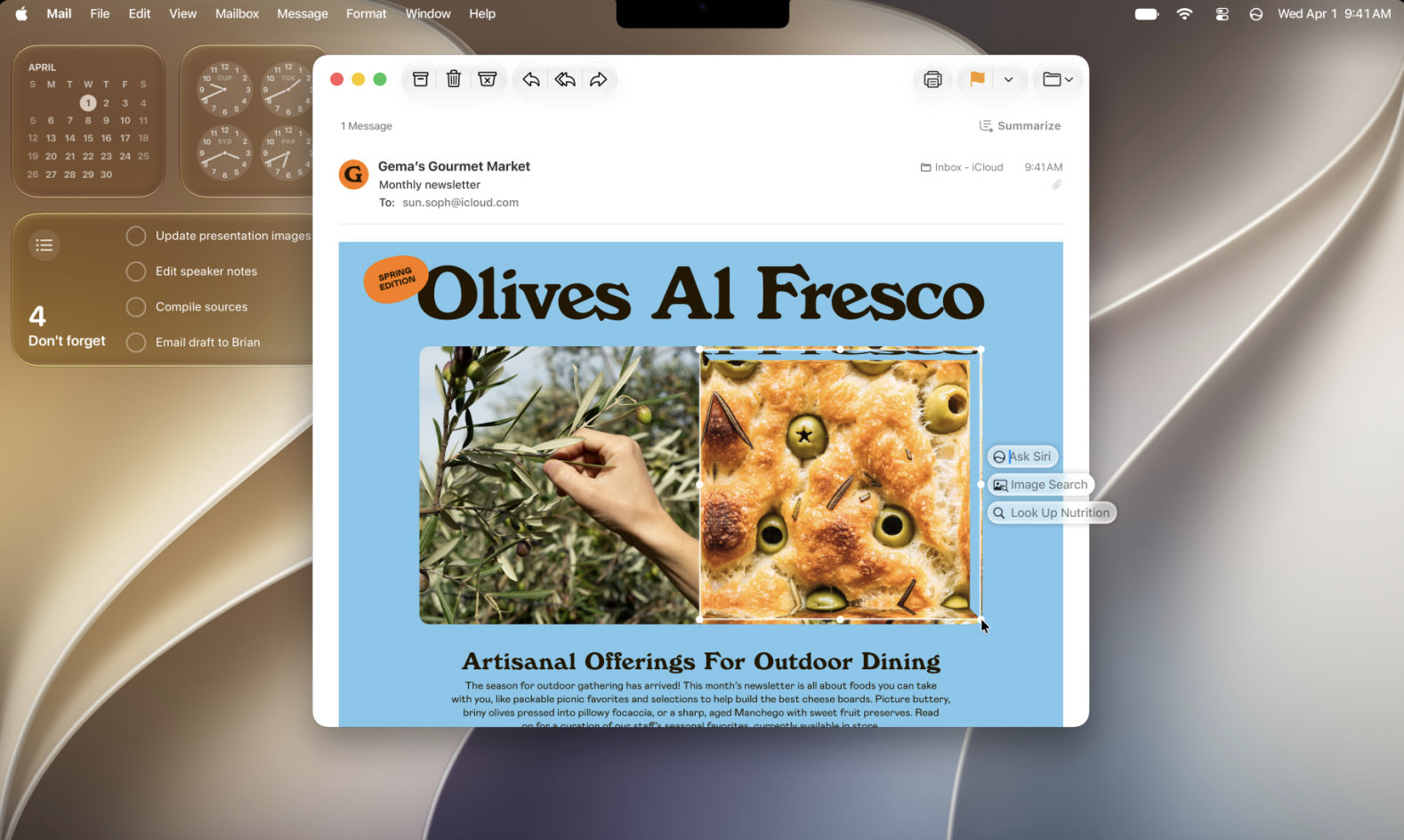
Apple Intelligence also powers photo and image features including enhanced Clean Up, Spatial Reframing, Extend and Image Playground. These are designed to make small photo edits and image creation easier from within Apple’s own environment.
Copilot can also create images, but its strength is generally the broader prompt-based creation experience and its ties to Microsoft’s productivity tools. Apple’s advantage is convenience if your original image is already in Photos or you want a simple image alongside a message, note or Apple project.
Safari, Finder, Mail and Shortcuts
The less flashy Apple Intelligence features may prove more useful day to day. In Golden Gate, Apple lists intelligent Safari features such as grouping tabs by topic and Notify Me, which can monitor a page for a change such as a price drop or restock. It also lists intelligent file and folder-name suggestions in Finder, automatic proofreading, mail suggestions and natural-language calendar and reminder creation.
Apple has also announced the ability to describe a shortcut in natural language. This is worth watching, but it should be described carefully in any buying decision because Apple labels some newer Apple Intelligence capabilities as coming in future software updates and applies usage limits to certain cloud-powered requests.
What Microsoft Copilot Does on a Mac
“Copilot” is a broad Microsoft brand, so it helps to separate the products.
- Microsoft Copilot is the general-purpose AI assistant for chat, research, writing and creation.
- Copilot in Microsoft 365 brings AI into personal Microsoft apps such as Word, Excel, PowerPoint and Outlook, depending on the plan and feature availability.
- Microsoft 365 Copilot is the more advanced work and business offering, with access to organisational context, agents and deeper Microsoft 365 integration.
On a Mac, Copilot’s main attraction is not that it looks like a Mac feature. It is that it can work inside the Microsoft tools many people already depend on.
Copilot in Word, Excel, PowerPoint and Outlook
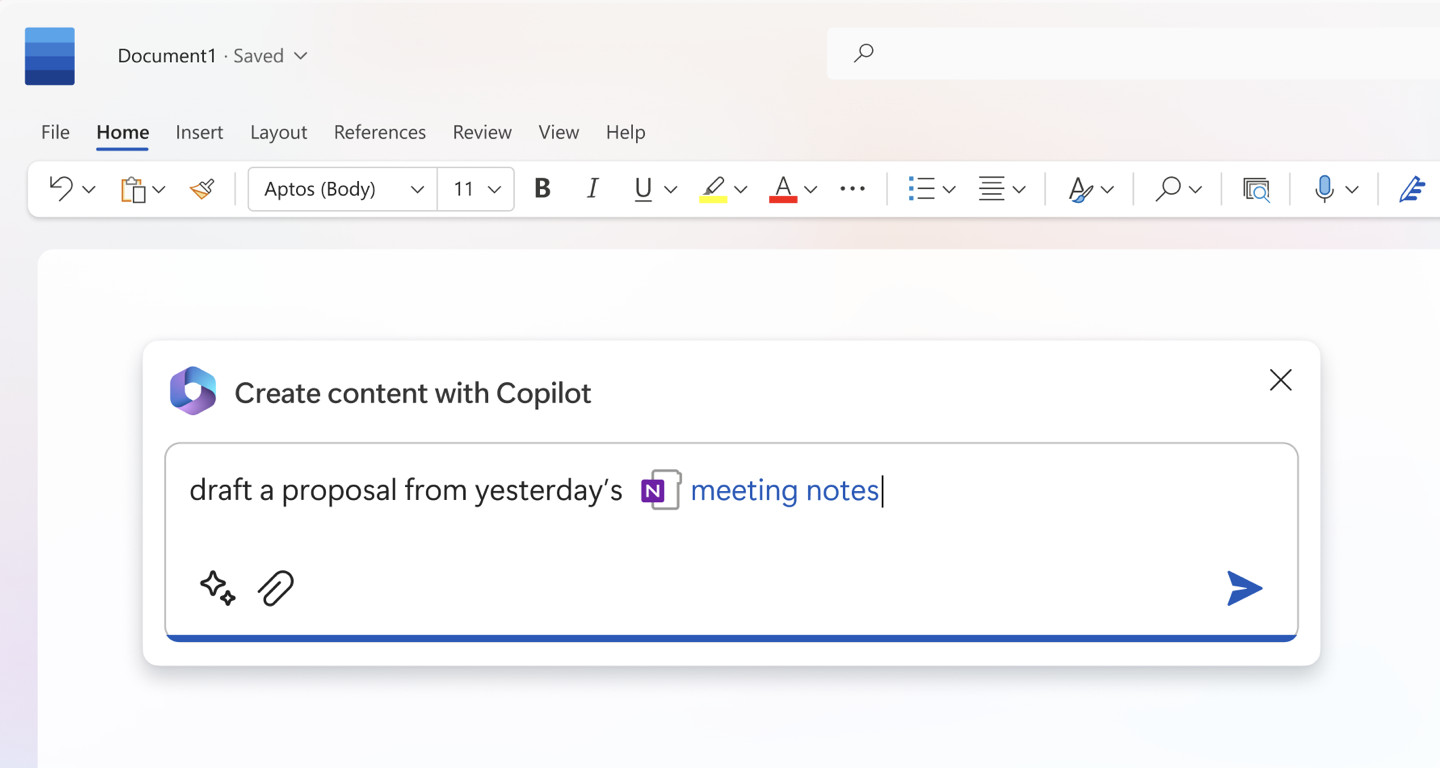
Microsoft says Copilot can create content, summarise documents, emails and meetings, analyse data and work across Word, Excel, PowerPoint, Outlook and Teams. That makes it a much more targeted tool than Apple Intelligence for someone whose job consists of Microsoft 365 files.
For example, Copilot can be the more practical option when you need to:
- Turn a Word brief into a first draft, then revise it in the same document.
- Analyse an Excel workbook, explain trends or help shape a chart.
- Create or restructure a PowerPoint presentation from source material.
- Summarise a long Outlook email thread and prepare a response.
- Catch up on information and collaboration in Microsoft Teams.
The key benefit is context. A good Copilot workflow starts with the actual document, spreadsheet or mailbox rather than copying its contents into a separate assistant.
Copilot for Research, Planning and Bigger Projects
Microsoft is increasingly positioning Copilot as a work layer, not just a chatbot. Its business tools include secure chat connected to work and web data, research and analysis features, and agents for repeatable or multi-step tasks. Microsoft calls the context layer behind this Work IQ.
That does not mean every Mac user needs a business Copilot subscription. It does mean that Copilot can be the stronger option for a company already built around Microsoft 365, SharePoint, OneDrive and Teams — assuming its data permissions and licensing are set up properly.
For a home user or small business, the practical test is simpler: if you regularly use Word, Excel, PowerPoint or Outlook, try the Copilot features already included with your Microsoft 365 plan before paying extra for a higher tier.
Copilot Pricing on a Mac
Copilot is available at different levels, with features and usage limits depending on the account and subscription. Microsoft’s UK pricing page currently lists Microsoft 365 Personal at $99.99 / £84.99 per year and says it includes desktop Word, Excel, PowerPoint and Outlook apps with Copilot, plus higher Copilot usage than the free experience. Microsoft 365 Family and Premium plans offer different allowances and benefits.
For business customers, Microsoft 365 Copilot is a separate licensing decision. Pricing, availability and which in-app features you get can change by market, organisation and plan – details in your region can be found here.
Apple Intelligence is included with eligible hardware and software, but “included” does not mean unlimited. Apple says that some server-side features have daily limits and that expanded access may be offered for a fee in the future.
Apple Intelligence vs Microsoft Copilot: Head-to-Head Comparison
| Area | Apple Intelligence | Microsoft Copilot | Better choice |
|---|---|---|---|
| How it feels on a Mac | Built into macOS and Apple apps, with system-level context. | Available through the web and Microsoft’s apps; it feels most natural inside Microsoft 365. | Apple Intelligence for general Mac use. |
| Writing | Excellent for quick rewriting, proofreading, summaries and drafting across Apple’s environment. | Strong when the writing lives in Word or Outlook and you want it to work with the document or mailbox. | Tie — choose by app. |
| Excel and data analysis | Useful for general explanations, but not designed around Excel workbooks. | Designed to help analyse data and work inside Excel. | Copilot. |
| PowerPoint and work presentations | Can help generate and polish text, but is not a presentation workflow. | Integrated with PowerPoint and designed for presentation creation. | Copilot. |
| Mail and calendar | Better for Apple Mail, Messages, Reminders, Calendar and general Apple-device context. | Better for Outlook, Teams and Microsoft 365 collaboration. | Tie — choose by ecosystem. |
| On-screen understanding | Visual Intelligence works from a screenshot on your Mac. | Visual AI assistance is available in higher Copilot tiers, but it is not as intrinsic to macOS. | Apple Intelligence. |
| Images and photos | Strong integration with Photos, Image Playground and Apple editing tools. | Stronger as a broad prompt-based image creation tool within Microsoft’s ecosystem. | Tie — Apple for personal photos, Copilot for work assets. |
| Automation | Shortcuts and app actions are ideal for personal Mac and Apple-device tasks. | Agents and Microsoft 365 workflows are better suited to organisational work. | Apple for personal use; Copilot for business. |
| Privacy model | Designed around on-device processing and Private Cloud Compute for larger requests. | Enterprise Copilot works with Microsoft 365 security, permissions and compliance controls; consumer use is more cloud-service oriented. | Apple Intelligence for privacy-first personal tasks; Copilot can be appropriate in a well-managed Microsoft 365 organisation. |
| Hardware requirements | Requires a Mac with M1 or later and macOS 27. | Can be used without Apple Intelligence hardware; the best experience depends on your Microsoft apps and plan. | Copilot for Intel Macs. |
Privacy: The Most Important Difference for Many Mac Users
Apple’s privacy approach is a genuine point of distinction. Apple says Apple Intelligence uses on-device processing where possible. For requests that need larger models, it says Private Cloud Compute processes the request without storing the data or making it accessible to Apple or anyone else.
That does not mean that every Apple Intelligence request happens completely offline. It means Apple is deliberately splitting work between the device and a privacy-focused cloud system. Some features also involve third-party services if you choose to use them, so check the prompt and service before sharing private information.
Microsoft’s business offering has a different but valid focus. Microsoft says Microsoft 365 Copilot Chat inherits existing Microsoft 365 security and compliance requirements and respects the permissions already applied to work content. In a properly administered business tenant, that can be far more useful than a generic public chatbot because it is designed to use company data without exposing it to people who do not already have access.
For personal use, do not assume that an AI chat service has the same privacy model as on-device Apple Intelligence. Avoid pasting financial records, confidential client information, passwords, private family documents or unpublished work into any service unless you understand its account settings, terms and your organisation’s policy.
Compatibility: Can Your Mac Use Apple Intelligence and Copilot?
Apple Intelligence Requirements
To use Apple Intelligence on a Mac, you need:
- A Mac with an M1 chip or later.
- macOS 27 Golden Gate.
- Your device language and Siri language set to the same supported language.
- Enough free storage for the downloaded models: Apple says this can be up to 8GB on many eligible Macs and up to 14GB on newer configurations.
Golden Gate itself supports Apple silicon Macs only. If you own an Intel Mac, you cannot update to macOS 27 or use Apple Intelligence. This is a major practical reason why Copilot remains useful for owners of older Macs.
Copilot Requirements
Copilot does not require an Apple silicon Mac or Golden Gate. You can use the web version through a modern browser, and Microsoft 365 plans support use on Macs as well as PCs, phones and tablets. The exact Copilot capabilities depend on the app version, account type, country and subscription.
That flexibility makes Copilot the only one of the two that is realistically available to an Intel Mac user. It is also why Apple Intelligence should not be presented as a universal replacement for Microsoft’s assistant.
Should You Use Apple Intelligence, Copilot or Both?
Choose Apple Intelligence if:
- You have an M-series Mac and want AI that feels native to macOS.
- You mainly use Safari, Apple Mail, Messages, Notes, Reminders, Photos and Apple Calendar.
- You care most about system-level convenience and Apple’s privacy architecture.
- You want help with everyday writing, on-screen questions, photo edits and personal organisation.
- You do not need sophisticated Excel, PowerPoint or Teams help.
Choose Microsoft Copilot if:
- Your working day is centred on Word, Excel, PowerPoint, Outlook and Teams.
- You need help analysing spreadsheets, producing presentations or working with Microsoft 365 documents.
- You work in an organisation that already uses Microsoft 365, OneDrive, SharePoint and Teams.
- You have an Intel Mac or an older Mac that cannot use Apple Intelligence.
- You need a cross-platform assistant that behaves broadly the same on a Mac, Windows PC, phone and web browser.
Use Both if:
- You own an Apple silicon Mac and pay for Microsoft 365.
- You want Apple Intelligence for Mac and iPhone tasks, but Copilot for office work.
- You use Apple apps personally and Microsoft apps professionally.
For most Mac owners in this final group, there is no need to pick a winner and disable the other. Keep Apple Intelligence enabled for the operating-system features you find genuinely useful, then use Copilot where its Microsoft 365 context makes it the better tool.
Recommended Setup for a Mac-Based Microsoft 365 User
If you write, publish, present or analyse data on a Mac, we would suggest a sensible setup is:
- Use Apple Intelligence for personal and system-level tasks. Ask Siri AI to find things, use quick writing improvements where you type, use Visual Intelligence on screenshots and take advantage of Apple’s Photos, Safari and Shortcuts features.
- Use Copilot inside Microsoft 365. Let it help with Word drafts, Outlook threads, Excel analysis and PowerPoint structure where it has the relevant file or work context.
- Do not blindly trust either one. Check facts, calculations, citations, names, dates and the final tone of every important output. AI is often useful for a first pass, not a final sign-off.
- Apply a privacy rule. Keep especially sensitive personal or business material out of consumer AI chat tools. For company data, follow your organisation’s Microsoft 365 and AI policy.
FAQ
Is macOS Golden Gate the same as Microsoft Copilot?
No. macOS Golden Gate is Apple’s operating system. Microsoft Copilot is an AI assistant. The actual Apple competitor to Copilot is Apple Intelligence, including Siri AI.
Does macOS Golden Gate include an AI assistant like Copilot?
Yes. Golden Gate includes Apple Intelligence and the new Siri AI experience on supported Macs. Siri AI is Apple’s conversational assistant and can use personal context, work with supported apps and provide broader online information. Some features are rolling out gradually and are subject to language, region and usage restrictions.
Can I use Microsoft Copilot on macOS Golden Gate?
Yes. Updating to Golden Gate does not stop you using Microsoft Copilot. You can use Copilot through the web and in supported Microsoft 365 apps on your Mac.
Is Apple Intelligence free on a Mac?
Apple Intelligence is included with compatible hardware and supported macOS software. However, Apple says that certain server-based features have daily usage limits and that expanded access may be offered for a fee in the future.
Does Apple Intelligence work on Intel Macs?
No. Apple Intelligence on Mac requires an M1 chip or later. macOS Golden Gate also supports Apple silicon Macs only, so Intel Mac owners should look to Copilot or another web-based AI assistant instead.
Is Copilot better than Apple Intelligence for Microsoft Word on a Mac?
Usually, yes. Apple Intelligence can still help with general writing, but Copilot has the more natural advantage when it can work directly inside Word with the document you are editing. The same applies to Excel, PowerPoint, Outlook and Teams.
Is Apple Intelligence more private than Copilot?
They use different approaches. Apple prioritises on-device processing and Private Cloud Compute for its own AI system. Microsoft 365 Copilot is designed to work within an organisation’s existing Microsoft 365 security, permissions and compliance controls. For personal sensitive material, Apple’s on-device-first design is generally the more reassuring model; for managed work data, the right answer depends on your company’s configuration and policy.
Final Verdict
Apple Intelligence is the better AI experience for the Mac itself. Microsoft Copilot is the better AI experience for Microsoft 365 work.
If you have an Apple silicon Mac running macOS Golden Gate, Apple Intelligence gives you a useful, privacy-led layer of help across the operating system. It is especially appealing for writing, finding things, working with screenshots, personal organisation and Apple apps.
If Word, Excel, PowerPoint, Outlook and Teams are central to your work, Copilot is more likely to save you meaningful time because it is embedded in the documents and collaboration tools that contain your work.
The best answer for a modern Mac user is often not Apple Intelligence or Copilot. It is Apple Intelligence plus Copilot, with each doing the work it is best positioned to understand.