


SmartDraw and RoomSketcher are both popular floor planning tools, but they’re designed for very different types of users.
I’ve used both extensively (as you can read in my SmartDraw and RoomSketcher reviews), so this is my personal, independent view of each product.
RoomSketcher publishes its own comparison with SmartDraw but naturally, its biased towards its own product and such marketing blurbs often don’t highlight the limitations of the product.
This guide focuses on which tool is better for specific use cases (floor plans, diagrams, casual users, professionals), rather than generic feature lists.
Since both apps work on Mac and Windows PCs, this comparison will also be of interest to users on both platforms.
Firstly, let’s start with seeing how they compare side-by-side.
Comparison Table
| SmartDraw | RoomSketcher | Which to pick | |
|---|---|---|---|
| Aimed at | Businesses, architects, engineers | Homeowners, interior designers, DIYers | Choose SmartDraw for technical/business needs; RoomSketcher for glossy visuals and ease |
| Platform | Desktop app + Web | Web only but mobile apps available | SmartDraw gives you the choice of both desktop and web access but RoomSketcher offers mobile app |
| Learning curve | Low | Low | Both apps are easy to use for anyone new to floor plans |
| 2D drawing tools | Advanced (dimensioning, layers) | Solid (auto room detection) | SmartDraw if you need CAD-like precision |
| 3D visualisation | None | High-quality photorealistic renders | RoomSketcher wins for stunning visuals |
| Templates & symbols | Huge choice, multi-purpose | Focused on interiors | Depends on whether you need broad diagram support on just home design |
| Export formats | PDF, PNG, SVG, Visio, Office | High-res JPG/PNG, PDF, 2D/3D plans | SmartDraw for Visio/SVG needs |
| Collaboration | Team plans and Enterprise features support real-time collaboration, SSO | Simple sharing & exports | SmartDraw for teams; RoomSketcher for client previews |
| Integrations | MS 365, Confluence, Jira, Google Workspace | Minimal integrations available | SmartDraw for integration with third party services |
| Offline use | Desktop app but requires internet | Requires internet | Neither offer offline usage |
| Pricing | Starts at $9.95/m with a free trial | Freemium plus paid tiers starting at $12/month | RoomSketcher offers a limited free version but won’t be enough for detailed designs |
Here’s a look at how some of these things compare between the two in more detail.
1. Ease of use
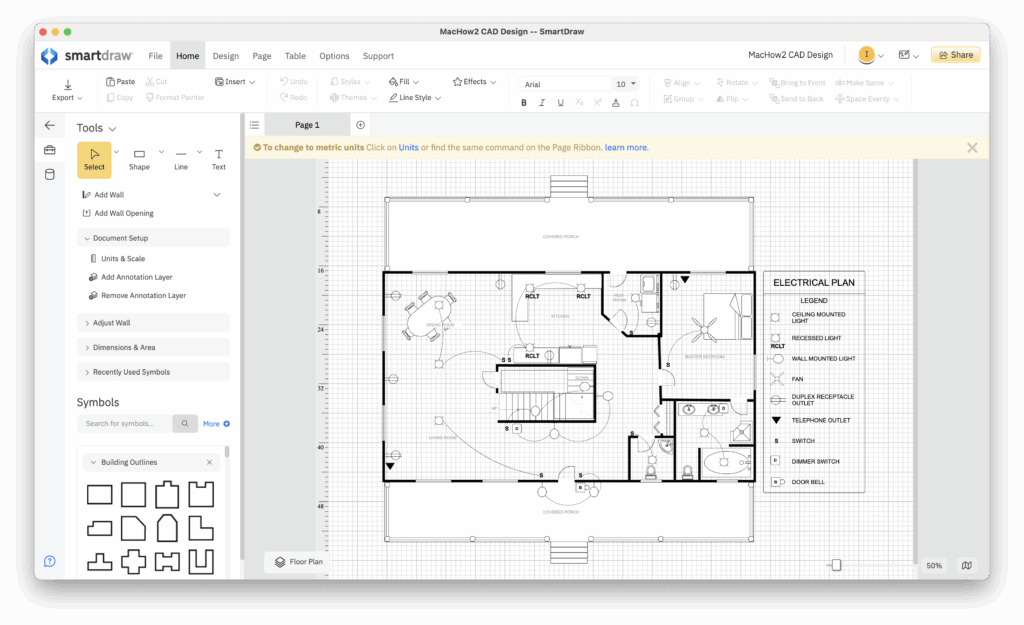
- SmartDraw: Clean desktop/web interface and hundreds of templates. There is a small learning curve because of the sheer number of features but I found it one of the easiest floor planners to get going with quickly.
- RoomSketcher: Super simple drag-and-drop floor planner, aimed at beginners with lots of templates. Quick to draw rooms, add doors/windows/furniture and preview in 3D. If you want to turn a 2D floor plan into 3D, RoomSketcher easily wins.

2. Floor plan & drawing tools
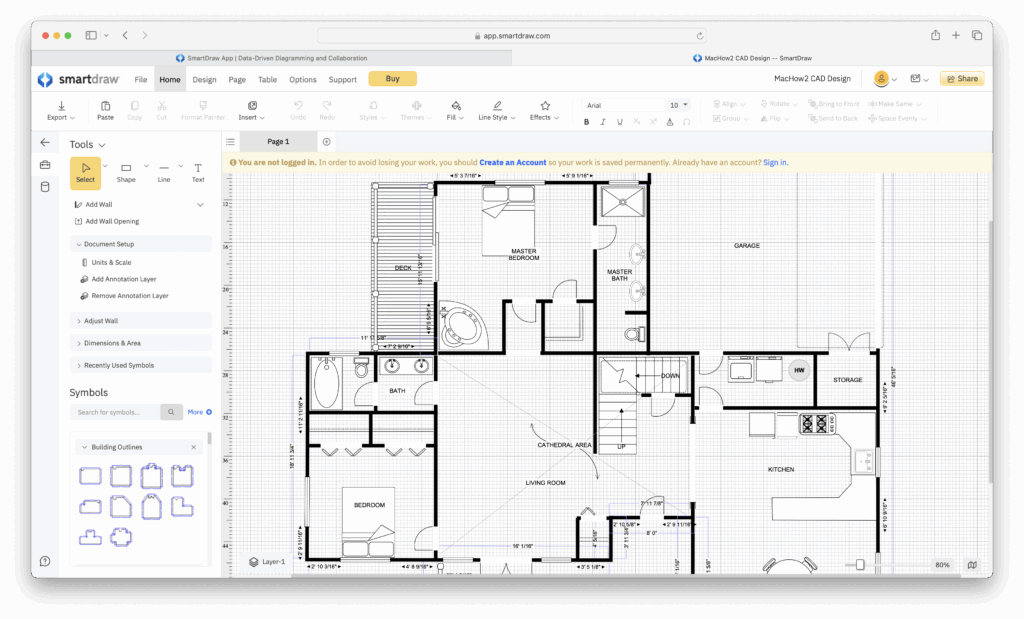
- SmartDraw: Lots of tools, layer control, CAD-like measurement options. It’s particularly good for commercial plans and integration with engineering projects.
- RoomSketcher: Convenient wall snapping, automatic room detection, and a huge library of furniture/objects. It’s more focused on residential & interior design than SmartDraw.

RoomSketcher also gives you many ways to create floor plans including uploading Blueprints, tracing around blueprints and AI generation.

3. 3D visualization & rendering
- SmartDraw: SmartDraw is a 2D drawing app and does not have any 3D viewing features.
- RoomSketcher: This is where RoomSketcher really impresses for me – high-quality renders, 3D Walkthroughs, and 360° views. If photorealistic views of your designs matter, choose RoomSketcher.

4. Templates & content library
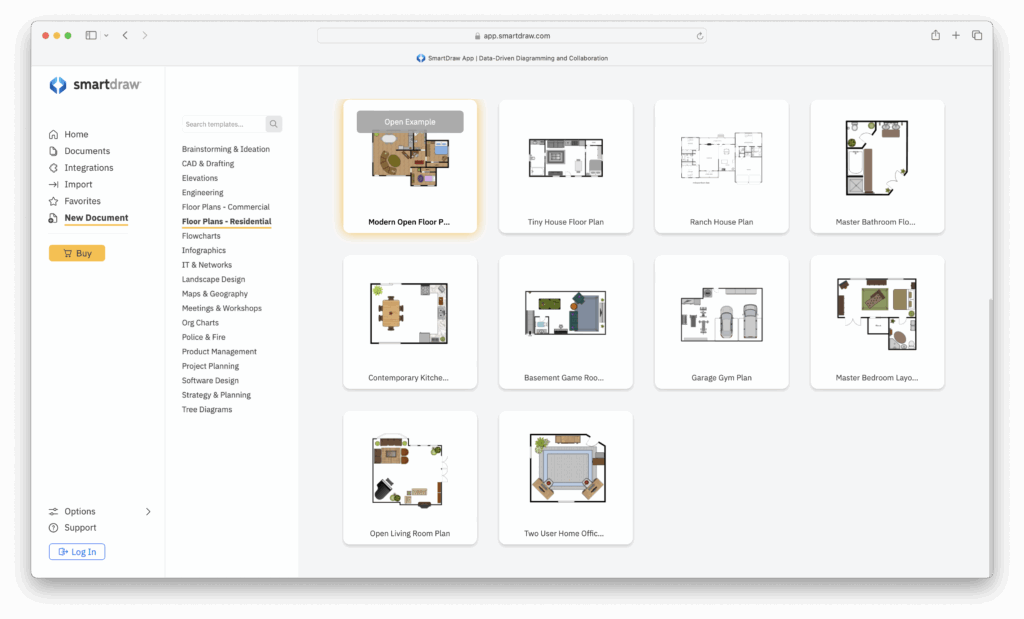
- SmartDraw: It has one of the biggest diagram templates library of any app I’ve tried (including floor plans, flowcharts, org charts, landscape designs). This is great if you also need non-floor-planning tools.
- RoomSketcher: It has lots of home design templates including kitchens, bathrooms, and furniture packs. RoomSketcher is definitely better for interior styling but not suitable for other types of diagramming if you need it.

5. Collaboration & sharing
- SmartDraw: Very easy to collaborate as a team and also allows you to share diagrams via link with non-SmartDraw users.

- RoomSketcher: Sharing is only possible via links or exporting images/PDFs) and this is restricted to the Pro plan. You also can’t collaborate on floor plans or designs in real time like you can with SmartDraw.
6. Integrations & export formats
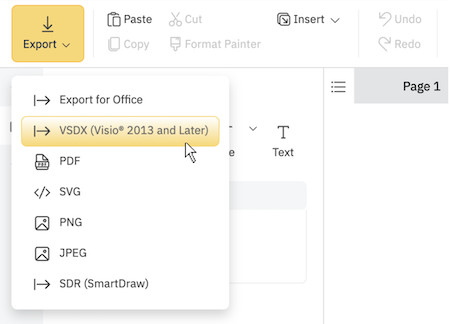
- SmartDraw: Exports to PDF, PNG, SVG and even Visio (which is why its easily the best Visio alternative I’ve tried too) and integrates with Microsoft 365, Google Workspace, Confluence, Jira, and more.
- RoomSketcher: Exports high-res images, PDFs, and 2D/3D floor plans in the Pro version. There’s limited direct app integrations compared with SmartDraw, but exported graphics are high quality, fit for presentations, client demonstrations etc.
7. Pricing & licensing
- SmartDraw: Subscription-based with per-user commercial pricing starting at $9.95/month ($8.95/month for teams with Enterprise pricing on request). There’s no free plan but there is a free trial.
- RoomSketcher: Freemium model which means a basic free plan and then paid subscriptions starting at $12/month to unlock higher-resolution exports, 3D rendering, and commercial rights.
Conclusion: Which One Should You Choose?
I was impressed with both tools and the difference largely comes down to whether you need 2D and 3D, glossy graphics and team collaboration.
I’d say:
- Pick SmartDraw if: you need precision, enterprise integrations (MS 365, Confluence, Jira), exports to Visio/SVG, or you’re doing a mix of diagrams and floor plans. SmartDraw is also better if you need to collaborate in corporate environments.
- Pick RoomSketcher if: you’re a homeowner, interior designer, or DIYer who wants beautiful 3D renders, an easier learning curve, and lots of home design templates. If you want to produce walkthroughs for clients quickly, RoomSketcher is the better choice.
For other floor planning and home design software, check out our guide to the best floor plan software for Mac.