

Apple’s latest desktop releases have changed the options for Macs significantly.
Previously, the choice was relatively simple: buy a Mac mini for everyday computing and lighter creative work, or pay substantially more for a Mac Studio if you needed professional performance.
The arrival of the M6 and M5 Pro Mac mini, alongside the M5 Max and M5 Ultra Mac Studio, has now created a more interesting four-tier lineup:
- M6 Mac mini: Everyday computing and lighter creative work
- M5 Pro Mac mini: Professional video, audio, development and design work
- M5 Max Mac Studio: Demanding GPU, AI, 3D and high-resolution video work
- M5 Ultra Mac Studio: Specialist VFX, scientific and exceptionally memory-intensive work
The most important change is that the M5 Pro Mac mini now provides enough processing power, memory and connectivity for many users who might previously have needed a Mac Studio – but with a higher price.
The Mac Studio has consequently moved further upmarket. Its main advantages are no longer simply better performance and more ports, but much more powerful graphics, substantially higher memory bandwidth, up to 512GB of unified memory and support for as many as eight displays.
For most users, the M6 Mac mini is now the best-value desktop Mac. For demanding professional work, I recommend the M5 Pro Mac mini. The Mac Studio is worth the additional cost only if your work will genuinely benefit from an M5 Max or M5 Ultra chip – such as for high-end video editing or demanding 3D modelling and CAD software.
Here’s a closer look at the differences between the Mac mini and Mac Studio in 2026.
Important: Apple announced these models on 25 August 2026. They can be pre-ordered now and begin arriving on 22 September. The 512GB M5 Ultra Mac Studio configuration will follow later in October.
Mac mini vs Mac Studio At a Glance
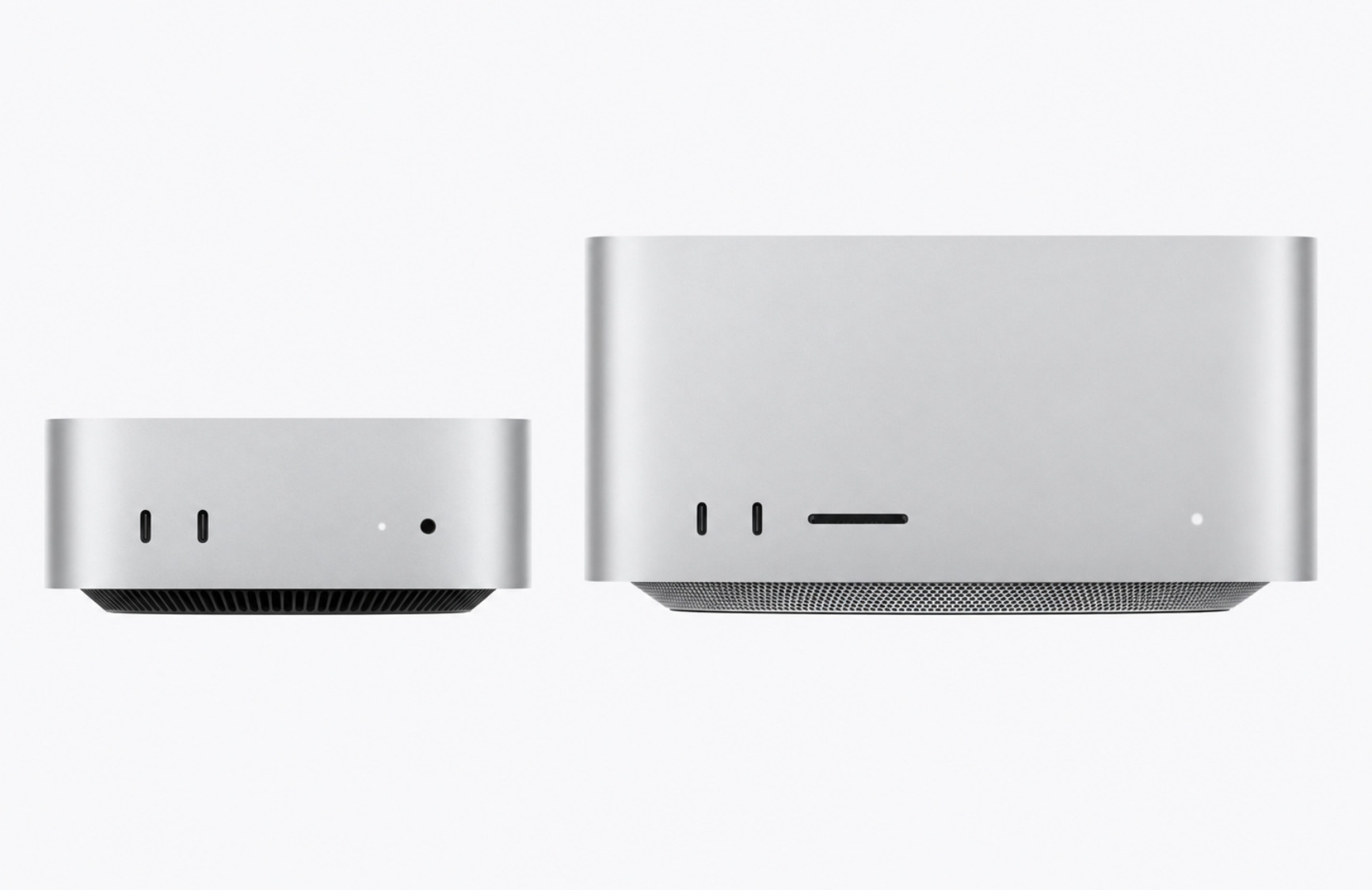
| M6 Mac mini | M5 Pro Mac mini | M5 Max Mac Studio | M5 Ultra Mac Studio | |
|---|---|---|---|---|
| Best For | Home, office and lighter creative work | Professional work and best overall value | Demanding creative, 3D and AI work | Extreme professional work |
| Starting Price | $899 | $1,699 | $2,499 | $5,499 |
| CPU | 12 cores | Up to 18 cores | 18 cores | Up to 36 cores |
| GPU | 12 cores | Up to 20 cores | Up to 40 cores | Up to 80 cores |
| Unified Memory | 16GB–32GB | 24GB–64GB | 36GB–128GB | 96GB–512GB |
| Memory Bandwidth | Up to 170GB/s | 307GB/s | Up to 614GB/s | 1.2TB/s |
| Storage | 256GB–2TB | 512GB–8TB | 512GB–8TB | 1TB–16TB |
| Thunderbolt | Three Thunderbolt 4 ports | Three Thunderbolt 5 ports | Four rear Thunderbolt 5 ports | Six Thunderbolt 5 ports |
| Maximum Displays | Three | Three | Five | Eight |
| Ethernet | 2.5Gb; 10Gb optional | 2.5Gb; 10Gb optional | 10Gb | 10Gb |
| SD Card Slot | No | No | Yes | Yes |
| USB-A Ports | No | No | Two | Two |
The prices shown are Apple’s US starting prices. Recommended configurations with additional memory and storage cost considerably more.
The Short Answer
Buy the M6 Mac mini if you mainly use your Mac for:
- Web browsing
- Microsoft Office
- Email and video calls
- General home or office work
- Photo management
- Occasional video editing
- Everyday AI tools
- Programming and development that isn’t exceptionally demanding
Buy the M5 Pro Mac mini if you regularly use:
- Final Cut Pro
- DaVinci Resolve
- Adobe Premiere
- Logic Pro or another professional DAW
- Xcode
- CAD and 3D-design software
- Large development projects
- Several high-resolution displays
- Local AI models requiring more than 32GB of memory
Choose a Mac Studio with M5 Max if you need:
- Much faster GPU performance
- Up to 128GB of unified memory
- Several streams of high-resolution video
- Advanced 3D rendering
- Professional visual effects
- Larger local AI models
- Five displays
- More ports and built-in 10Gb Ethernet
The M5 Ultra Mac Studio is aimed at exceptionally demanding users who need up to 80 GPU cores, 512GB of unified memory, several media engines or as many as eight displays.
Most individuals and small businesses don’t need an M5 Ultra.
Mac mini vs Mac Studio: What’s the Main Difference?
The fundamental difference is the level of processor available in each Mac.
The Mac mini uses:
- M6
- M5 Pro
The Mac Studio uses:
- M5 Max
- M5 Ultra
The standard M6 is designed for mainstream computing, while M5 Pro adds more CPU and GPU cores, higher memory bandwidth and support for more unified memory.
M5 Max and M5 Ultra take this much further. They provide considerably more GPU performance, additional media engines, much higher memory bandwidth and configurations with far more unified memory.
This means the Mac mini is now capable of handling a surprisingly wide range of professional tasks. The Mac Studio is mainly for software that can use its additional GPU resources, media engines or memory capacity.
Simply buying a Mac Studio doesn’t make every application dramatically faster. Many everyday applications, including web browsers, Microsoft Office and email clients, won’t take advantage of dozens of additional GPU cores.
M6 Mac mini: Best for Most Users
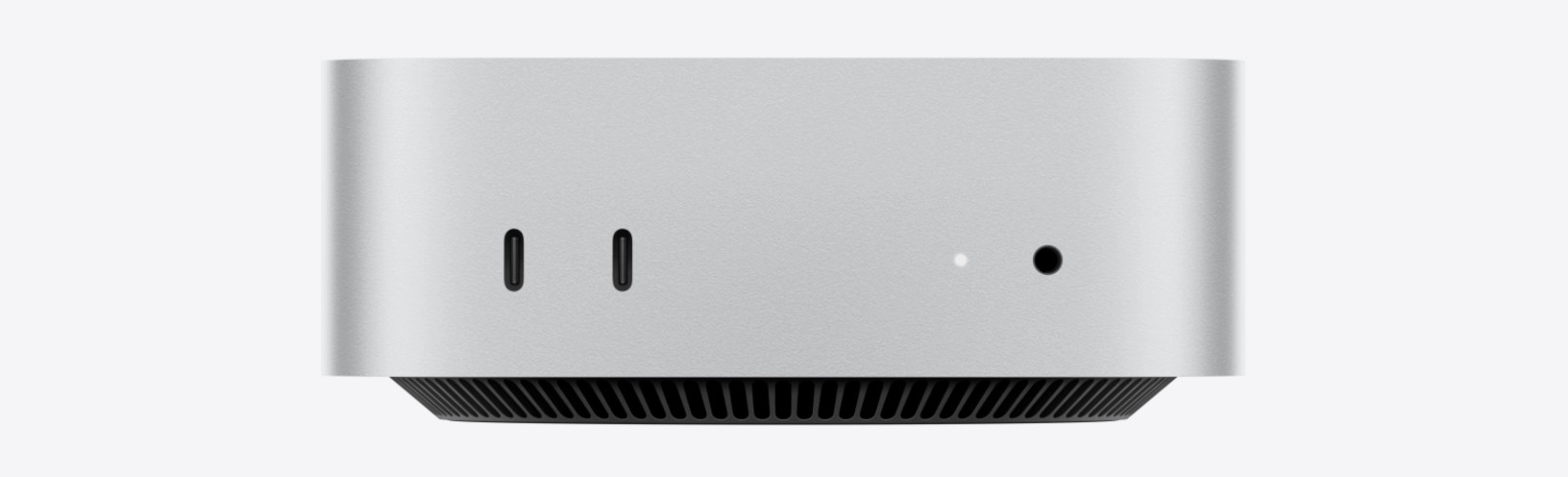
The M6 Mac mini is the desktop Mac I recommend to most home and business users.
It has a 12-core CPU, 12-core GPU and Neural Accelerators integrated into the GPU. Apple claims up to 40% faster CPU performance and twice the graphics performance of the previous M4 Mac mini, although the gains will vary between applications.
The M6 supports up to 32GB of unified memory and up to 2TB of internal storage.
It is more than powerful enough for:
- General productivity
- Office work
- Web design
- Photo editing
- Light-to-moderate video editing
- Music recording
- Programming
- Running virtual machines with moderate memory requirements
- Smaller local AI models
The M6 Mac mini can also drive up to three displays, including configurations involving an 8K, 5K 120Hz or 4K 240Hz display.
Its main limitation is the 32GB maximum memory. That is sufficient for most users, but it can become restrictive for large virtual machines, complex video projects, very large sample libraries and demanding local AI models.
For general use, I would choose 24GB of unified memory and at least a 512GB SSD. If you expect to keep the Mac for many years or use it for creative work, 32GB provides more breathing room.
The standard 256GB SSD is likely to feel restrictive once macOS, applications, photos and other files are installed.
You can see all the current options on Apple’s Mac mini specifications page.
M5 Pro Mac mini: The New Professional Sweet Spot

The M5 Pro Mac mini is the most significant part of Apple’s revised desktop lineup.
It is available with up to an 18-core CPU, 20-core GPU, 64GB of unified memory and 307GB/s of memory bandwidth. It also includes three Thunderbolt 5 ports instead of the M6 model’s Thunderbolt 4 connections.
This gives it enough performance and memory for many tasks that might previously have justified purchasing a Mac Studio.
It is particularly well suited to:
- Professional photo editing
- 4K and multicamera video editing
- Music production with large projects
- Software development
- CAD
- 3D modelling
- Engineering applications
- Running several virtual machines
- Local AI development
- Smaller professional studios
The M5 Pro Mac mini also supports up to three high-resolution displays and can drive multiple 5K displays at 120Hz.
For many users, it now represents the best combination of professional performance, compact size and price in Apple’s desktop range.
I would choose 48GB or 64GB of unified memory for demanding work. The memory cannot be upgraded later, whereas storage can be expanded relatively easily using a Thunderbolt SSD.
The Mac mini still lacks USB-A ports and an SD card reader, so photographers, video editors and anyone with older peripherals may require a hub or dock.
M5 Max Mac Studio: Best for Demanding Creative Work
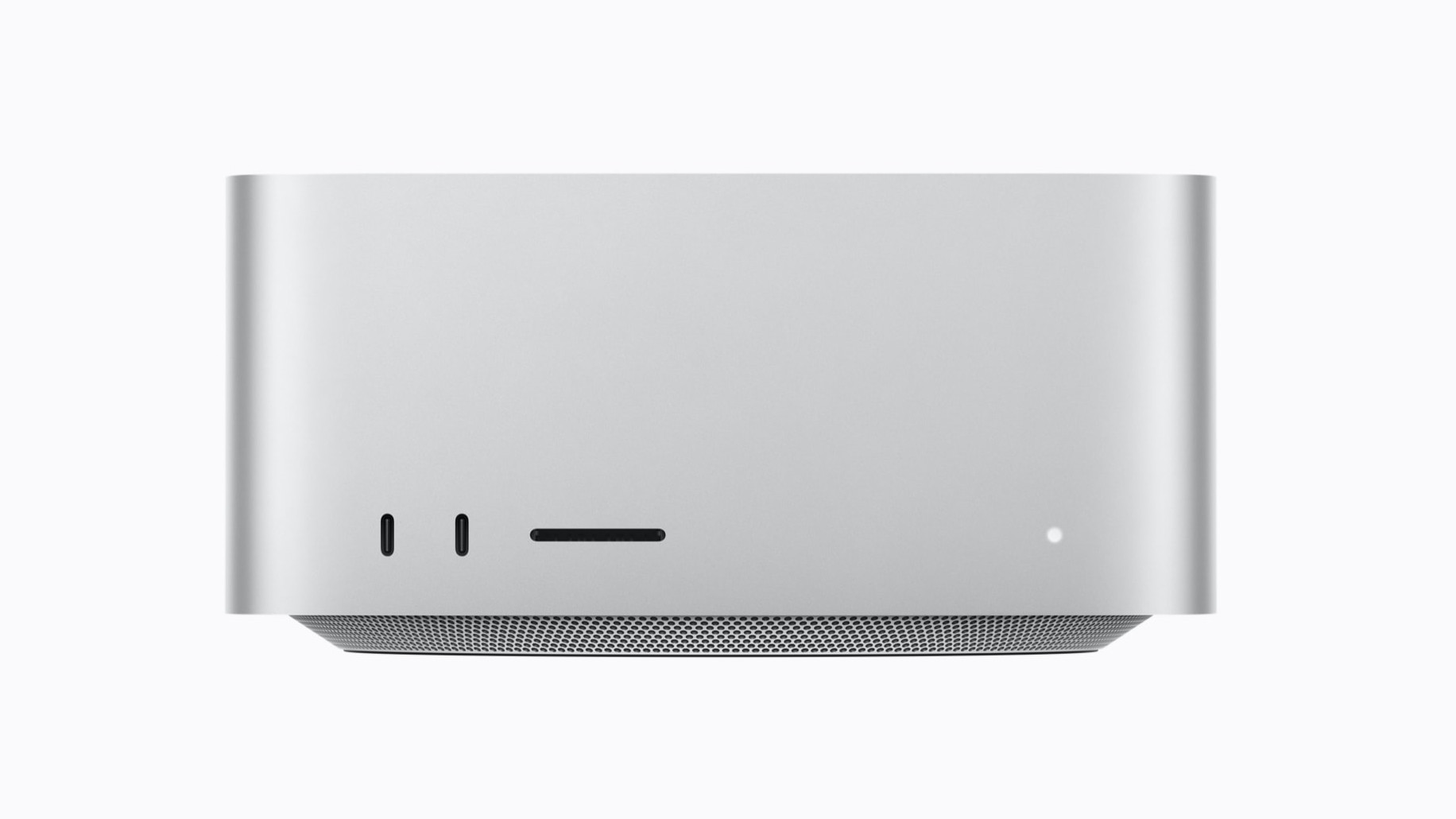
The M5 Max Mac Studio starts with an 18-core CPU and 32-core GPU and can be configured with a 40-core GPU.
It supports up to 128GB of unified memory and provides up to 614GB/s of memory bandwidth—twice that of the M5 Pro Mac mini.
Its advantage is most noticeable in applications that make extensive use of the GPU, including:
- DaVinci Resolve
- Final Cut Pro
- Adobe Premiere and After Effects
- Blender
- Cinema 4D
- Redshift
- 3D rendering
- Visual effects
- AI image generation
- Large local language models
- Scientific and engineering workloads
The M5 Max also includes two video-encode engines and two ProRes encode-and-decode engines. This makes it better suited to processing multiple high-resolution video streams and exporting complex projects.
The M5 Pro Mac mini can edit video extremely well, but the Mac Studio becomes worthwhile when faster exports, effects processing and smoother handling of several high-resolution streams directly affect your productivity or income.
The Mac Studio also supports five displays and offers more built-in connectivity, including:
- Four rear Thunderbolt 5 ports
- Two front USB-C ports
- Two USB-A ports
- HDMI 2.1
- SDXC UHS-II card reader
- 10Gb Ethernet
- Headphone connection
Unlike the Mac mini, you don’t need to pay extra for 10Gb Ethernet or add a card reader for importing photos and video.
M5 Ultra Mac Studio: Only for Extreme Tasks
The M5 Ultra Mac Studio is Apple’s most powerful desktop Mac.
It can be configured with:
- Up to a 36-core CPU
- Up to an 80-core GPU
- A 32-core Neural Engine
- Up to 512GB of unified memory
- 1.2TB/s of memory bandwidth
- Up to 16TB of internal storage
It also has twice as many video-decode, video-encode and ProRes engines as the M5 Max.
Apple says the M5 Ultra can simultaneously play up to 33 streams of 8K ProRes 422 video at 30 frames per second. It is also designed to load exceptionally large local AI models that won’t fit into the memory of other Macs.
The M5 Ultra is aimed at users working with:
- Feature-film editing
- Advanced visual effects
- Large 3D simulations
- Scientific datasets
- Exceptionally large AI models
- High-end animation
- Multiple streams of 8K video
- Complex software development
- Eight-display installations
It isn’t a sensible upgrade for general productivity, normal photo editing or occasional video work. Most software simply won’t use all its resources.
Unless you already understand why you need more than 128GB of memory or a 40-core GPU, the M5 Max is the more sensible Mac Studio.
Performance: Is Mac Studio Always Faster?
The Mac Studio is technically more powerful, but the difference you experience depends heavily on what you do.
For web browsing, Office, email and normal productivity, the M6 Mac mini will feel just as responsive as a Mac Studio in most situations.
Many everyday tasks depend more on single-core CPU performance and SSD responsiveness than on the number of GPU cores.
The Mac Studio pulls ahead when software can divide work across its larger GPU or take advantage of its extra media engines and memory bandwidth.
Examples include:
- Rendering 3D scenes
- Applying complex video effects
- Exporting large video projects
- Processing AI models
- Training or fine-tuning smaller machine-learning models
- Running scientific simulations
- Working with exceptionally large images or datasets
The M5 Pro Mac mini sits between these two extremes. It offers more CPU and GPU power than the M6 and is likely to be fast enough for most individual professional users.
Unified Memory
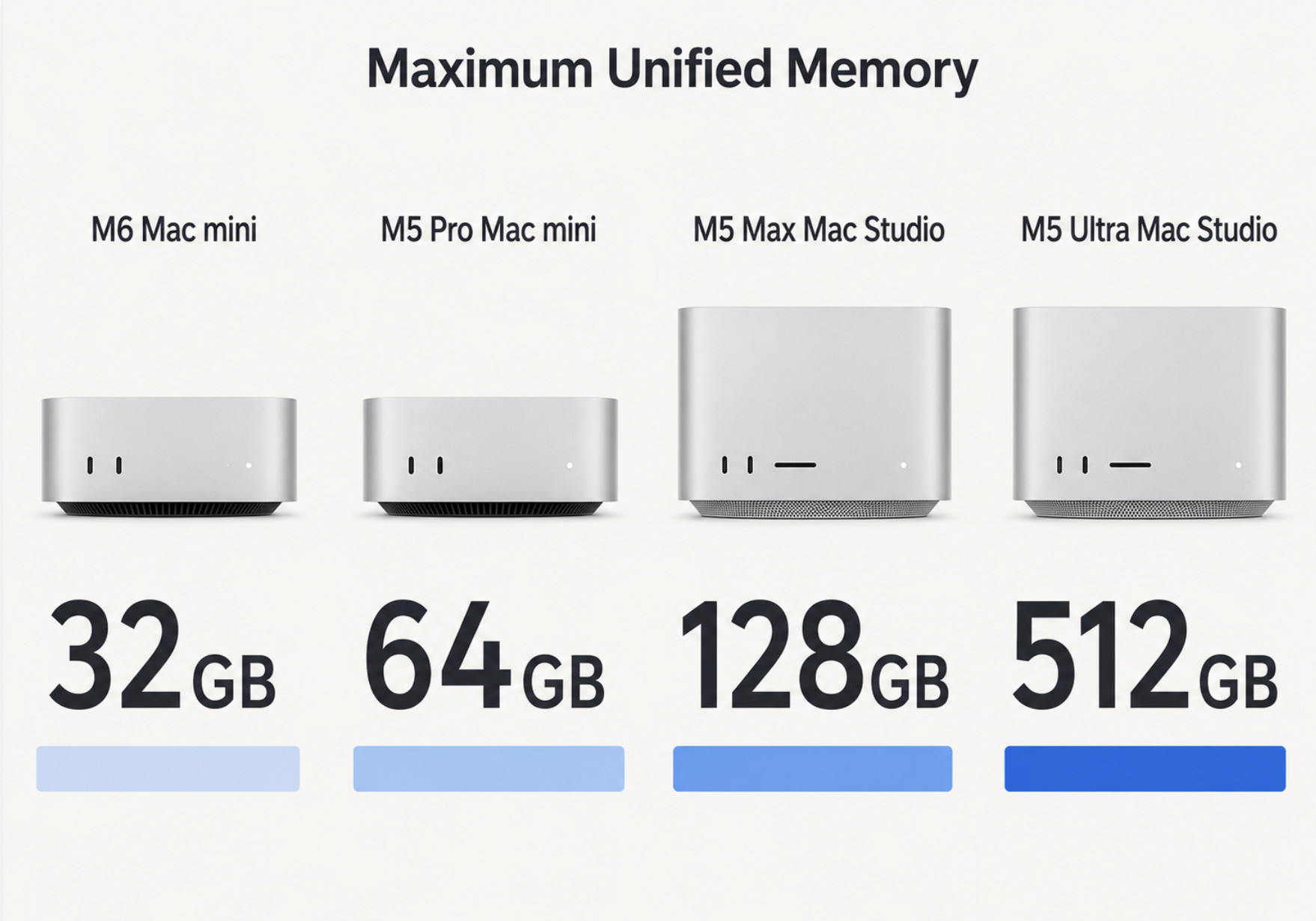
Memory is one of the most important differences between the Mac mini and Mac Studio.
| Chip | Available Unified Memory |
|---|---|
| M6 | 16GB, 24GB or 32GB |
| M5 Pro | 24GB, 48GB or 64GB |
| M5 Max | 36GB, 48GB, 64GB or 128GB |
| M5 Ultra | 96GB, 256GB or 512GB |
Apple Silicon uses unified memory shared between the CPU and GPU. This is efficient, but it also means the advertised capacity must accommodate macOS, applications and graphics workloads simultaneously.
For general use, 24GB is sufficient.
For professional photo, music, programming and video work, I recommend between 32GB and 64GB.
Choose 128GB or more only if you regularly work with:
- Large AI models
- Huge sample libraries
- Complex 3D scenes
- Extensive visual-effects projects
- Several virtual machines
- Very large datasets
- Multiple memory-intensive applications simultaneously
The Mac Studio’s maximum memory is impressive, but buying memory that your applications never use won’t make the Mac faster.
Mac mini vs Mac Studio for Video Editing
For most 4K video editing, the M5 Pro Mac mini is the best choice.
It supports hardware acceleration for H.264, HEVC, ProRes, ProRes RAW and AV1. It can comfortably handle mainstream Final Cut Pro, DaVinci Resolve and Adobe Premiere projects.
The M6 Mac mini is also capable of editing 4K video, particularly for shorter projects with limited effects.
Choose the M5 Max Mac Studio if you regularly work with:
- Multiple 4K or 8K streams
- ProRes RAW
- Complex colour grading
- AI-powered video effects
- Noise reduction
- Motion graphics
- Multicam productions
- Professional deadlines where export speed matters
The M5 Ultra is only necessary for extremely demanding video and VFX environments.
You can find more specific recommendations in our guide to the best Macs for video editing.
Mac mini vs Mac Studio for Music Production
For most music production, the M5 Pro Mac mini is the better-value choice.
Digital audio workstations are often more dependent on CPU performance and memory than GPU power. The additional graphics cores in a Mac Studio may therefore make little difference in Logic Pro, Ableton Live, Pro Tools or Cubase.
A Mac Studio becomes more useful if you:
- Use exceptionally large orchestral libraries
- Work with hundreds of tracks
- Run demanding audio alongside video
- Need 128GB or more unified memory
- Require the Studio’s additional ports
- Use several high-resolution displays
For most home and professional studios, an M5 Pro Mac mini with 48GB or 64GB of memory is an excellent configuration.
See our guide to the best Macs for music production for more detailed recommendations.
Mac mini vs Mac Studio for CAD and 3D Work
The right choice for CAD software and 3D modelling tools depends on whether your software mainly uses the CPU or GPU.
For 2D CAD, architectural drawing and moderate 3D modelling, the M5 Pro Mac mini should be more than sufficient.
The M5 Max Mac Studio is the better choice for:
- Complex 3D assemblies
- GPU rendering
- Real-time visualisation
- Animation
- Large architectural models
- Visual effects
- Game development
- High-resolution textures
The M5 Ultra is aimed at specialist studios handling exceptionally demanding simulations, renders and datasets.
Before buying, check how well your particular application supports Apple Silicon and Apple’s Metal graphics system. Some professional 3D and engineering applications remain better optimised for NVIDIA GPUs on Windows.
Mac mini vs Mac Studio for Local AI
The M6 Mac mini is suitable for smaller local AI models, but its 32GB memory ceiling limits the size of model it can load.
The M5 Pro Mac mini with 64GB is the best overall option for users experimenting with local language models, private document analysis, coding assistants and other AI tools.
The M5 Max Mac Studio with 128GB is more appropriate for regularly running 70B-class models, long context windows or several models simultaneously.
The M5 Ultra’s 256GB and 512GB configurations can load exceptionally large quantised models that won’t fit on other Macs or conventional consumer graphics cards.
For local AI, memory capacity and memory bandwidth may be more important than simply choosing the newest chip. This means an M5 Pro Mac mini can be a better choice than an M6 Mac mini even though M6 is newer.
Display Support
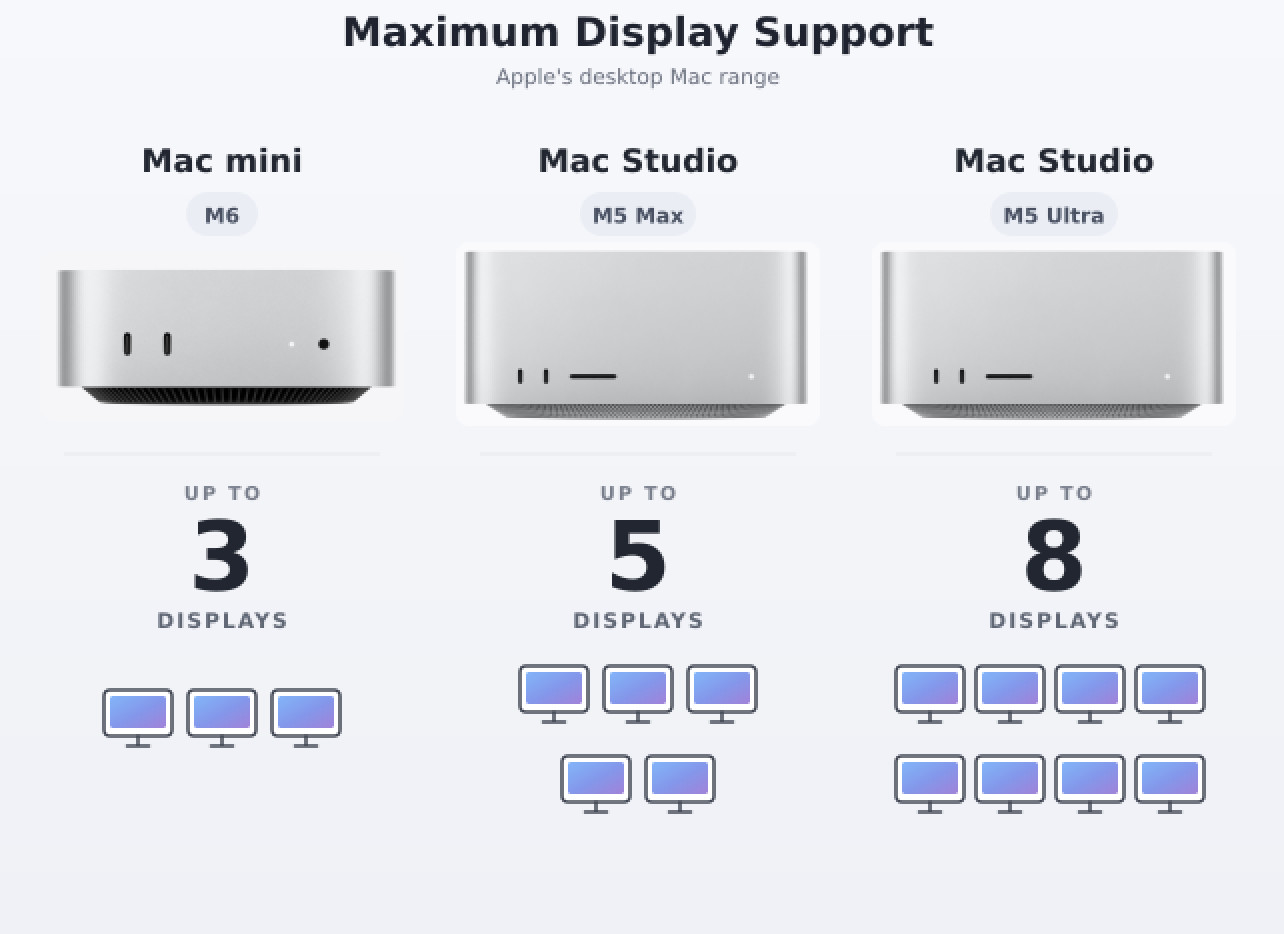
Both Mac mini models support up to three external displays.
The M5 Max Mac Studio supports up to five, while the M5 Ultra supports as many as eight.
| Mac | Maximum Displays |
|---|---|
| M6 Mac mini | Three |
| M5 Pro Mac mini | Three |
| M5 Max Mac Studio | Five |
| M5 Ultra Mac Studio | Eight |
For most single, dual or triple-monitor workspaces, the Mac mini is sufficient.
The M5 Pro Mac mini can also support two 5K displays at 120Hz, making it compatible with demanding professional display setups.
The Mac Studio is mainly necessary when you need more than three monitors or several very high-resolution displays connected simultaneously.
Ports and Connectivity
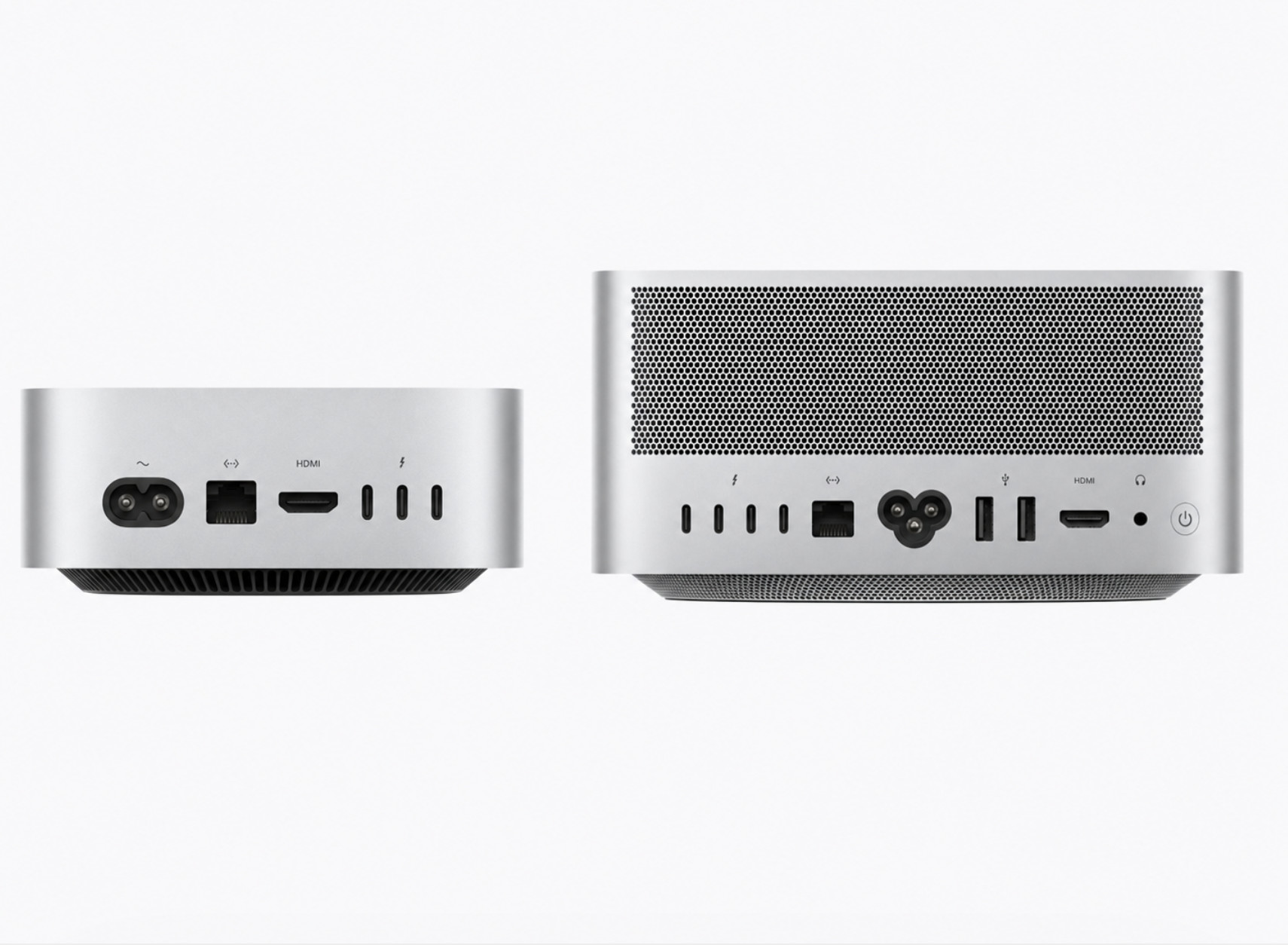
The Mac Studio has the advantage if you regularly connect external equipment.
Mac mini Ports
The front of the Mac mini includes:
- Two USB-C ports supporting speeds up to 10Gb/s
- Headphone connection
The rear includes:
- Three Thunderbolt 4 ports on M6
- Three Thunderbolt 5 ports on M5 Pro
- HDMI
- 2.5Gb Ethernet
- Power connection
Both models can be configured with 10Gb Ethernet.
The Mac mini has no USB-A ports or SD card reader.
Mac Studio Ports
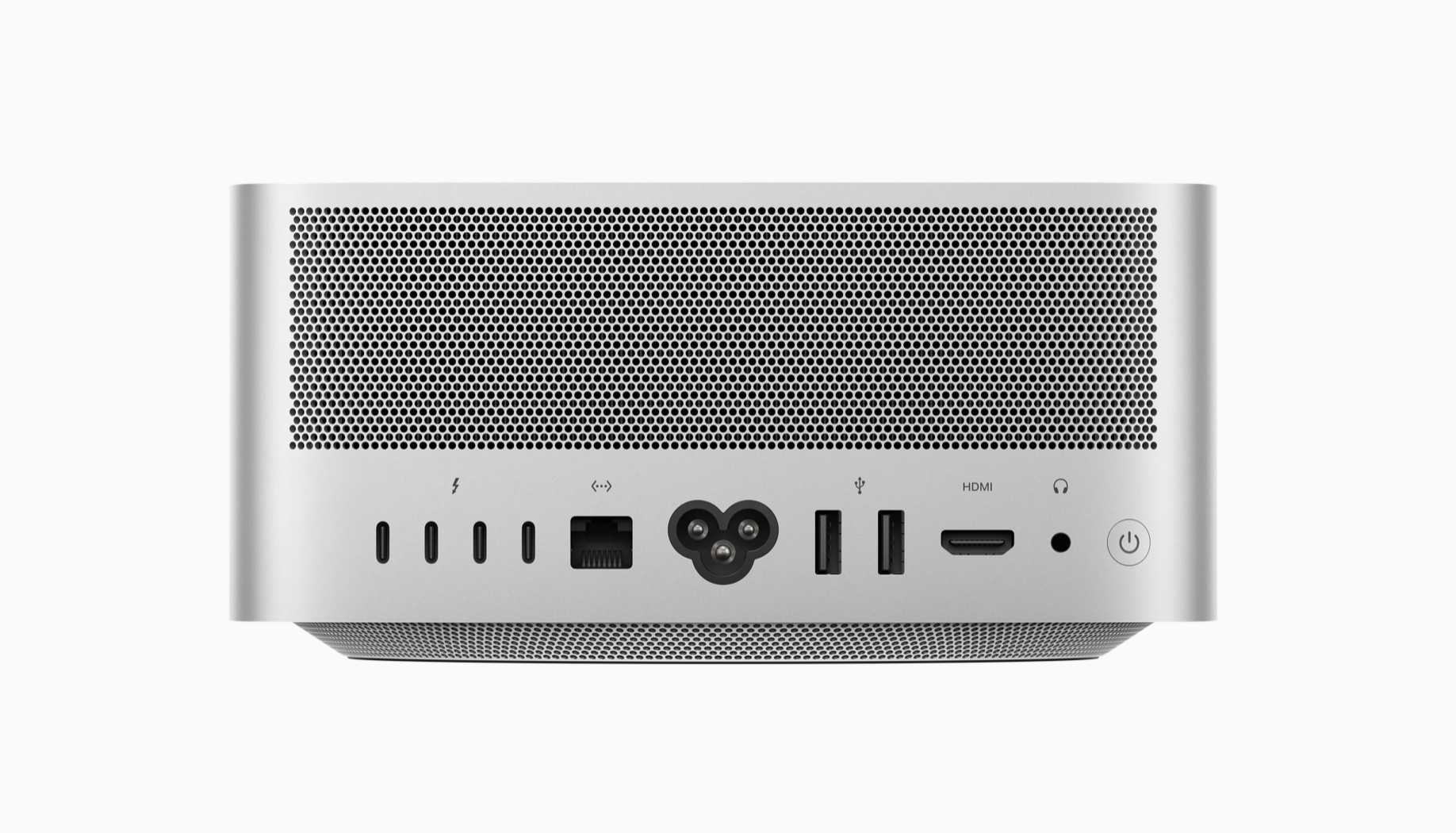
The rear of both Mac Studio models includes:
- Four Thunderbolt 5 ports
- Two USB-A ports
- HDMI 2.1
- 10Gb Ethernet
- Headphone connection
The front includes an SDXC UHS-II card reader.
The M5 Max model has two front USB-C ports, while the M5 Ultra upgrades these to Thunderbolt 5.
The Mac Studio is more convenient for photographers, video editors, audio professionals and anyone with several external drives or older USB devices.
You can compare the complete layout on Apple’s Mac Studio specifications page.
Storage
The M6 Mac mini starts with a 256GB SSD, which I consider too small for most users purchasing a new desktop Mac in 2026.
The M5 Pro Mac mini and M5 Max Mac Studio start with 512GB, while the M5 Ultra starts with 1TB.
| Mac | Internal Storage Range |
|---|---|
| M6 Mac mini | 256GB–2TB |
| M5 Pro Mac mini | 512GB–8TB |
| M5 Max Mac Studio | 512GB–8TB |
| M5 Ultra Mac Studio | 1TB–16TB |
Apple’s internal storage upgrades can be expensive. A fast Thunderbolt SSD is usually a more economical way to add storage for video, photos, sample libraries and archived projects.
However, I recommend at least 512GB internally for general use and 1TB for professional work. Keeping macOS, applications and current projects on the internal SSD is more convenient than depending entirely on external storage.
Size and Desk Space
The Mac mini measures approximately 5 inches square and 2 inches tall. It is exceptionally compact and can easily fit beneath a monitor or in a crowded workspace.
The Mac Studio measures 7.7 inches square and 3.7 inches tall. It remains compact compared with a conventional desktop PC but occupies significantly more space than the Mac mini.
The M6 Mac mini weighs approximately 0.67kg, compared with 2.7kg for the M5 Max Mac Studio and 3.6kg for the M5 Ultra.
Both are designed as stationary desktop computers, so portability shouldn’t be the deciding factor. The Mac mini is nevertheless easier to move between workspaces.
Price and Value
The M6 Mac mini offers the best value in Apple’s desktop range.
However, the comparison becomes more complicated once you add memory, storage and networking upgrades.
A heavily configured M5 Pro Mac mini can move close to the price of an entry-level M5 Max Mac Studio. At that point, consider what your work needs most.
Choose the upgraded M5 Pro Mac mini if you value:
- 48GB or 64GB of memory
- Strong CPU performance
- Compact size
- Lower overall cost
- Three or fewer displays
Choose the base or upgraded M5 Max Mac Studio if you value:
- More GPU cores
- Additional media engines
- Higher memory bandwidth
- Built-in 10Gb Ethernet
- SD card and USB-A connections
- Support for five displays
- Future expansion to 128GB of memory
The entry-level Mac Studio isn’t automatically a better purchase than an upgraded Mac mini. The best choice depends on whether your applications benefit more from memory and CPU performance or from the Studio’s much larger GPU.
Recommended Configurations
Best for Home and Office Use
M6 Mac mini
- 24GB unified memory
- 512GB SSD
This configuration should provide excellent performance and useful longevity without excessive upgrades.
Best for General Creative Work
M6 Mac mini
- 32GB unified memory
- 1TB SSD
Suitable for photo editing, moderate video work, music production and development.
Best for Professional Work
M5 Pro Mac mini
- 48GB or 64GB unified memory
- 1TB SSD
This is the new professional sweet spot and the configuration I recommend to most power users.
Best for Video, 3D and Local AI
M5 Max Mac Studio
- 40-core GPU
- 64GB or 128GB unified memory
- 1TB or 2TB SSD
Choose 128GB for large local AI models, exceptionally complex creative projects or several memory-intensive applications.
Best for Extreme Processing Power
M5 Ultra Mac Studio
- 80-core GPU
- 256GB unified memory
- 2TB SSD or larger
The 512GB configuration is only necessary for users who already know they will need more than 256GB.
Which Should You Buy?
The M6 Mac mini is the best desktop Mac for most people. It is compact, powerful and supports enough memory and displays for normal home, office and lighter creative work.
The M5 Pro Mac mini is now the most compelling choice for professional users. It handles video editing, music production, development, CAD and many local AI setups without the cost of a Mac Studio.
The M5 Max Mac Studio is the right choice when your work genuinely benefits from additional GPU cores, media engines, memory bandwidth, ports or more than three displays.
The M5 Ultra sits at the top of Apple’s new buying hierarchy, but it is a specialist workstation rather than a faster general-purpose Mac. Buy it only if you have an identifiable workload that can use its extreme GPU, memory and media capabilities.
For most buyers, the decision is therefore no longer simply “Mac mini or Mac Studio.” It is:
- M6 for mainstream use
- M5 Pro for professional value
- M5 Max for demanding creative and AI work
- M5 Ultra for exceptional specialist work
Apple’s recent releases have made the Mac mini capable enough for more professionals while giving the Mac Studio a clearer role at the very top of the desktop range.
FAQ
Is Mac Studio better than Mac mini?
The Mac Studio is more powerful, supports more memory, has more ports and can drive more displays. However, it won’t feel significantly faster for ordinary productivity, web browsing or office work.
The Mac mini provides better value for most users.
Is the M5 Pro Mac mini better than the M6 Mac mini?
The M6 offers newer CPU, graphics and AI technology, making it the better mainstream Mac.
The M5 Pro supports twice as much unified memory, has higher memory bandwidth, more CPU and GPU cores, and includes Thunderbolt 5. It is the better choice for demanding professional work.
Is an M5 Pro Mac mini powerful enough for professional use?
Yes. With up to an 18-core CPU, 20-core GPU and 64GB of memory, the M5 Pro Mac mini is suitable for professional video editing, music production, development, CAD and other demanding work.
Should I buy an upgraded Mac mini or a base Mac Studio?
Choose the upgraded M5 Pro Mac mini if your applications primarily need CPU performance and up to 64GB of memory.
Choose the base M5 Max Mac Studio if your work relies heavily on GPU processing, video encoding, 3D rendering or the Studio’s additional ports and display support.
Can Mac mini and Mac Studio be upgraded?
The unified memory cannot be upgraded after purchase. Internal storage also isn’t intended to be user-upgradeable.
You can add external storage, docks and other peripherals, but choose enough unified memory when ordering.
Does Mac Studio include a monitor, keyboard or mouse?
No. Like the Mac mini, the Mac Studio is sold without a display, keyboard or mouse.
Is the M5 Ultra Mac Studio worth it?
Only for specialist tasks that use its 80-core GPU, additional media engines, 256GB or 512GB of unified memory, or eight-display support.
For most professionals, the M5 Max Mac Studio or M5 Pro Mac mini provides much better value.