

If you’re looking for the best personal finance software for Mac — or a credible Quicken alternative for Mac — the right choice depends on how you manage money.
Some people want a traditional desktop app with local files and no compulsory subscription. Others want automatic bank syncing, strict budgeting, investment tracking, long-term cash-flow forecasts or support for UK and international accounts.
The best options are no longer interchangeable. Banktivity is our top pick for a deep, Apple-focused finance app, while Moneyspire and Moneydance suit people who prefer desktop software and a one-time purchase. MoneyWiz and PocketSmith are particularly strong for international users, and YNAB remains the best choice for anyone who wants a budgeting system rather than just a spending tracker.
It is also worth saying that Quicken Classic for Mac is now a capable option in its own right. You do not need to switch simply because you use a Mac. An alternative makes more sense if you want local-first software, better multi-currency support, a different budgeting method, or a bank connection that better suits your accounts.
Prices below are in US dollars, checked in September 2026, and may exclude local taxes or limited-time promotions.
Quick Picks: Best Personal Finance Software for Mac
- Best overall: Banktivity
- Best traditional Quicken alternative: Moneyspire
- Best one-time desktop purchase: Moneydance
- Best for UK and international bank syncing: MoneyWiz
- Best for budgeting: YNAB
- Best modern Apple app: Copilot Money (US only)
- Best for forecasting: PocketSmith
- Best free offline option: Money Manager Ex
Quick Comparison of the Best Mac Finance Apps By Use Case
| Software | Mac Experience | Best For | Bank Sync Availability | Starting Price |
|---|---|---|---|---|
| Banktivity | Native Mac, iPhone and iPad app | Deep all-round personal finance | Check your institution before subscribing | $59.99/year |
| Moneyspire | Desktop app | Traditional, local-first Quicken alternative | Optional; more than 15,000 institutions listed | $59.99 one-time promotion |
| Moneydance | Desktop app with mobile companion | One-time purchase and multi-currency | Varies by bank and download method | $49.99 one-time |
| MoneyWiz | Native Mac, iPhone and iPad app | International and flexible money management | 40,000+ banks in 50+ countries | $29.99/year |
| Copilot Money | Native Mac, iPhone, iPad and web app | Polished US personal finance | US accounts only | $95/year |
| YNAB | Web app on Mac, plus iPhone and iPad | Zero-based budgeting | Select US, Canadian, UK and EU banks | $109/year |
| PocketSmith | Web app on Mac, plus mobile apps | Forecasting and international accounts | Varies by country; UK/EU feeds available | Free / $9.99 per month annually |
| Tiller | Excel or Google Sheets on Mac | Spreadsheet-led finance tracking | Check support for your institution | $99/year |
| Empower | Web and mobile app | Free US investment dashboard | US accounts only | Free |
| Money Manager Ex | Desktop app | Free offline tracking | Manual imports | Free |
1. Banktivity
⭐ Why We Picked It
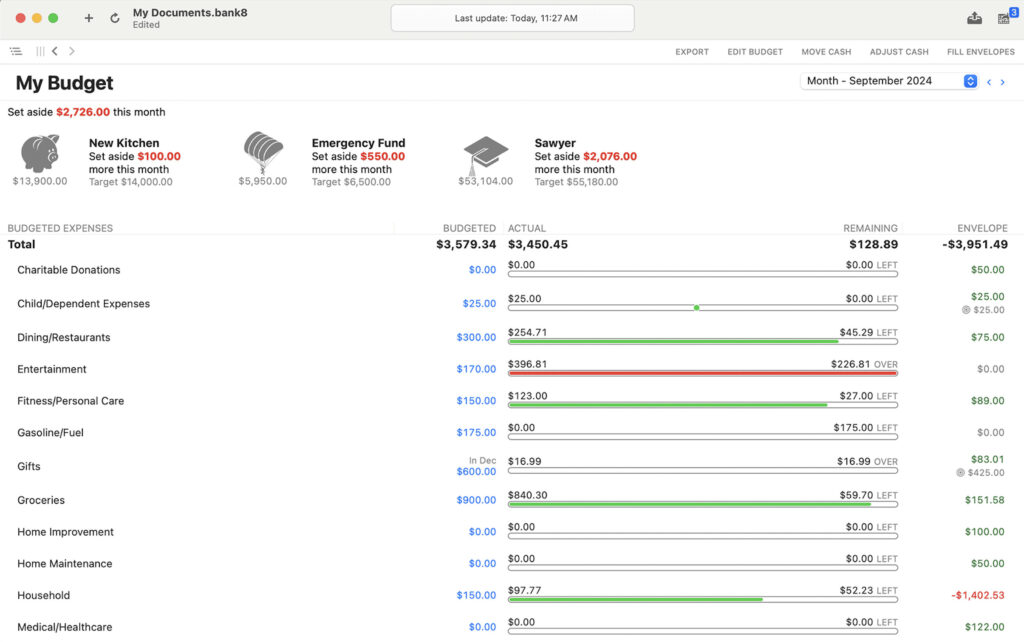
Banktivity (formerly iBank) is the best overall personal finance software for Mac because it is built specifically for Apple users rather than adapted from a Windows or web-first product.
It gives you a full view of accounts, loans, investments, budgets, goals and reports in a proper Mac app, with companion iPhone and iPad apps. It is one of the closest genuine alternatives to Quicken for Mac if you want more than a simple budgeting app.
Banktivity is particularly good for people who want to track investments, create detailed reports, use envelope budgeting or manage a household’s wider financial picture from one place.
It’s also suitable for those in the UK and EU thanks to its support for PSD2/Open Banking.
👤 Who It’s Aimed At
Banktivity is ideal for:
- Mac users who want a genuinely Apple-focused finance app
- Former Quicken users with multiple accounts, loans or investments
- People who want budgeting, reporting and goal planning in one place
- Users who value a desktop app alongside iPhone and iPad access
- Anyone prepared to pay an annual subscription for a more complete tool
Pricing: Bronze plan $59.99/year, Silver $79.99/year, Gold $99.99/year billed annually. Free trial available. Monthly plans are also available, and the direct Mac download includes a 30-day free trial.
| ✅ Pros | ❌ Cons |
|---|---|
| Proper native app for Mac, iPhone and iPad | Subscription-only |
| Strong reporting, budgeting and goal tools | Important features vary by plan |
| Good investment and net-worth tracking | Check bank compatibility before committing |
| 30-day trial with no credit card when downloaded directly | No Windows or Android app |
| Strong alternative to Quicken for Mac power users | Can feel more complex than a simple budget tracker |
2. Moneyspire
⭐ Why We Picked It
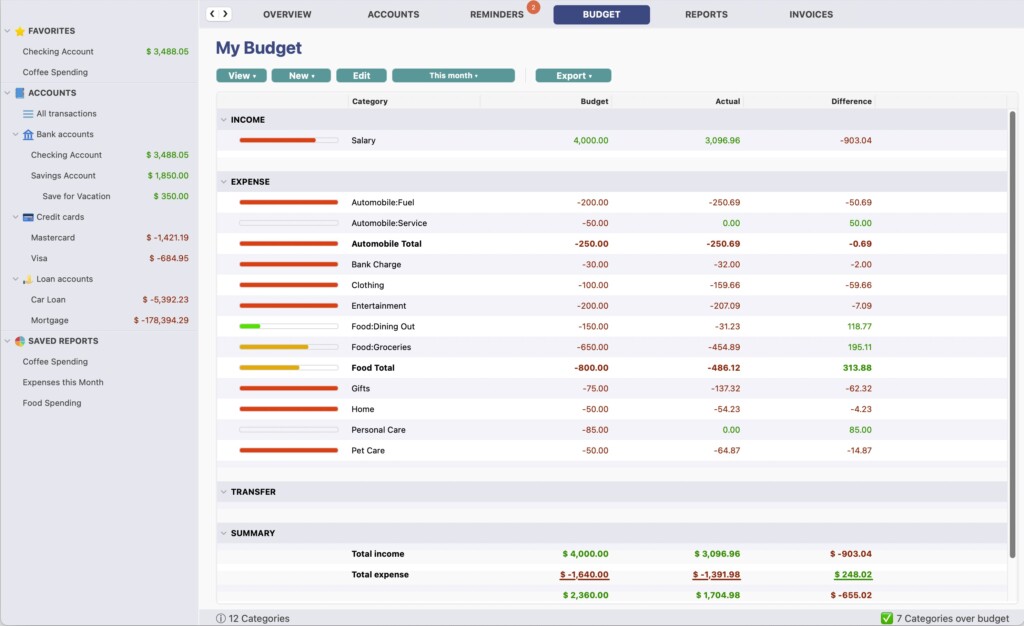
Moneyspire is the best traditional Quicken alternative for Mac users who want a desktop program with optional cloud features rather than a cloud service that happens to work on a Mac.
It covers accounts, budgets, bills, forecasts, reports and investments, while allowing you to keep working locally if you prefer not to link accounts online. It can also import data from Quicken and Microsoft Money (making it an excellent alternative to MS Money on Macs), although you should always test an import carefully before relying on it.
Its biggest attraction is the perpetual licence. However, this needs an important clarification: the purchase includes one year of Moneyspire Connect, Moneyspire Cloud, stock quotes and currency downloads. After that, you can continue using the software, but need a discounted major-version upgrade to retain those connected services.
👤 Who It’s Aimed At
Moneyspire is perfect for:
- Former Quicken or Microsoft Money users
- Anyone who prefers a desktop-first finance app
- Users who want to keep data local and enter transactions manually
- Households using Mac and Windows computers
- People who want a one-time purchase rather than a compulsory annual subscription
Pricing: Standard $59.99 as a one time purchase reduced from $99.99. The licence is perpetual, and a major-version upgrade currently costs $49.99 if you want to continue connected services after the first year. A free trial and 30-day money-back guarantee are available.
| ✅ Pros | ❌ Cons |
|---|---|
| Perpetual licence and local-first option | Connected services are included for one year, not forever |
| Imports Quicken and Microsoft Money data | Import quality can vary with complex files |
| Budgeting, bills, forecasts and reports | Interface is more traditional than Banktivity or Copilot |
| Works across Mac, Windows, Linux and Chromebook | Not designed exclusively for Apple users |
| Optional bank and cloud syncing | Always test your bank connection first |
3. Moneydance
⭐ Why We Picked It
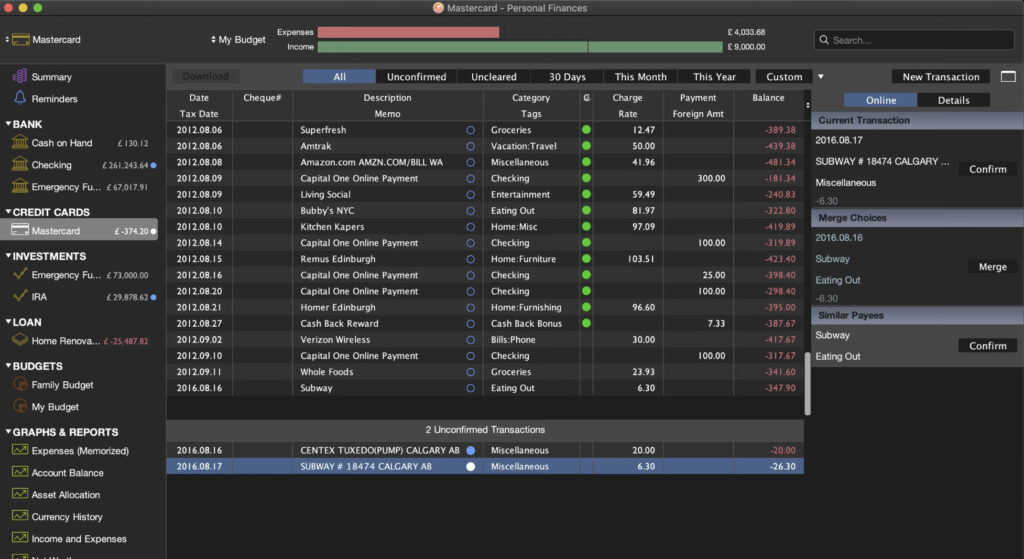
Moneydance remains one of the best one-time purchase personal finance apps for Mac, especially for people who value local data storage, multiple currencies and investment tracking.
It has a traditional finance-software feel, with account registers, scheduled transactions, budgeting, reports, investments and bill reminders. It is not as visually polished as newer apps, but it is capable and works well for people who want to avoid being locked into a subscription.
It is also one of the better choices for users with accounts in more than one currency.
👤 Who It’s Aimed At
Moneydance is best for:
- Quicken users who want a non-subscription desktop replacement
- People managing accounts in multiple currencies
- Users who value local data and manual control
- Investors who want basic portfolio tracking alongside everyday finances
- Households using Mac, Windows or Linux
Pricing: $69.99 one off purchase or $9 per month with bank syncing included. Free trial available. You can also purchase Moneydance as a one-off purchase from the developer for $65 but this does not include MoneyDance+ for connecting to banks.
| ✅ Pros | ❌ Cons |
|---|---|
| One-time purchase with no compulsory subscription | Interface feels dated beside newer Mac apps |
| Good multi-currency and investment support | Bank-download support varies by institution |
| Local data and privacy-focused approach | Automatic downloads or payments may involve bank-specific fees |
| Available for Mac, Windows and Linux | Less approachable for complete beginners |
| Mobile companion apps available | Some users will prefer a more modern dashboard |
4. MoneyWiz
⭐ Why We Picked It
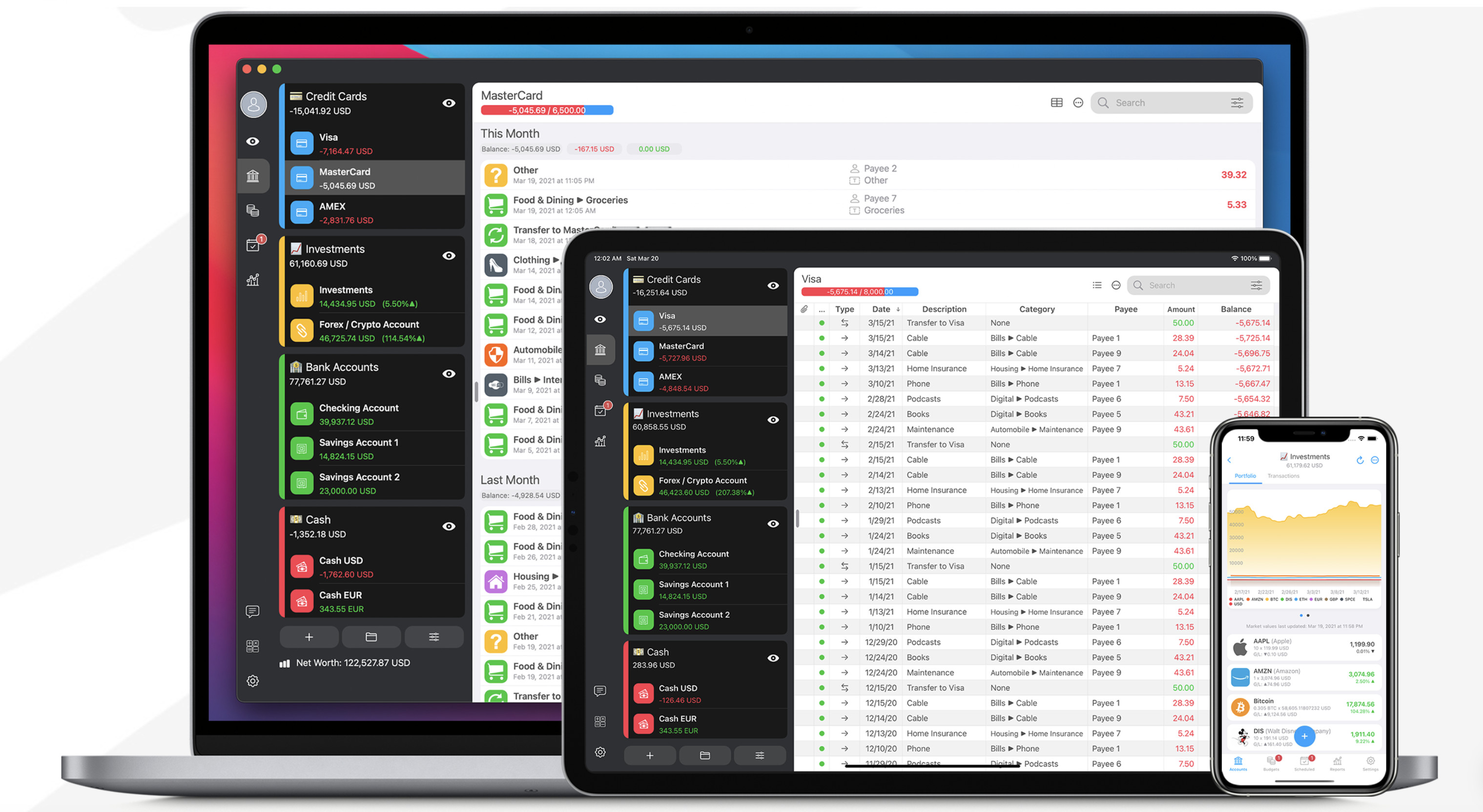
MoneyWiz deserves a place in the main list because it is one of the strongest Mac finance apps for UK and international users.
Unlike many personal-finance tools that focus almost entirely on US accounts, MoneyWiz supports bank connections through multiple data providers and advertises access to more than 40,000 banks in over 50 countries. It is also a proper Mac app, with matching iPhone and iPad apps rather than a browser-only experience.
It is flexible too: you can use conventional budgets, track investments, loans, savings and multiple currencies without being forced into one strict methodology.
👤 Who It’s Aimed At
MoneyWiz is ideal for:
- UK and international users with several currencies or financial institutions
- Mac, iPhone and iPad users who want one synced system
- People who want flexible budgeting rather than YNAB’s fixed methodology
- Users who need broader international bank coverage
- Anyone who wants a more modern alternative to Moneydance
Pricing: Standard costs $29.99/year and includes cloud sync and updates. Premium costs $59.99/year or $5.99/month and adds bank syncing.
| ✅ Pros | ❌ Cons |
|---|---|
| Native Mac, iPhone and iPad apps | Bank syncing requires Premium |
| Strong international and multi-currency support | Subscription rather than a one-time purchase |
| Flexible enough for accounts, loans, investments and budgets | Large feature set can feel overwhelming initially |
| Works offline and syncs when online | Not every listed institution or account type will work perfectly |
| Multiple bank-data providers | Check your essential accounts before subscribing |
5. Copilot Money
⭐ Why We Picked It
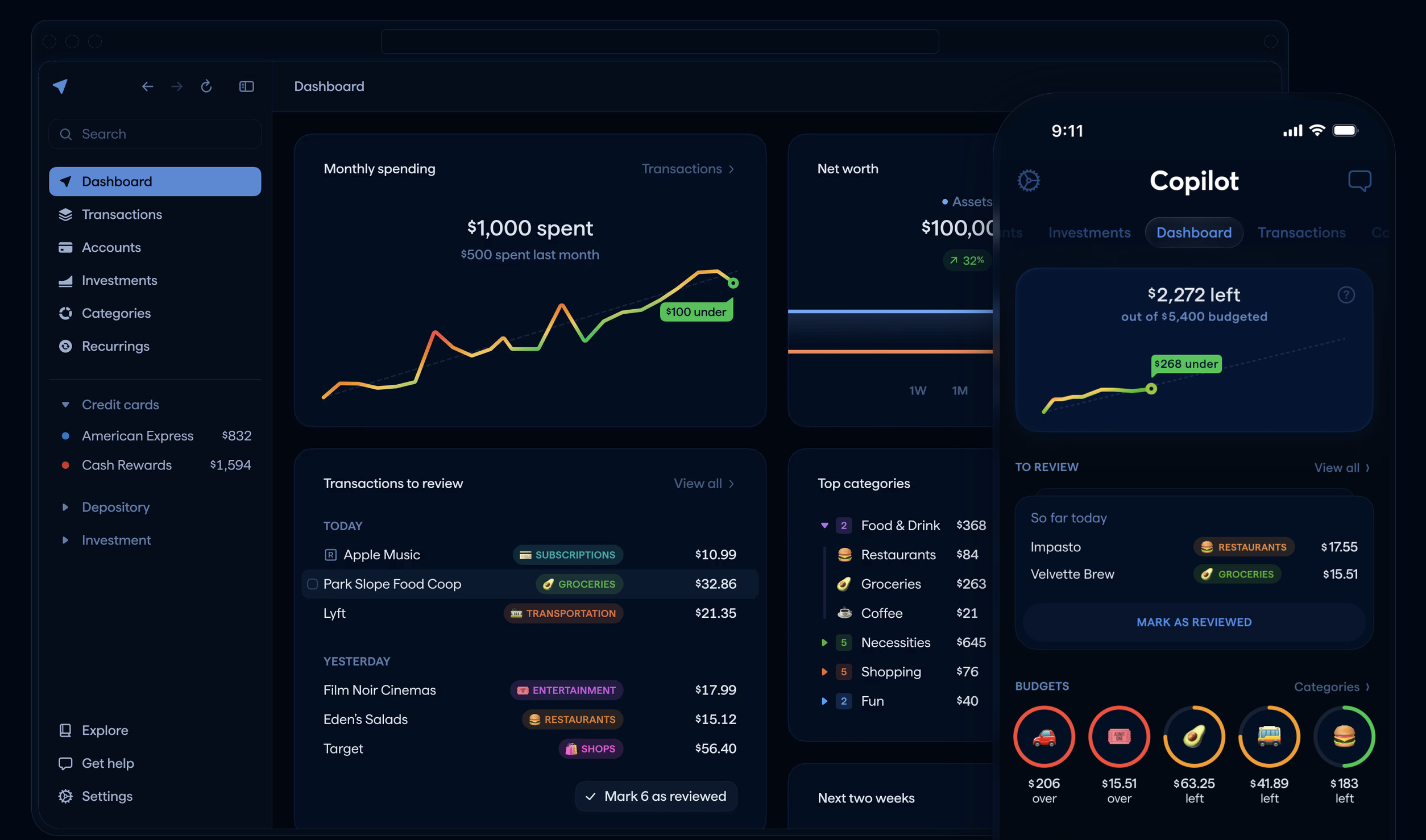
Copilot Money (formerly simply “Copilot”) is the best-looking modern personal finance app for Mac users in the US.
It has native apps for Mac, iPhone and iPad, plus a web app, and presents spending, budgets, recurring bills, investments and net worth in an unusually clear way. Its automatic categorisation is one of its strongest features, and its new Money Assistant remains in beta.
This is not a replacement for every Quicken power user, but it is excellent for people who want a clean, low-maintenance view of everyday finances without a spreadsheet-like interface.
👤 Who It’s Aimed At
Copilot is ideal for:
- US-based Mac and iPhone users
- People who value design and easy-to-understand spending insights
- Former Mint users who want a premium Apple-focused replacement for Mint on Mac
- Users who want automatic categorisation and less manual entry
- Households that need budgets, net worth and investment tracking in one app
👉 Read our full Copilot review
Pricing: $13/month or $95/year. You can download the Copilot app from the Mac App Store for both Intel and Apple Silicon apps and also get it from the Copilot website.
| ✅ Pros | ❌ Cons |
|---|---|
| Excellent Mac, iPhone, iPad and web experience | Supports US-based financial institutions only |
| Strong spending, budgeting, investment and net-worth views | Subscription only |
| Automatic categorisation and recurring-bill tracking | Not as deep as Banktivity for reports and finance power users |
| No ads or permanent free tier | Less suitable for multi-currency users |
| Very polished, approachable design | Not designed for business accounting |
6. YNAB
⭐ Why We Picked It
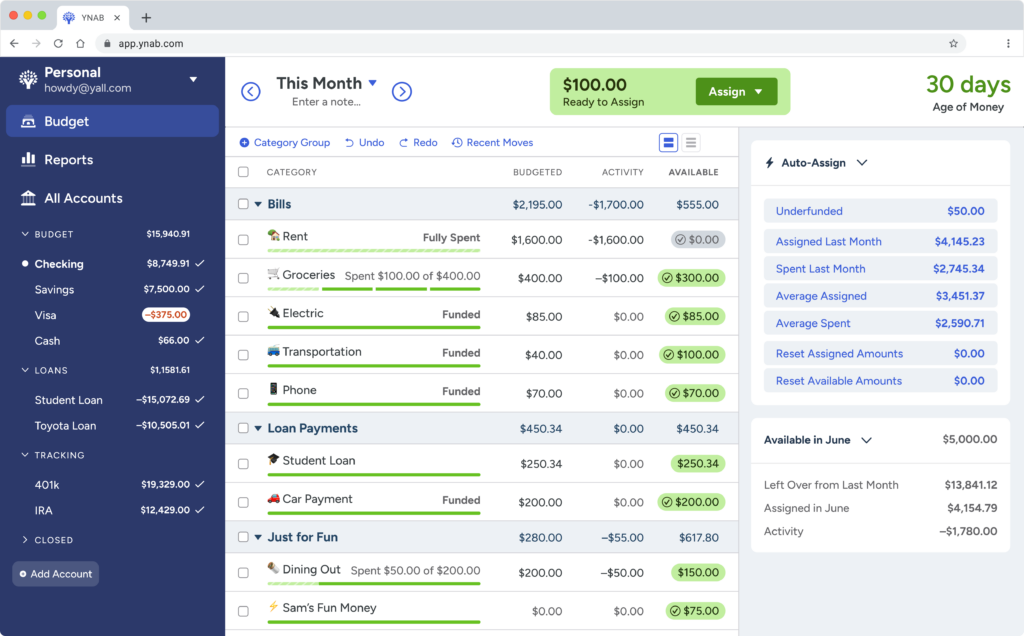
YNAB — short for You Need A Budget — is the best finance app for people who want to change how they manage money, rather than simply record what they spent last month.
It is built around zero-based budgeting: you assign the money you have to specific jobs, prepare for irregular expenses and adjust plans when life changes. That approach requires more involvement than a passive tracking app, but it can be extremely effective for couples, families and anyone trying to get ahead of irregular bills or debt.
YNAB works in a browser on a Mac rather than through a native Mac desktop app. Direct import supports selected banks in the US, Canada, UK and EU.
👤 Who It’s Aimed At
YNAB is perfect for:
- Anyone who needs a more disciplined budgeting system
- Couples and families planning money together
- People managing irregular expenses, debt or savings goals
- Users happy to budget proactively rather than retrospectively
- UK and EU users whose bank is supported by direct import
Pricing: $109/year or $9.08/month. A 34-day trial is available, and one subscription can be shared with up to six people.
| ✅ Pros | ❌ Cons |
|---|---|
| Excellent zero-based budgeting methodology | No native Mac desktop app |
| Strong education, guides and budgeting support | More of a system to learn than a simple tracker |
| Works across Mac, iPhone and iPad | Subscription is expensive for a budgeting-only tool |
| Supports selected US, Canadian, UK and EU banks | One spending plan cannot use multiple currencies together |
| Useful goals, debt tools and household sharing | Limited investment analysis |
7. PocketSmith
⭐ Why We Picked It
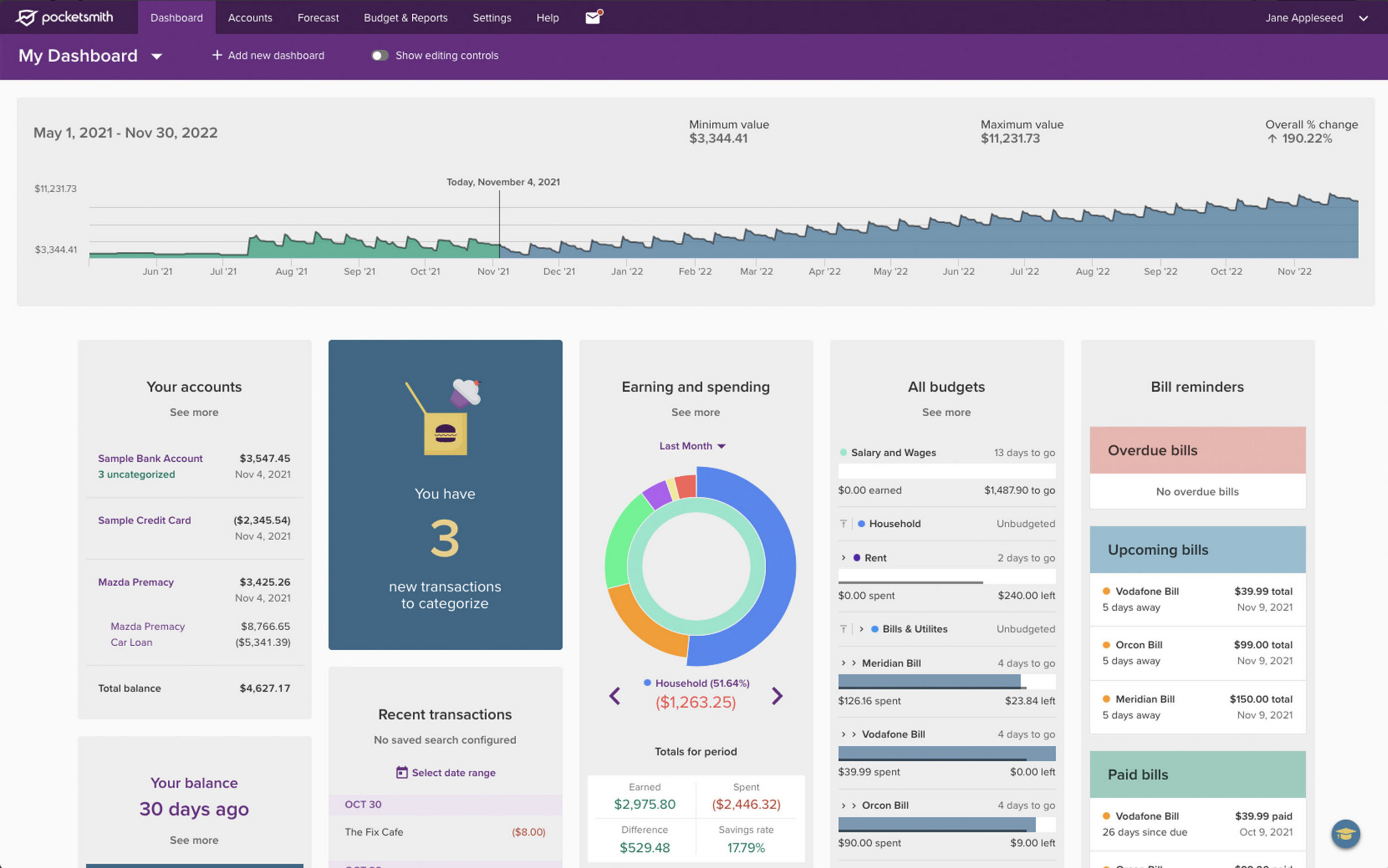
PocketSmith is the best personal finance software for Mac users who want to look forward, not just backwards.
Its strongest feature is long-term cash-flow forecasting. You can model future bills, salary, savings targets, debt and spending to see how your finances could look months, years or even decades ahead. It also supports flexible budgets, multiple currencies, detailed categories and customised dashboards.
PocketSmith is browser-based on Mac rather than a native desktop app, but it works well on modern Macs and has mobile apps. It is one of the stronger options for UK users because it supports UK and EU connections through Salt Edge, subject to bank availability.
👤 Who It’s Aimed At
PocketSmith is ideal for:
- Long-term planners and detailed budgeters
- People managing cash flow several months or years ahead
- UK, EU and international users
- Users with multiple currencies or accounts
- Couples or households that want collaborative access
Pricing: Free plan available with two accounts and a six-month forecast. Paid plans start at $9.99/month when billed annually, or $14.95 month-to-month. Free trial available.
| ✅ Pros | ❌ Cons |
|---|---|
| Excellent long-term cash-flow forecasting | No native Mac desktop app |
| Good multi-currency and global finance tools | More expensive plans are needed for deeper forecasting and more connections |
| UK and EU bank-feed support via Salt Edge | Can feel complex for casual budgeters |
| Flexible budgets, calendars and reports | Bank-feed availability varies by institution and country |
| Free plan available | Better for planners than users wanting a simple checkbook |
8. Tiller
⭐ Why We Picked It
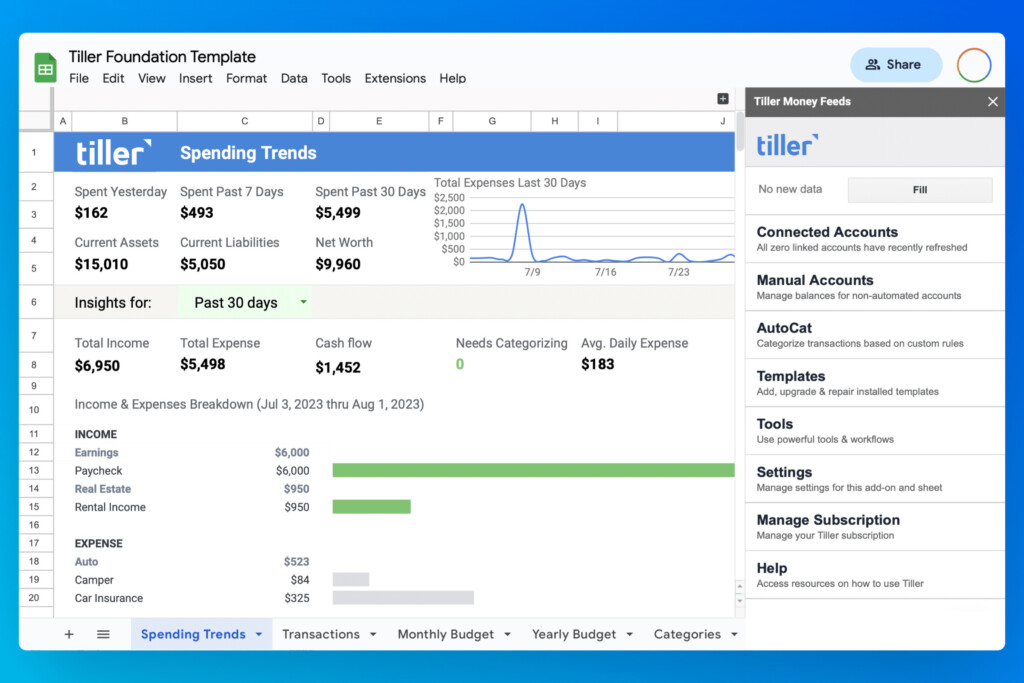
Tiller is the best option for people who genuinely prefer spreadsheets to finance apps.
It automatically feeds account balances and transactions into Google Sheets or Microsoft Excel, where you can use its templates or build exactly the reports, budgets and dashboards you want. Your financial data lives in spreadsheets you control, making it ideal for people who dislike being limited by a traditional app’s reporting structure.
Tiller is not a native Mac app. You use it through Google Sheets or Excel on your Mac, so it is best for users comfortable with spreadsheets and formulas.
👤 Who It’s Aimed At
Tiller is best suited for:
- Excel and Google Sheets users
- People who want complete control over categories and reports
- Former Quicken users who prefer their own spreadsheets
- Users tracking personal finances and a simple side business
- Anyone willing to spend more time setting up their system
Pricing: $99/year after a 30-day free trial.
| ✅ Pros | ❌ Cons |
|---|---|
| Your data lives in spreadsheets you own | No native Mac, iPhone or iPad app |
| Works with Excel and Google Sheets | Requires more setup and confidence with spreadsheets |
| Highly flexible reports, templates and categories | Check your bank support before starting |
| Automatic daily transaction feeds | Less convenient for quick mobile use |
| Useful for personal finances and simple business tracking | Annual price has increased to $99 |
9. Empower (Free)
⭐ Why We Picked It
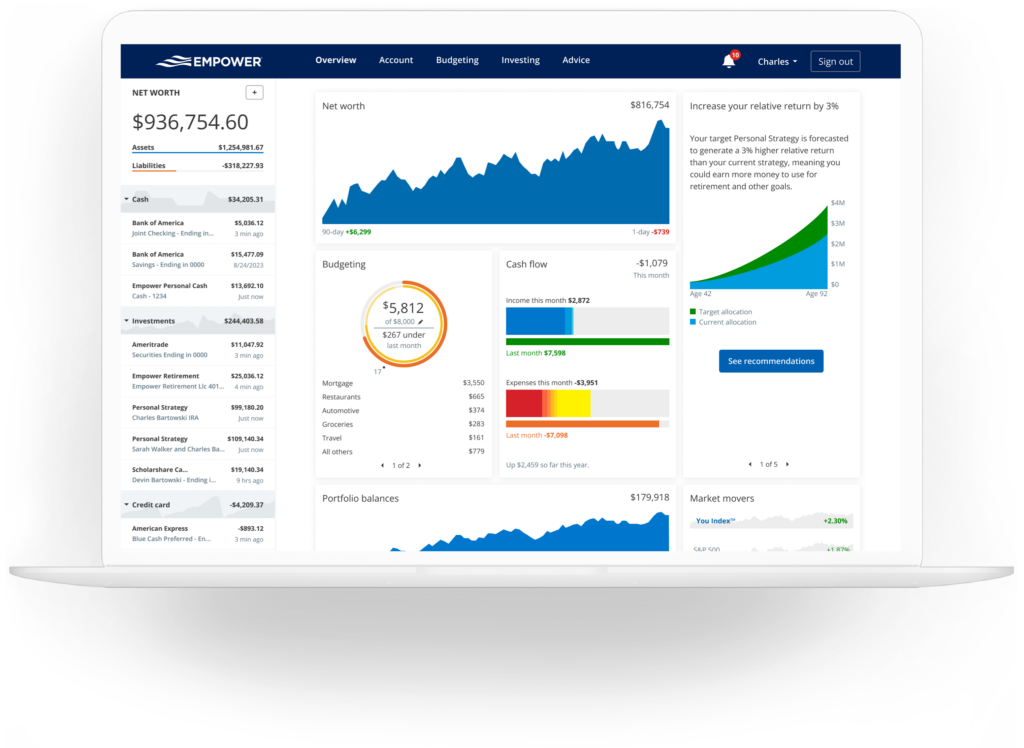
Empower is the best free personal finance dashboard for US users who care most about investments, net worth and retirement planning.
It brings bank, credit-card, loan and investment accounts together in a browser-based dashboard and is particularly useful for seeing your overall asset allocation, account balances and long-term financial position.
It is not a full desktop replacement for Quicken. Think of it as a free account-aggregation and investment dashboard rather than a program for managing detailed registers, old financial records and complex imports.
👤 Who It’s Aimed At
Empower is ideal for:
- US users with several investment or retirement accounts
- People who want a free net-worth dashboard
- Users who care more about investments than strict budgeting
- Anyone who wants a broad overview before paying for a finance app
- People comfortable using a browser-based service
Pricing: Free
| ✅ Pros | ❌ Cons |
|---|---|
| Free investment, net-worth and retirement tools | Intended for US accounts |
| Useful dashboard for several financial accounts | Not a native Mac app |
| Good for monitoring a wider investment picture | Not a complete Quicken-style desktop replacement |
| Browser and mobile access | Do not expect a perfect historical-data migration |
| No subscription required for the dashboard | Promotes Empower’s advisory services |
10. Money Manager Ex (Free)
⭐ Why We Picked It
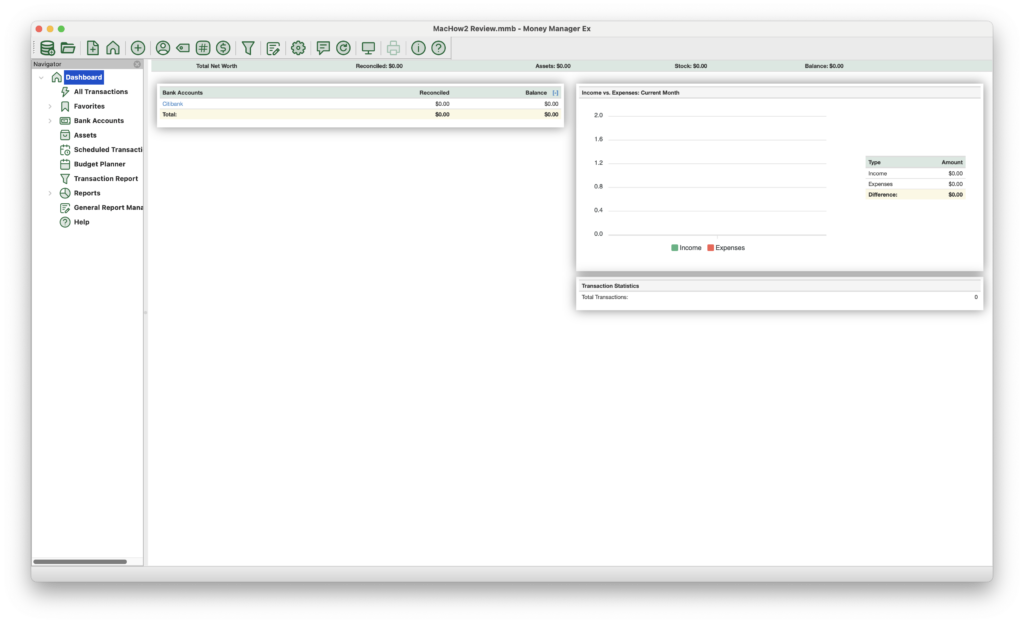
Money Manager Ex is the best free offline personal finance software for Mac.
It is open source, cross-platform and focused on the essentials: accounts, transactions, budgets, scheduled payments, assets, currencies and basic investment tracking. It is not as polished as paid apps, but it is a good option if you want to avoid subscriptions, linked bank accounts and cloud storage.
It supports CSV and QIF import/export, which makes it useful for basic financial record keeping or moving older data into a free desktop app.
👤 Who It’s Aimed At
It’s perfect for:
- Users who want completely free personal finance software
- Manual budgeters and checkbook-style trackers
- Anyone who prefers offline records
- People comfortable with open-source software
- Users importing basic CSV or QIF data
👉 Read our full Money Manager Ex review
Pricing: Free
| ✅ Pros | ❌ Cons |
|---|---|
| Completely free and open source | No built-in automatic bank syncing |
| Mac desktop app with local data | Interface is basic and less polished |
| Budgets, scheduled transactions, assets and currencies | Community support rather than premium support |
| Imports and exports CSV and QIF files | Less suitable for complex investment analysis |
| No subscription or advertising | More manual work than bank-connected apps |
Other Personal Finance Apps for Mac Worth Considering
The following budgeting apps didn’t quite make our top ten list, but if none of the above are what you are looking for, may be worth considering.
- Monarch Money — a strong web-first household finance app for US and Canadian users, with budgets, planning and collaboration features, but no native Mac desktop app.
- Quicken Simplifi — a simpler web-first option from Quicken for US users who do not need Quicken Classic’s desktop depth.
- Money Pro — a lightweight Apple-focused app for manual budgets, bills and iCloud syncing.
- GnuCash — a powerful free open-source choice for users comfortable with double-entry accounting.
- Actual Budget — a privacy-focused budgeting tool worth considering if you are comfortable with a more technical, self-hosted setup.
- SEE Finance 2 – A powerful Mac-first app with strong investment tracking and excellent Quicken import support. Ideal for users migrating large datasets, although bank syncing options are more limited than some competitors.
- CountAbout – A simple, low-cost budgeting tool with reliable Quicken import support. It’s browser-based rather than a native Mac app, but a good lightweight option for basic budgeting and syncing.
- MoneyWell – A Mac-focused budgeting app built around envelope budgeting. Best suited to users who want a visual, hands-on way to manage spending rather than track investments.
What We Looked for in These Apps
Mac Experience
A finance app that merely works in a browser is not necessarily a bad choice, but it is different from a proper Mac app. We have made that distinction clear throughout this guide.
Bank Syncing by Region
Bank availability matters more than a headline claim about “thousands of institutions”. Always check your exact current account, credit card, pension and investment providers before paying.
Local Data vs Cloud Convenience
Some people want local files and manual control. Others want automatic syncing across Mac, iPhone and iPad. Neither approach is universally better, but you should know which you are choosing.
Budgeting Style
YNAB teaches a specific zero-based method. Tiller gives you a spreadsheet. Copilot automates much of the categorisation. Moneydance and Moneyspire feel more like traditional desktop finance software.
Imports and Exports
If you are moving from Quicken, Mint or Microsoft Money, check the import route before cancelling anything. A product that says it “imports Quicken data” may still struggle with investment lots, attachments, categories, transfers and reconciled transactions.
Total Cost
A one-time desktop purchase can still have ongoing costs if you want bank syncing, stock quotes or future major upgrades. Likewise, a subscription can be worthwhile if it saves you enough time.
How To Switch From Quicken Without Losing Important Data
Before moving from Quicken to another Mac finance app:
- Back up your Quicken file and keep a copy somewhere safe.
- Export the formats your new app supports, such as CSV, QIF, QFX or OFX.
- Test one bank account and one credit card before importing everything.
- Check opening balances, transfers, split transactions and reconciled balances.
- For investments, compare share quantities, cost basis and transaction history carefully.
- Keep Quicken available until you have completed at least one successful monthly reconciliation in the new app.
For a simpler register-based option, see our guide to the best checkbook software for Mac. If investments are your main priority, our guide to the best investment portfolio trackers for Mac may be more useful.
Best Personal Finance Software for Mac Overall
Banktivity is the best overall choice for Mac users who want a serious personal-finance app rather than a lightweight budgeting tool.
It combines budgeting, goals, reporting, investment tracking and Apple-device integration in a way few rivals match. However, if you specifically want a one-time desktop licence, choose Moneyspire or Moneydance instead.
Best Budgeting Software for Mac
YNAB is the best choice if your priority is building a proactive budget and changing spending habits.
For a more flexible, less prescriptive approach, MoneyWiz is an excellent alternative. US users who want a highly visual experience should also consider Copilot Money.
Best Mint Alternative for Mac
Mint is closed, and Credit Karma is not a like-for-like replacement for people who want detailed budgeting and account tracking.
- Best polished Apple alternative: Copilot Money — US only.
- Best global Mac alternative: MoneyWiz.
- Best web-based household alternative: Monarch Money — US and Canada.
- Best investment-focused free option: Empower — US only.
For more choices, see our guide to Mint alternatives for Mac.
Best UK Personal Finance Apps for Mac
For UK readers, start with these:
- MoneyWiz — best all-round Mac app for international and multi-currency use.
- PocketSmith — best for cash-flow forecasting and UK/EU Open Banking connections.
- YNAB — best for strict budgeting, provided your bank supports direct import.
- Moneyspire — best if you prefer desktop software and do not mind manual imports where bank syncing is unavailable.
Mobile-first apps such as Plum, Emma and Snoop can be useful for UK spending insights, but they are not direct replacements for desktop personal-finance software on a Mac.