

macOS 27 Golden Gate marks an important turning point for the Mac because it is the first version of macOS that only works on Apple Silicon.
That means every Intel Mac has been dropped, including the 2019 Mac Pro and 2020 27-inch iMac that were supported by macOS Tahoe.
For those with a compatible Mac, most mainstream software and peripherals should eventually work with Golden Gate. However, compatibility during the beta period is mixed and some developers are still evaluating their apps.
Here we look at which Macs support macOS Golden Gate, which applications are already working and which printers, scanners, displays and other peripherals you should check before updating macOS.
Important: macOS Golden Gate was released on 14th September 2026 but it’s best to wait a few days or weeks to upgrade to allow bugs to be fixed, especially if you depend on specialist software, plug-ins, scanners or other peripherals for work.
macOS Golden Gate Compatibility At a Glance
If you don’t want to read the entire guide, here’s the essentials you need to know:
- macOS Golden Gate only works on Apple Silicon Macs.
- All Macs supported by Golden Gate can run Apple Intelligence.
- No Intel Macs can install it.
- Parallels Desktop’s main virtualisation features already work in the beta. No other virtual machines have been confirmed yet.
- Microsoft 365 and Adobe Creative Cloud are expected to support the final release, but their current versions aren’t yet officially certified for Golden Gate.
- DisplayLink has released a Golden Gate-compatible version of DisplayLink Manager.
- ScanSnap Home software for document scanners has now been confirmed as officially compatible with macOS Golden Gate and any searchable-PDF, Spotlight indexing and scanning performance problems have been fixed.
- AirPrint printers should continue working without separate drivers including for all-in-one printers.
- Software such as CrossOver, VPNs, security software, audio plug-ins and specialist drivers should be tested before upgrading – or at least double check with developer websites where possible.
- Rosetta 2 remains available, so most 64-bit Intel applications should still run.
- Old 32-bit Mac apps won’t work although there are still ways to run 32 bit software on a Mac.
Which Macs Support macOS 27 Golden Gate?
Apple has confirmed that macOS Golden Gate supports the following Macs:
| Mac | Compatible Models |
|---|---|
| MacBook Neo | 2026 |
| MacBook Air | Apple Silicon models from 2020 or later |
| MacBook Pro | Apple Silicon models from 2020 or later |
| iMac | Apple Silicon models from 2021 or later |
| Mac mini | Apple Silicon models from 2020 or later |
| Mac Studio | 2022 or later |
| Mac Pro | Apple Silicon model from 2023 |
The easiest way to check is to go to the Apple logo in the top-left corner of your screen and select About This Mac.
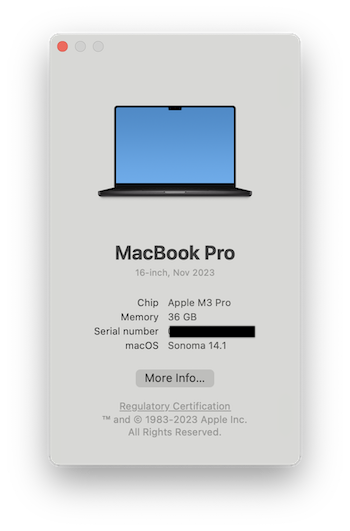
If the chip is listed as Apple M1, M2, M3, M4, M5 or M6, your Mac can install Golden Gate. The A18 Pro-powered MacBook Neo is also supported.
If the processor is described as Intel Core i5, Core i7, Core i9 or Xeon, it cannot be upgraded to macOS Golden Gate unfortunately.
Which Macs Have Been Dropped?
The following Intel Macs can run macOS Tahoe but cannot be upgraded to Golden Gate:
- MacBook Pro 13-inch with four Thunderbolt 3 ports from 2020
- MacBook Pro 16-inch from 2019
- iMac Retina 5K 27-inch from 2020
- Mac Pro from 2019
The 2019 Mac Pro is particularly notable because it was Apple’s most expensive and expandable Mac only a few years ago – and now its already on the road to being obsolete.
Owners of these Macs can remain on macOS Tahoe. Apple says it will continue providing security updates for Intel-based Macs for three years, although this doesn’t mean every Intel model will necessarily receive exactly the same updates for that entire period.
I wouldn’t replace an Intel Mac immediately if it still does everything you need. However, Golden Gate makes it clear that new macOS features and application updates will increasingly be designed exclusively for Apple Silicon.
Will Apple Intelligence Work On Every Supported Mac?
Yes. Unlike macOS Tahoe, there are no supported Macs that lack the hardware needed for Apple Intelligence.
Apple Intelligence in Golden Gate supports:
- Macs with an M1 chip or later
- The A18 Pro-powered MacBook Neo
This includes Siri AI, Visual Intelligence, new Writing Tools, smarter features in Photos and Safari and the updated Image Playground.
However, not every Apple Intelligence feature will be available everywhere at launch.
Apple has stated that Siri AI is rolling out in beta in English, with French, Japanese, Korean, Portuguese and Spanish following in October. Availability in other languages and regions has not been confirmed.
Apple says Mac and Vision Pro users in the EU can use Siri AI when their device is set to a supported language. The initial EU restriction applies to iPhone, iPad and Apple Watch—not Mac.
Some server-based image-generation features will have daily usage limits, with increased access available through selected iCloud+ plans.
macOS Golden Gate App Compatibility
The fact that an app runs on Apple Silicon doesn’t automatically mean it is fully compatible with Golden Gate.
Major macOS updates can affect:
- System extensions
- File and folder permissions
- Local network access
- Screen recording permissions
- External display control
- Audio plug-ins
- Background services
- Finder extensions
- Printer and scanner drivers
Simple self-contained apps from the Mac App Store are generally less likely to encounter problems than utilities that modify macOS or interact directly with hardware.
The current compatibility picture looks like this:
| App or Service | Current Golden Gate Status |
|---|---|
| Apple apps | Included and supported |
| Parallels Desktop | Basic functionality confirmed working |
| DisplayLink Manager | Version 17.0 officially supports Golden Gate |
| Microsoft 365 | Expected to work, but beta macOS isn’t officially supported |
| OneDrive | Beta versions of macOS aren’t officially supported |
| Adobe Creative Cloud | Not yet officially certified for Golden Gate |
| BetterDisplay | Update and test before relying on it |
| CrossOver | Not yet formally confirmed |
| Pixel Port | Not yet formally confirmed |
| VMware Fusion | Not yet formally confirmed |
| ScanSnap Home | Officially supported |
| AirPrint printers | Expected to work without additional drivers |
| VPN and antivirus apps | Check with the developer |
| Music production plug-ins | Wait for confirmation from each developer |
These statuses will probably change as the final release approaches.
Does Parallels Desktop Work With macOS Golden Gate?
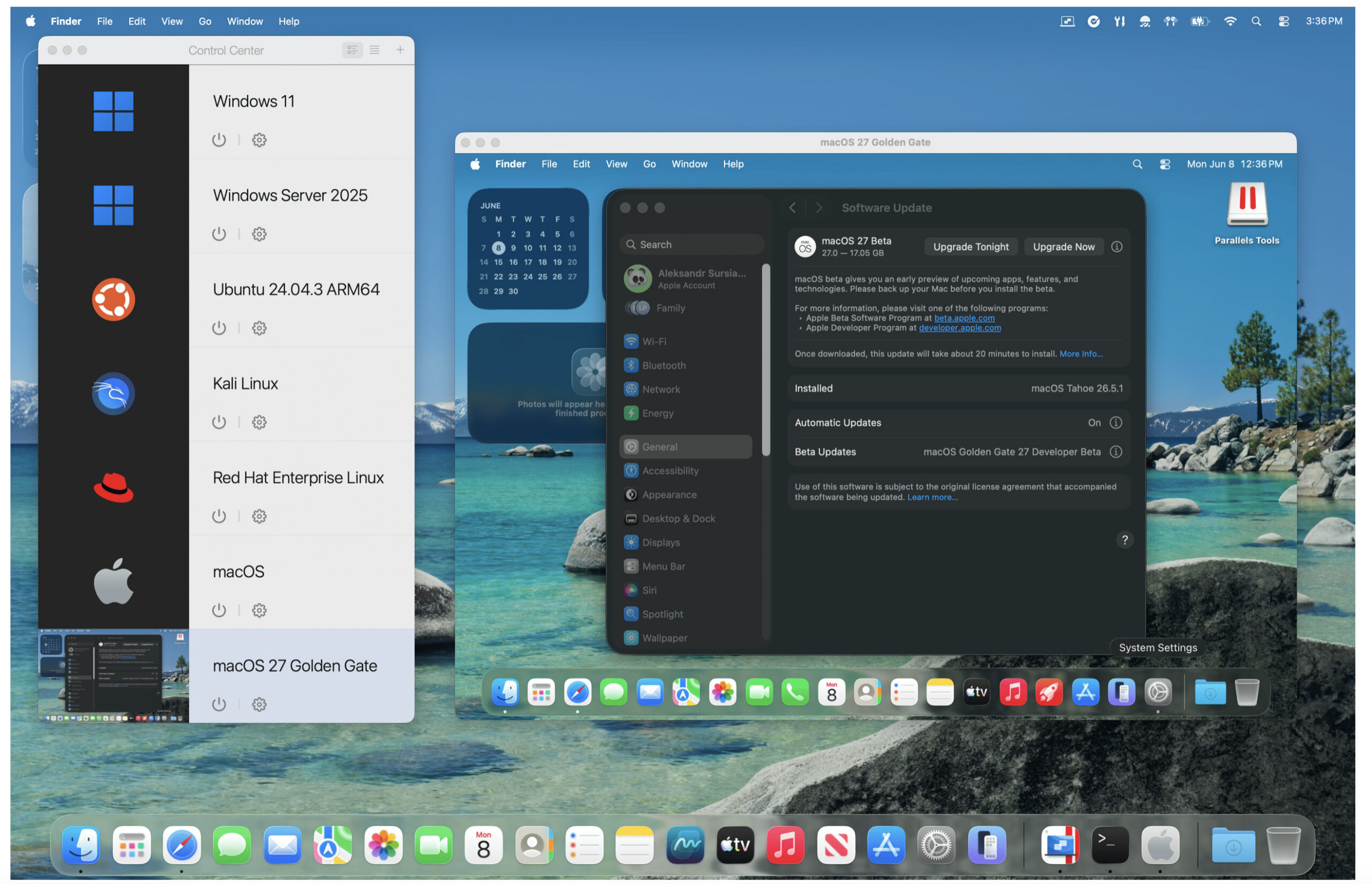
Parallels Desktop is one of the first major Mac applications to confirm that its basic features work in Golden Gate.
According to Parallels’ Golden Gate compatibility report, testing shows that you can:
- Run existing Windows, Linux and macOS virtual machines on a Mac running Golden Gate.
- Upgrade a macOS Tahoe virtual machine to the Golden Gate beta.
- Create a new Golden Gate virtual machine using an IPSW image.
There is currently a known problem where creating a macOS virtual machine may become stuck at around 70–80% if Xcode 27 is installed on certain earlier versions of macOS Tahoe.
This relates to beta software and may be fixed before the final Golden Gate release.
Parallels is continuing to test the operating system, so I recommend installing the latest available Parallels Desktop update before upgrading your Mac.
I would also back up any important virtual machines separately. A Time Machine backup of your Mac is useful, but it’s safer to have another copy of a critical Windows virtual machine on an external drive.
Does CrossOver Work With macOS Golden Gate?
CrossOver for Mac can run on Apple Silicon, but CodeWeavers hasn’t yet published a final Golden Gate compatibility statement.
Some CrossOver users have successfully launched Windows games during Golden Gate beta testing, although there have also been reports of problems related to graphics, Game Porting Toolkit components and individual games.
This isn’t surprising during an early macOS beta, particularly because CrossOver relies heavily on Apple’s Metal graphics framework.
CrossOver 27 also marks a significant transition of its own. CodeWeavers has confirmed that CrossOver 27 for Mac will require:
- An Apple Silicon Mac
- macOS Sonoma or later
- 64-bit Windows bottles
Support for 32-bit bottles is being removed.
If you depend on CrossOver for a specific Windows application or game, I recommend waiting until CodeWeavers confirms support and checking its compatibility database for the individual software you use.
Does VMware Fusion Work With Golden Gate?
VMware hasn’t yet confirmed full support for running VMware Fusion on macOS Golden Gate.
Fusion may work during the beta, but I wouldn’t rely on it for an important Windows or Linux virtual machine until Broadcom adds Golden Gate to its official list of supported host operating systems.
This is especially important if you use features such as:
- Shared folders
- USB passthrough
- Networking modes
- Multiple displays
- 3D graphics acceleration
These deeper system integrations are more likely to be affected by a major macOS update than simply opening the Fusion application.
Does Microsoft Office Work With macOS Golden Gate?
The latest versions of Word, Excel, PowerPoint, Outlook and OneNote are compatible with the final version of Golden Gate.
However, Microsoft doesn’t officially support its apps on beta or preview versions of macOS.
This is particularly important for OneDrive. Microsoft states that beta versions of macOS aren’t supported and recommends using a production version of macOS for reliable OneDrive synchronisation.
If you’re testing Golden Gate, make sure Microsoft 365 is up to date by opening one of its apps and going to:
Help > Check for Updates
You should also check that OneDrive has completely synchronised before upgrading. Don’t assume that a green status icon means every important file is stored locally! Some may only be available on demand from the cloud.
Microsoft is also ending support for the legacy version of Outlook for Mac in October 2026. If you still use legacy Outlook, it’s a good idea to switch to the new Outlook before upgrading to Golden Gate rather than changing both at the same time.
Do Adobe Creative Cloud Apps Work?
Adobe hasn’t yet officially certified Photoshop, Lightroom, Premiere Pro, Illustrator, InDesign and its other Creative Cloud apps for macOS Golden Gate.
Adobe’s current macOS compatibility page lists confirmed versions for macOS Tahoe rather than Golden Gate.
The current Apple Silicon versions of Adobe’s main applications are likely to run, but professional users should wait for official confirmation. This is particularly important if you use:
- Third-party Photoshop or Lightroom plug-ins
- Premiere Pro effects
- After Effects plug-ins
- Colour calibration hardware
- Capture cards
- Audio interfaces
- Font-management software
- Older Creative Cloud applications
Adobe has also confirmed that version 27 of Premiere Pro, After Effects, Media Encoder and Audition will require an Apple Silicon Mac. Intel Mac users will need to remain on the 26.x releases.
If you earn your living using Adobe software, wait until both Adobe and the developers of your essential plug-ins confirm Golden Gate support.
Does BetterDisplay Work With Golden Gate?
BetterDisplay is more likely to be affected by macOS updates than a normal desktop application because it interacts closely with macOS display management.
The latest version may work with Golden Gate, but I recommend checking for a BetterDisplay update before upgrading.
Pay particular attention to:
- HiDPI resolutions
- Virtual displays
- Display mirroring
- Brightness and volume controls
- DDC control
- HDR
- High refresh rates
- Custom display overrides
If you depend on BetterDisplay to make a 4K or ultrawide monitor usable, test Golden Gate on a separate volume or Mac first. A display can still show an image while particular scaling, brightness or virtual-screen features fail.
Do DisplayLink Docks Work?
DisplayLink is one of the peripheral software with confirmed Golden Gate support.
DisplayLink Manager 17.0 supports:
- macOS Golden Gate 27
- macOS Tahoe 26
- macOS Sequoia 15
- macOS Sonoma 14
It also adds automatic update notifications, faster display activation after login, FileVault-status detection and a fix for blank displays when DL-7xxx devices are connected through Thunderbolt.
If you use a DisplayLink dock to connect additional monitors to a MacBook, update DisplayLink Manager before upgrading macOS.
You may need to reapprove Screen Recording or other privacy permissions after the upgrade. These permissions are required because DisplayLink creates the video signal for its connected displays in software.
Standard USB-C and Thunderbolt docks that don’t use DisplayLink generally require no graphics driver, although their Ethernet, audio or management features may still depend on firmware or third-party software.
Will External Monitors Work?
Most 5K and 4K monitors connected directly by HDMI, DisplayPort, USB-C or Thunderbolt should continue working.
A monitor doesn’t usually require a macOS-specific driver. However, the following features may depend on software:
- Automatic brightness adjustment
- Mac keyboard brightness controls
- KVM switching
- Firmware updates
- Display presets
- Colour calibration
- Display chaining
- Custom scaling
- High refresh rates
If your monitor includes a utility such as BenQ Display Pilot, Dell Display and Peripheral Manager or LG Calibration Studio, check that utility separately.
The display itself may work while the accompanying control software doesn’t.
Do Printers Work With macOS Golden Gate?
Most modern AirPrint printers should work because AirPrint doesn’t require you to install a traditional printer driver.
Apple maintains a large list of AirPrint-compatible printers, including models from Brother, Canon, Epson, HP and many other manufacturers.
However, compatibility with the manufacturer’s additional software is a separate issue.
Features that may require updated software include:
- Printer maintenance
- Ink-level monitoring
- Advanced colour controls
- Borderless printing
- CD or label printing
- Fax management
- Firmware updates
- Scanning from an all-in-one printer
If the manufacturer’s software stops working, try adding the printer using AirPrint:
- Go to System Settings.
- Select Printers & Scanners.
- Click Add Printer, Scanner or Fax.
- Select your printer.
- Make sure AirPrint is selected in the Use menu.
- Click Add.
I’d be more cautious with old USB-only printers that depend on a discontinued driver. If the manufacturer no longer supports your model, Golden Gate may finally break compatibility with it.
Do Scanners Work With macOS Golden Gate?
Document scanner compatibility is harder to predict because many scanners rely on dedicated software rather than Apple’s built-in scanning tools.
You may still be able to scan through:
- Image Capture
- Preview
- Printers & Scanners in System Settings
- The manufacturer’s scanning app
However, advanced functions such as OCR, document separation, automatic naming, cloud uploads and receipt processing normally require the manufacturer’s software.
Do ScanSnap Scanners Work?
Ricoh has officially confirmed that ScanSnap Home is compatible with Golden Gate although other apps are still being tested.
Its macOS compatibility table currently lists the following as under evaluation:
- ScanSnap Online Update
- Kofax Power PDF Standard
- Older ScanSnap Manager software
- ABBYY FineReader for ScanSnap
Ricoh also states that beta versions of macOS aren’t supported.
Modern ScanSnap models are likely to receive an update, but owners of older models should be more cautious. The ScanSnap iX500, for example, has already lost support on more recent versions of macOS.
If you use a ScanSnap for business documents, you will be fine using ScanSnap Home with Golden Gate but for other software, I recommend waiting until Ricoh publishes its final Golden Gate compatibility results.
Do External Drives Work?
Normal external SSDs, thunderbolt SSDs, hard drives and USB flash drives formatted in APFS, Mac OS Extended or exFAT should continue working.
The bigger risk is with storage devices that require proprietary software for:
- Hardware encryption
- RAID management
- Automatic backups
- Password protection
- Drive health monitoring
- Firmware updates
Before upgrading, unlock any encrypted drive and make sure you can access its files without relying on an outdated application.
Time Machine should continue working, but you should complete a backup before installing Golden Gate rather than waiting until afterwards.
If possible, also keep a separate copy of irreplaceable files. A Time Machine backup shouldn’t be the only copy of your data when installing beta software.
Will Intel Mac Apps Still Work?
Many 64-bit Intel applications should continue to work through Rosetta 2.
Apple says Rosetta will remain available as a general-purpose translation tool in macOS Golden Gate. This allows Apple Silicon Macs to run applications originally developed for Intel processors.
However, Apple has also warned that future versions of Rosetta will provide more limited support, mainly for older games that depend on Intel frameworks.
Golden Gate is therefore a good time to identify any apps that still require Rosetta and look for native Apple Silicon replacements.
To check whether an application is native:
- Open Finder.
- Go to the Applications folder.
- Select the application.
- Press Command-I.
- Look at the information next to Kind.
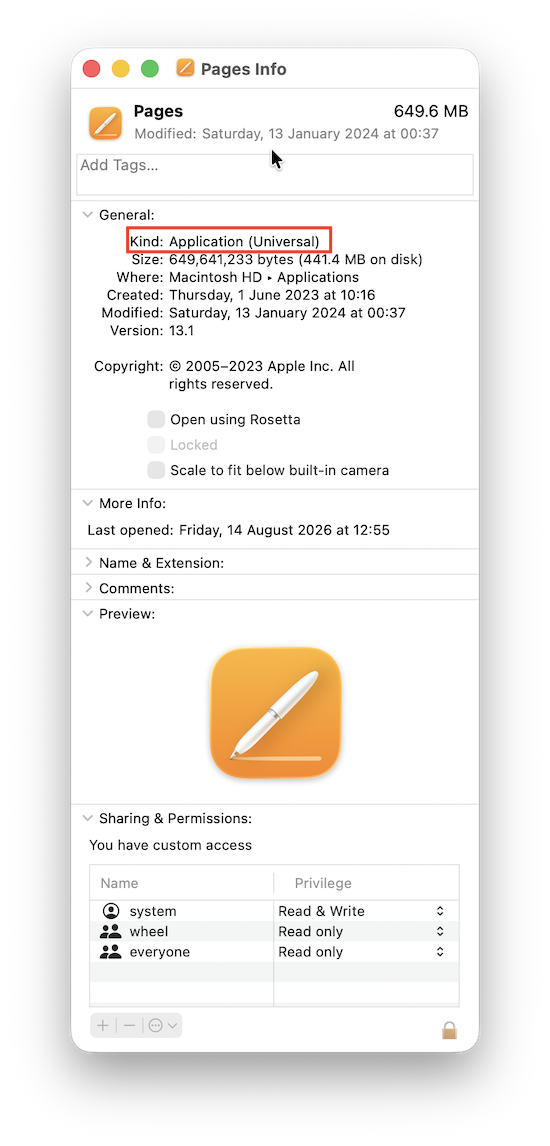
The result will usually be:
- Application (Apple Silicon): Runs natively.
- Application (Universal): Includes both Apple Silicon and Intel code.
- Application (Intel): Requires Rosetta.
Applications that require old Intel kernel extensions or discontinued hardware drivers may still fail even if the main app can open through Rosetta.
For more, check our in-depth look at for how long Intel apps will work on Macs.
Do 32-Bit Apps Work?
No. Golden Gate doesn’t restore support for 32-bit Mac applications.
Apple removed 32-bit app support in macOS Catalina, and those apps still won’t run in Golden Gate.
Rosetta 2 only helps with compatible 64-bit Intel applications. It cannot make old 32-bit Mac software work.
If you need an old 32-bit app, your main options are to:
- Keep an older Mac.
- Run an older compatible version of macOS in a virtual machine.
- Find a newer replacement.
- Export your files before upgrading.
- Use one of these methods to run 32 bit applications on a Mac.
Be Careful With VPNs, Antivirus And System Utilities
Apps that install system extensions or network filters are among the most likely to encounter problems after a major macOS update.
This includes:
- VPN clients
- Antivirus software
- Firewalls
- Network monitors
- NTFS drivers
- Disk utilities
- Menu bar customisation tools
- Keyboard and mouse utilities
- Fan-control tools
- System cleaners
An ordinary application failure is inconvenient. A broken VPN, security tool or storage driver can prevent network access or make a disk inaccessible.
Check the developer’s website for explicit Golden Gate support rather than relying solely on the fact that the application launches.
Music Production And Audio Plug-in Compatibility
If you use your Mac for music production, I recommend waiting before upgrading.
Digital audio workstations may work while individual components don’t, including:
- Audio Unit plug-ins
- VST plug-ins
- Audio interfaces
- MIDI drivers
- Licence-management software
- Control surfaces
- Sample-library managers
One incompatible plug-in can prevent a project from opening correctly.
Check your DAW, audio-interface manufacturer and every essential plug-in developer before upgrading. Music production users are often better off waiting for macOS 27.1 or 27.2.
How To Check Your Apps Before Upgrading
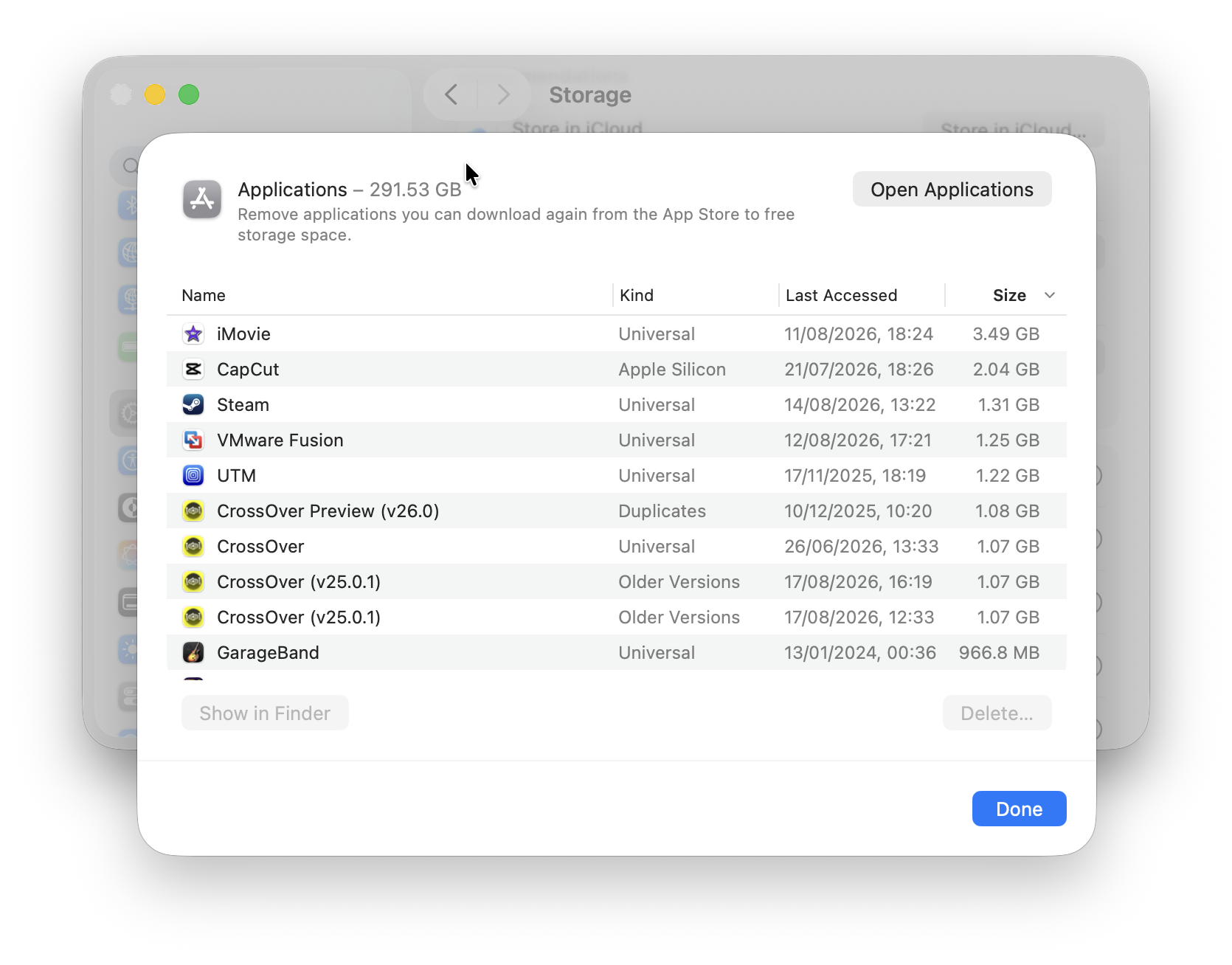
Before installing Golden Gate:
- Open System Settings.
- Select General > Storage.
- Open Applications to review what is installed.
- Identify the apps and drivers you depend on.
- Visit each developer’s website and search for Golden Gate compatibility.
- Update all supported apps.
- Remove software you no longer use.
- Complete a Time Machine backup.
- Make a separate copy of important files.
- Check that cloud services such as iCloud, OneDrive and Dropbox have finished synchronising.
Pay particular attention to software that hasn’t been updated for several years.
Should You Install The Golden Gate Beta?
For most users, no. The beta is useful for developers, testers and anyone with a spare Mac, but it isn’t intended for a computer that you rely on every day.
Potential problems include:
- Application crashes
- Reduced battery life
- Missing printer or scanner features
- Display problems
- Cloud synchronisation errors
- Broken VPN connections
- Audio plug-in failures
- Incompatible drivers
- Changes between beta releases
If you want to test it, install Golden Gate on a separate APFS volume, external SSD or secondary Mac.
This allows you to keep macOS Tahoe available, although you should still make a full backup first.
Should You Upgrade When Golden Gate Is Released?
If you use standard Apple apps, Microsoft 365, a modern AirPrint printer and mainstream cloud services, you will probably be safe to upgrade once the final versions of those apps are updated.
However, I recommend waiting if you depend on:
- ScanSnap or another document scanner
- CrossOver or Pixel Port
- VMware Fusion
- Professional Adobe workflows
- Specialist CAD or engineering software
- Audio production software
- VPN or security tools
- NTFS or RAID drivers
- Display management utilities
- Older printers and peripherals
Waiting for macOS 27.1 is often the safest option because it gives Apple and third-party developers time to fix the first round of compatibility problems.
There is no urgent need to upgrade on release day. macOS Tahoe will continue receiving updates, and Golden Gate’s headline Siri AI features may not all be available immediately anyway.
Frequently Asked Questions
Does macOS Golden Gate support Intel Macs?
No. Golden Gate only supports Apple Silicon Macs and the A18 Pro-powered MacBook Neo. Intel Macs must remain on macOS Tahoe or an earlier compatible version.
Is macOS Golden Gate available now?
Yes, Golden Gate was released to the public on 14th September 2026. It was also previously available as a developer and public beta version.
Will M1 Macs run Golden Gate?
Yes. All M1 MacBook Air, MacBook Pro, iMac and Mac mini models are supported.
Will every compatible Mac get Apple Intelligence?
Yes. Every Mac officially supported by Golden Gate has a compatible Apple Silicon chip. However, individual features may still be restricted by language, region or usage limits.
Does Parallels work with Golden Gate?
Parallels says its basic virtualisation features work in the Golden Gate beta, although there are still some known issues involving macOS virtual-machine creation.
Does Microsoft Office work with Golden Gate?
The latest Microsoft 365 apps are expected to support the final release. Microsoft doesn’t officially support beta versions of macOS, so anyone dependent on Office or OneDrive should wait.
Will my printer work with Golden Gate?
Most modern AirPrint printers should work without a separate driver. Manufacturer utilities and older USB printers may require updated software.
Will ScanSnap work with Golden Gate?
Ricoh is still evaluating ScanSnap Home and its associated software. Wait for official confirmation before upgrading a Mac used for important scanning workflows.
Does Rosetta 2 work in Golden Gate?
Yes. Rosetta remains available as a general-purpose translation tool in macOS Golden Gate, allowing many 64-bit Intel apps to run on Apple Silicon.
Can I downgrade from Golden Gate to Tahoe?
Yes, but downgrading may require erasing the Mac and restoring it from a backup. Make a complete Time Machine backup before upgrading and don’t open irreplaceable files solely in beta versions of apps.